Your browser introduces itself before it says a single word. Long before the HTTP request, before the first GET /, before any cookie or User-Agent header, the very first packet of a TLS handshake (the ClientHello) carries a list of preferences so specific that it acts like a signature. Salesforce noticed this back in 2017, hashed those preferences into a 32-character string, and called it JA3. In 2023 John Althouse, one of the original JA3 authors, threw the whole thing out and built JA4 to fix what JA3 got wrong. Both do the same trick: TLS fingerprinting lets your server recognise the software talking to it, even when that software is lying about who it is.
That’s the pitch for TLS fingerprinting, and it’s a good one. A Python requests script can set User-Agent: Mozilla/5.0 ... Chrome/120 all day long. It cannot easily forge the byte-level shape of a real Chrome handshake, because that shape comes from the TLS library underneath, not the string you type into a header. So a bot pretending to be a browser usually fails the handshake-shape test even while it passes the header test. That’s why fingerprinting works, and that’s why people want to block on it. Whether you should block on it is the part nobody warns the juniors about, and it’s where this post spends most of its time.
We’ll use Hanada Lee’s ngx_ssl_fingerprint_module as the concrete example, because it’s the cleanest current implementation for nginx and it exposes JA3, JA3 hash, and the full JA4 family as plain nginx variables you can log, match, and (if you’re brave) reject on.
What a TLS fingerprint actually is
Here’s what’s happening on the wire. When a client opens a TLS connection, the first thing it sends is the ClientHello. It’s a structured blob that says, roughly: “I speak TLS version X, here are the cipher suites I support in this order, here are the extensions I’m sending in this order, here are the elliptic curves I like, and here are the signature algorithms I’ll accept.” None of that is secret. All of it is necessary for the handshake to work. And all of it is wildly inconsistent between different TLS stacks.
Chrome’s BoringSSL sends a different cipher list, in a different order, with a different extension layout than OpenSSL, than Go’s crypto/tls, than Python’s ssl module, than curl, than Java. The ordering matters as much as the contents. Two libraries can support the exact same 15 cipher suites and still be told apart instantly because one lists them oldest-first and the other newest-first. That ordering is baked into the library at compile time. The script kiddie spoofing a User-Agent string never touches it.
A fingerprint is just a deterministic recipe for turning that ClientHello into a short, comparable string. Feed the same client through the recipe twice, you get the same string. Feed a different stack through it, you get a different string. The recipe is public. The discriminating power comes from the fact that the inputs are stable per-software and varied across-software.
JA3: the original, and where it bleeds
JA3 was the first widely-adopted version, and the recipe is simple enough to do on a napkin. You take five fields from the ClientHello: the TLS version, the list of cipher suites, the list of extensions, the list of elliptic curves, and the list of EC point formats. You concatenate their decimal values with commas, glue the five groups together with dashes, and you get a string like this:
769,4865-4866-4867-49195-49199-...,0-23-65281-10-11-35-16-5-13-18-51-45-43-27-21,29-23-24,0Then you MD5-hash that string down to something like e7d705a3286e19ea42f587b344ee6865. That hash is the JA3. Short, loggable, easy to compare against a blocklist of known-bad bots. Salesforce shipped it, threat-intel feeds adopted it, and for a few years it was the bot-detection darling.
And then it started bleeding, for two reasons that will page you at 3 a.m. if you trusted it too hard.
First: MD5. Not for the cryptographic reasons (collisions don’t matter here, nobody’s attacking the hash) but because once you’ve hashed the string you’ve thrown away all the structure. You can’t look at e7d705a3... and reason about why two clients differ. It’s opaque. You either have it in your blocklist or you don’t.
Second, and worse: GREASE. Chrome and other modern browsers deliberately inject random junk values into their cipher and extension lists. RFC 8701, “Generate Random Extensions And Sustained Extensibility”, exists so that middleboxes don’t ossify the protocol by assuming the list of valid values never grows. The browser tosses in a reserved GREASE value (0x0a0a, 0x1a1a, and friends) that means nothing, and a correct server ignores it. But naive JA3 includes those random values in the hash. So the same Chrome install produces a different JA3 on every single connection, because the GREASE value rotates. Your blocklist of “known bad JA3 hashes” is now playing whack-a-mole against noise. Implementations learned to strip GREASE before hashing, but the spec never said they had to, so you get inconsistent JA3 values depending on whose code computed them. Great.
JA4: same idea, fewer foot-guns
John Althouse went back to the drawing board and released the JA4+ family in 2023 under a more permissive license than the original drama around JA3 allowed. JA4 keeps the core insight and fixes the operational mess.
The big changes. JA4 is human-readable by design. Instead of one opaque MD5, a JA4 fingerprint has visible structure: a prefix that tells you the transport (TCP or QUIC), the TLS version, whether SNI was present, the cipher and extension counts, and the ALPN value, followed by a truncated SHA-256 of the sorted cipher list and another of the sorted extension list. So a JA4 looks like t13d1516h2_8daaf6152771_b186095e22b6 and you can actually read the front of it: t = TCP, 13 = TLS 1.3, d = SNI present, 1516 = 15 ciphers / 16 extensions, h2 = ALPN says HTTP/2.
And the killer fix: JA4 sorts the cipher and extension lists before hashing. GREASE values get stripped, the rest get sorted, so the random junk and the connection-to-connection ordering jitter stop mattering. One Chrome build now produces one stable JA4, the way you always wanted JA3 to behave. This is the single most important reason to prefer JA4 over JA3 if you’re starting fresh. The sorted, GREASE-stripped fingerprint is the one that survives contact with reality.
JA4 also comes with a whole family. JA4 fingerprints the client. JA4S fingerprints the server’s ServerHello response, which is handy for fingerprinting what a backend is running. The original JA3 had a server-side sibling too, JA3S, built the same way from the ServerHello. The module we’re about to compile exposes both raw and hashed JA4 variants so you can pick readability or compactness depending on whether a human or a regex is reading the value.
Getting it into nginx: the patched-stack tax
Now the part that makes sysadmins sigh. You cannot just --add-module this thing onto a stock nginx and call it a day. TLS fingerprinting needs the raw ClientHello bytes, and stock OpenSSL doesn’t hand them to nginx. The handshake parsing happens deep inside OpenSSL, the interesting bytes get consumed, and by the time nginx’s code runs they’re gone. So ngx_ssl_fingerprint_module ships two patches: one for OpenSSL (to preserve the ClientHello during negotiation and expose it) and one for nginx (to store the computed fingerprints on the connection where the variables can reach them).
That means rebuilding nginx against a patched, statically-linked OpenSSL. You’re not using the distro’s libssl any more. The current module targets OpenSSL 3.5.4+ and nginx 1.29.3+, and the build looks like this:
git clone -b release-1.29.3 --depth=1 https://github.com/nginx/nginx
cd nginx
git clone -b openssl-3.5.5 --depth=1 https://github.com/openssl/openssl
git clone -b ja4_fingerprint https://git.hanada.info/hanada/ngx_ssl_fingerprint_module

patch -p1 -d openssl < ngx_ssl_fingerprint_module/patches/openssl.openssl-3.5.5+.patch
patch -p1 < ngx_ssl_fingerprint_module/patches/nginx-1.29.3+.patch

./auto/configure \
  --with-openssl=./openssl \
  --with-stream_ssl_module \
  --add-module=./ngx_ssl_fingerprint_module \
  --with-http_v2_module \
  --with-stream
make -j
Two things bite here. One: this is a static OpenSSL build, so every time OpenSSL ships a CVE fix (and OpenSSL ships CVE fixes the way the rest of us ship typos) you rebuild nginx, you don't just apt upgrade libssl3 and reload. You own the patch cadence now. Two: the patch is version-pinned. The OpenSSL patch is written against a specific OpenSSL source tree, and if you bump to a version it wasn't written for, it'll fail to apply or, worse, apply with fuzz and miscompile. Pin your versions, test the build in a throwaway environment, and don't do it for the first time on the box that's serving traffic.
If the idea of maintaining your own OpenSSL build makes you twitch, that's the correct instinct, and it's exactly why we ship a dedicated openssl-nginx package built just for nginx and Angie. The fingerprinting patch lives in the same world as every other "nginx needs a custom crypto stack" feature: HTTP/3, post-quantum key exchange, kTLS. Once you've accepted one, the rest are just more patches on the pile.
The variables, and a config that does something
Once it's built, you flip it on with one directive and you get a fistful of nginx variables. The directive is ssl_fingerprint on; and it works in both the http and stream contexts, which means you can fingerprint plain TCP/TLS too, not only HTTP. Off by default, because computing fingerprints on every handshake isn't free and most vhosts don't need it.
Here's the variable set:
$ssl_greased            # 1 if the client sent GREASE values (a real-browser tell)
$ssl_fingerprint_ja3    # raw JA3 string
$ssl_fingerprint_ja3_hash   # MD5 of the JA3
$ssl_fingerprint_ja4_r  # JA4 raw (full, unhashed)
$ssl_fingerprint_ja4    # JA4 standard (the readable+hashed form)
$ssl_fingerprint_ja4_ro # JA4 "original" raw (the pre-sort ordering variant)
$ssl_fingerprint_ja4_o  # JA4 "original" hashed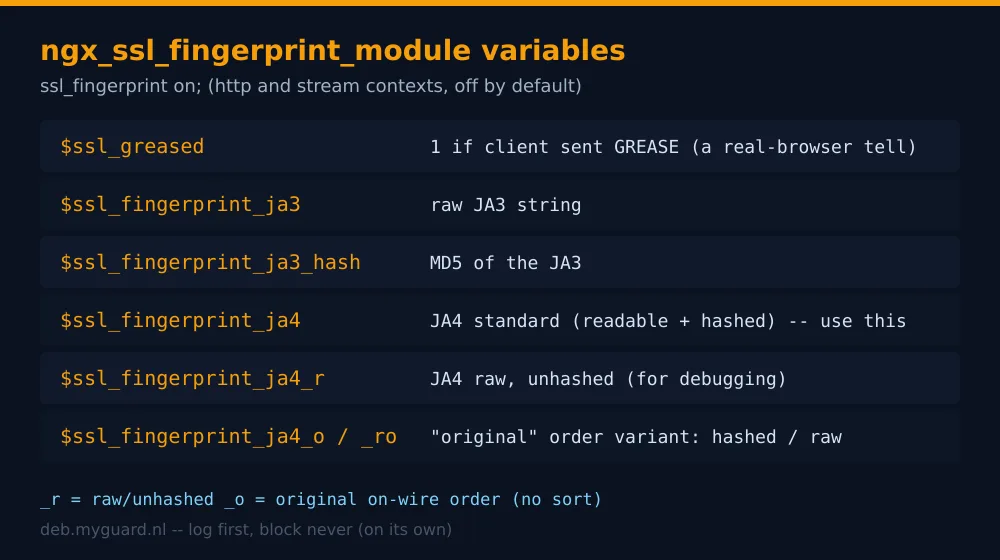
The _r suffix means raw (unhashed, debuggable). The _o suffix is the "original" ordering variant: JA4 normally sorts the lists, but JA4_O preserves the original on-wire order, which keeps a little more discriminating power at the cost of the GREASE-stability that sorting buys you. Use the plain $ssl_fingerprint_ja4 for blocklists and the _r / _ro raw forms when you're staring at a log trying to work out why a legit client got nuked.
A minimal config that just shows you your own fingerprint:
http {
    ssl_fingerprint on;
    server {
        listen 127.0.0.1:4433 ssl;
        ssl_certificate     cert.pem;
        ssl_certificate_key priv.key;
        return 200 "ja4: $ssl_fingerprint_ja4\nja3: $ssl_fingerprint_ja3\ngreased: $ssl_greased\n";
    }
}
The first thing any sane person does is log the fingerprint, don't block on it. Add $ssl_fingerprint_ja4 to your log_format, let it run for a week, and go look at what your actual traffic looks like before you reject a single byte. You'll learn more from one week of logs than from any threat-intel blog post. A custom log line:
log_format fp '$remote_addr "$http_user_agent" '
              'ja4=$ssl_fingerprint_ja4 greased=$ssl_greased';
access_log /var/log/nginx/fp.log fp;
From there, the obvious move is to feed the fingerprint into the same machinery you already use to deal with abusive clients. Pair it with the error-abuse module that auto-bans clients, or use it as one more signal in the broader fight to defend your webserver against vibe-coded AI exploit scanners and bots. The fingerprint is a feature, not a verdict. Treat it like one.
Why TLS fingerprinting works (and why GREASE is your friend)
The reason this whole approach has teeth is the gap between two layers. The application layer (headers, cookies, the User-Agent) is trivially forgeable because it's just strings the client chooses to send. The transport layer (the ClientHello shape) is much harder to forge because it's emitted by the TLS library, and the TLS library is compiled C that the average scraper author has no idea how to bend. A Go program using net/http emits Go's handshake. A Python requests call emits OpenSSL's handshake via CPython. Neither looks remotely like Chrome, no matter what User-Agent they paste on top.
So the highest-value check is dead simple and almost free: does the User-Agent claim to be Chrome while the JA4 fingerprint says "this is Python"? That mismatch is a screaming red flag. The header says one thing, the handshake says another, and the handshake is the one that's expensive to fake. That single contradiction catches a depressing amount of low-effort bot traffic.
And $ssl_greased is the quiet hero here. Real modern browsers send GREASE. Most scripting libraries don't bother. So a connection that claims to be a current browser but has greased=0 is suspicious before you even look at the full fingerprint. It's not proof (some libraries have started adding GREASE to blend in), but as a cheap first-pass tell it earns its keep. Remember that callback when we get to evasion: the moment a signal becomes valuable, the bots start mimicking it.
Is it safe to block on? The honest answer
No. Not on its own. Here's the part the breathless "block all bad JA3" blog posts skip, and it's the part that'll cost you real customers if you ignore it.
Fingerprints are shared by millions of people. A JA3 or JA4 fingerprint identifies a TLS stack, not a person and not a bot. Every Chrome 120 user on the same OS produces a near-identical fingerprint. That's hundreds of millions of humans behind a handful of hashes. So when you blocklist a fingerprint because some bot used it, you may be blocking that bot and also every legitimate Chrome user who happens to share its TLS library. The fingerprint has zero ability to tell those two apart, because at the TLS layer they are identical. This is the single biggest reason fingerprint blocklists backfire.
TLS libraries churn. Chrome updates roughly every four weeks, and a fair number of those updates touch the TLS stack: a new cipher, a reordered extension, a tweaked GREASE behaviour. Each change shifts the fingerprint. Your carefully-curated allowlist of "good browser fingerprints" goes stale on Chrome's release schedule, not yours. Pin too hard and you'll start blocking the newest Chrome the day it ships, which is exactly the users you least want to lose. I've watched a fingerprint allowlist turn into an outage because nobody updated it through three Chrome releases. It's always the allowlist.
Collisions cut both ways. Different browsers sometimes converge on the same fingerprint, and the same browser behind different middleboxes (corporate TLS-inspection proxies, some VPNs, certain antivirus products that MITM your HTTPS) produces a different fingerprint than the bare browser would. So your corporate users behind a Zscaler proxy don't look like Chrome any more, they look like Zscaler. Block "non-browser fingerprints" and you've just locked out every employee at a security-conscious company.
And spoofing is a solved problem for motivated attackers. Tools like utls (Go), curl-impersonate, and a pile of others exist specifically to emit a byte-perfect Chrome ClientHello from a non-Chrome client. The serious bots already use them. So fingerprinting filters out the lazy 80% (the raw python-requests and Go-http-client traffic) and does nothing to the motivated 20% who copied a real Chrome fingerprint on purpose. That's still a useful 80%. Just don't kid yourself that you've stopped the people actually worth worrying about.
So what is safe? Use the fingerprint as one weighted signal among several, never as a sole verdict. Log first, always. Score, don't ban: a UA/JA4 mismatch plus greased=0 plus a hammering request rate is a confident bot; any one of those alone is a coin flip. Rate-limit or challenge the suspicious buckets rather than hard-blocking them, so a false positive degrades to a CAPTCHA instead of a white page. And keep a human-readable record (the _r raw variants in your logs) so when a customer emails "your site won't load", you can actually see what their handshake looked like instead of guessing. Fingerprinting is a fantastic detector and a terrible judge. Wire it up accordingly.
Where this fits in a real defence
Think of TLS fingerprinting as the bouncer who clocks that your ID photo doesn't match your face. It's a fast, cheap first impression that flags the obvious fakes. It is not the metal detector, the guest list, or the security camera, and a club that ran on nothing but the bouncer's gut would get robbed weekly. Layer it. The fingerprint feeds a score; the score feeds rate-limiting and challenges; persistent abusers get auto-banned; and your underlying TLS configuration is already hardened so the handshake you're fingerprinting is a modern one in the first place.
The ngx_ssl_fingerprint_module gives you the raw material cleanly: JA3 for compatibility with old threat feeds, JA4 for the stuff that actually survives a Chrome update, JA3S/JA4S if you're fingerprinting servers, and $ssl_greased as the cheapest browser-tell you'll ever get. What it doesn't give you, and what no module can, is the judgement to know when a fingerprint is a clue and when it's a trap. That part's still your job.
Anyway. Log it for a week before you block anything, and back up your nginx config before you go anywhere near a custom OpenSSL build.
Frequently asked questions
What is the difference between JA3 and JA4?
JA3 is the original TLS client fingerprint from 2017: it concatenates five ClientHello fields and MD5-hashes them into one opaque string. JA4, released in 2023, keeps the same idea but makes the fingerprint human-readable, includes ALPN and SNI info in a visible prefix, and (crucially) sorts the cipher and extension lists and strips GREASE before hashing. That sorting makes JA4 stable across connections where JA3 would jitter. If you are starting fresh, use JA4.
Can a TLS fingerprint be spoofed?
Yes, by motivated attackers. Tools like utls, curl-impersonate and similar libraries can emit a byte-perfect copy of a real Chrome ClientHello from a non-Chrome client, producing a matching JA3/JA4. Fingerprinting reliably filters out lazy bots that use default Python or Go HTTP stacks, but it does little against attackers who deliberately impersonate a browser fingerprint. Treat it as one signal, not proof.
Is it safe to block traffic based on JA3 or JA4 fingerprints?
Not on its own. A fingerprint identifies a TLS library, not a person, so a single hash can be shared by hundreds of millions of legitimate browser users. Blocklisting a fingerprint risks blocking every real user on that browser version. Fingerprints also change with every Chrome TLS update and shift behind corporate TLS-inspection proxies. Safe use means scoring and rate-limiting on the fingerprint as one weighted signal, logging first, and never hard-blocking on the fingerprint alone.
Why does ngx_ssl_fingerprint_module need a patched OpenSSL and nginx?
The raw ClientHello bytes needed to compute a fingerprint are consumed deep inside OpenSSL during the handshake and are gone by the time nginx runs. The module ships one patch for OpenSSL (to preserve and expose the ClientHello) and one for nginx (to store the computed fingerprints on the connection where its variables can read them). That means rebuilding nginx against a statically-linked, patched OpenSSL rather than using the distro libssl, so you own the OpenSSL CVE-patch cadence yourself.
What does the $ssl_greased variable tell me?
GREASE (RFC 8701) is random reserved junk that modern browsers deliberately inject into their cipher and extension lists to keep the protocol extensible. $ssl_greased is 1 when the client sent GREASE values and 0 when it did not. Real current browsers send GREASE; many scripting libraries do not, so a client claiming to be a browser while reporting greased=0 is a cheap early bot tell. It is a hint, not proof, since some bot tooling now adds GREASE to blend in.
What are JA3S and JA4S?
JA3 and JA4 fingerprint the client's ClientHello. JA3S and JA4S fingerprint the server's ServerHello response instead, built the same way from the server-side handshake fields. They are useful for identifying what software a backend or remote server is running, for example in threat hunting or asset inventory, rather than for filtering incoming client traffic.
Related reading
- How to defend your webserver against vibe-coded AI exploit scanners and bots: where fingerprinting fits in the wider bot-defence toolkit.
- Auto-ban abusive clients in NGINX with the error-abuse module: the enforcement layer your fingerprint score should feed into.
- openssl-nginx: the dedicated OpenSSL built just for NGINX and Angie: the custom crypto stack that makes patched-OpenSSL features sane to maintain.
- TLS configuration for NGINX and Angie: getting an A+ on SSL Labs: harden the handshake you are fingerprinting.