Ten thousand people hit the same page the exact millisecond your cache expires, and a naive cache forwards all ten thousand to your backend at once. cache-turbo forwards one. The other 9,999 get served a slightly stale copy from RAM while that single request quietly fetches a fresh one. Nobody waits. Your database never finds out it was supposed to panic.
This is a build guide. By the end you’ll have an nginx page cache running inside the web server itself: no Varnish daemon, no Lua, no second port to babysit. We’ll go from a stock nginx to a tuned, fleet-shared, self-monitoring cache in nine steps, and I’ll tell you which knob pages you at 3 a.m. if you get it wrong.
First, the thirty-second version of why. Your backend is slow. I don’t care what it’s written in. PHP, Node, Python, that Rust service you’re very proud of: the moment it has to talk to a database, render a template, and stitch together a page, you’re looking at tens to hundreds of milliseconds per request. A WordPress homepage that wakes PHP-FPM, runs forty plugins, and fires a dozen MySQL queries can take 600 to 900 ms to build. nginx can hand you a saved copy out of memory in about 0.4 ms. That’s not a typo. It’s roughly a thousand to one. So you build the page once, keep it, and serve everyone else the copy. That’s a page cache, and cache-turbo is one that lives in the worker processes you already have.

Add an in-process page cache to nginx with cache-turbo: build the module, declare a shared-memory zone, turn caching on with stale-while-revalidate, tune the already-normalized cache key, pick a preset (including 1s microcaching), optionally add a Redis or memcached L2 tier, lock down the admin endpoint, scrape it with Prometheus, and verify the X-Cache header.
Time to a working cache 15 minutes
Build the module
Compile cache-turbo as a dynamic module against your nginx (or Angie) source: ./configure –with-compat –add-dynamic-module=/path/to/nginx-cache-turbo-module && make modules. On Debian or Ubuntu via deb.myguard.nl it ships prebuilt as libnginx-mod-http-cache-turbo, so you skip the compiler.
Declare a shared-memory zone
In the http block, carve out RAM for the cache: cache_turbo_zone name=ct 256m. This is your L1, shared across worker processes.
Turn caching on
In a location, bind the zone and set a freshness TTL: cache_turbo ct; cache_turbo_valid 60s; proxy_pass http://backend. Past the TTL, stale-while-revalidate serves the old copy while one background request refreshes it.
Tune the cache key
The default key is already normalized: it drops tracking params (utm_, fbclid, gclid, sid, sessionid, tmp_) and sorts args out of the box. Use cache_turbo_normalize_vary, or cache_turbo_auto_vary, to split genuinely different variants like gzip vs brotli or mobile vs desktop.
Pick a preset (or autotune)
Set cache_turbo_preset micro|conservative|balanced|aggressive to configure four knobs at once (micro = 1s microcaching), or turn on cache_turbo_autotune to adapt refresh eagerness, stale window and lock to measured backend load.
Add an L2 for a fleet
cache_turbo_redis redis://host:6379/0 (or rediss:// for TLS), or cache_turbo_memcached host:11211, gives every nginx box one shared cache: write-through on store, one GET on an L1 miss, never on a hit. Redis is required for tag-based purging.
Wire up the admin endpoint and lock it down
Point a location at the zone with cache_turbo_admin for stats, purge and warm, then gate it with allow 127.0.0.1; deny all. An open admin endpoint is a DoS button and an SSRF primitive.
Scrape it with Prometheus
GET /_cache?format=prometheus emits hit, miss, stale-serve, refresh, eviction, L2 and lock counters labelled by zone. Import the bundled Grafana dashboard, graph the hit ratio and watch evictions for an undersized zone.
Verify it works
Curl the URL twice and grep for X-Cache. First request: no header (a miss). Second: X-Cache: HIT, served from RAM. STALE means an old copy while a refresh runs.
Step 1: build the module
cache-turbo is a normal nginx dynamic module. Nothing exotic, no external libraries to chase:
$ ./configure --with-compat --add-dynamic-module=/path/to/nginx-cache-turbo-module
$ make modules
That drops ngx_http_cache_turbo_module.so into objs/. It compiles against both nginx and Angie. You end up with a .so and one line at the top of your config:
load_module modules/ngx_http_cache_turbo_module.so;One detail the README is quiet about and I’m not: the Redis client (Step 6) is hand-rolled on nginx’s own event loop. No hiredis, no blocking socket calls parked in the middle of your event-driven server choking every other connection on the worker. That’s why there’s nothing to apt install alongside it. Bolting a synchronous client into an async server is how you turn a fast server into a slow one with extra steps, and somebody always tries it.
Step 2: declare a shared-memory zone
The cache needs a slab of RAM to live in. You declare it once, in the http block, and name it:
http {
    cache_turbo_zone name=ct 256m;
    ...
}
This is your L1, and it’s the whole game on a single server. It’s an mmap‘d region the worker processes share, holding an rbtree keyed on a hash of each request, with LRU eviction once it fills. A hit here never leaves the worker. It’s per-box: every nginx server has its own L1, and they don’t know about each other until you add Redis.
Size it for your hot set, not your whole site. 256 MB holds a lot of HTML. If you’re caching a million long-tail URLs that each get one hit a week, you’ve misunderstood the tool: that’s a job for disk, and we’ll stack the two in a moment. Watch the eviction counter (Step 8) to know if you guessed too small.
Rough arithmetic, because “guess and watch” is only half an answer. Every unique key costs a node: 184 bytes of struct, call it ~256 bytes once slab rounding has had its way. Cached bodies cost their own size on top. So zone ≥ (unique_keys × 256B) + (cached_responses × avg_body). Ten thousand keys, two thousand of them actually worth storing at 50 KB each, comes to roughly 103 MB, and you round up to 256m and stop thinking about it. Treat that as an order of magnitude, not a spec: slab rounding depends on your body-size distribution, so measure and adjust.
Two knobs for when the long tail eats your zone
If the zone is big and the hit rate is still bad, the culprit is usually not the TTL, it’s one-hit wonders: crawlers, search queries, deep pagination, tracking-param permutations. Each is stored once, never read again, and each store evicts something that was being reused.
cache_turbo_min_uses      2;     # store on the SECOND miss, not the first
cache_turbo_scan_resistant on;   # split the LRU: unproven entries evict first
cache_turbo_min_uses 2 means a key must cold-miss twice before it gets a body attached, so the never-repeated class never occupies real memory. Read the fine print: the counter is still a node, so the tail costs a key slot either way — min_uses saves the body, not the slot, and it is no fix for a zone too small to hold your key cardinality. cache_turbo_preset aggressive already sets it to 2; everything else leaves it at 1.
cache_turbo_scan_resistant on is the other half. With a flat LRU, a crawler walking N unique URLs evicts your entire hot set, because its junk is the newest thing in the zone and eviction takes the tail. Scan-resistance splits the list in two: a new store enters probation, a second hit promotes it to protected (one hit can’t, which is exactly why a crawler can never promote anything), and eviction drains probation first. A scan can then only evict other scan entries. Protected is capped at 80% of resident entries by default, and overflow demotes to the probation head rather than discarding. It changes eviction order only — never what’s served, never a freshness decision. It also does nothing at all if your working set already fits, so measure evictions and hit rate before and after rather than enabling it on faith.
Step 3: turn caching on, and meet stale-while-revalidate
Now bind the zone inside a location and give it a freshness window:
server {
    listen 80;
    location / {
        cache_turbo       ct;
        cache_turbo_valid 60s;
        proxy_pass http://127.0.0.1:8080;
    }
}
That’s a working cache. But the interesting behaviour is what happens when a copy gets old, and this is the part worth tattooing somewhere.
A cached copy has three life stages. While it’s young it’s fresh: served instantly, backend stays asleep. Once it passes the TTL it goes stale, and here’s the move: cache-turbo keeps serving the old copy immediately while it sends exactly one request off in the background to fetch a new one. Nobody in the queue waits. When the copy gets truly ancient it’s expired, and only then does cache-turbo treat it as a miss and make someone wait.
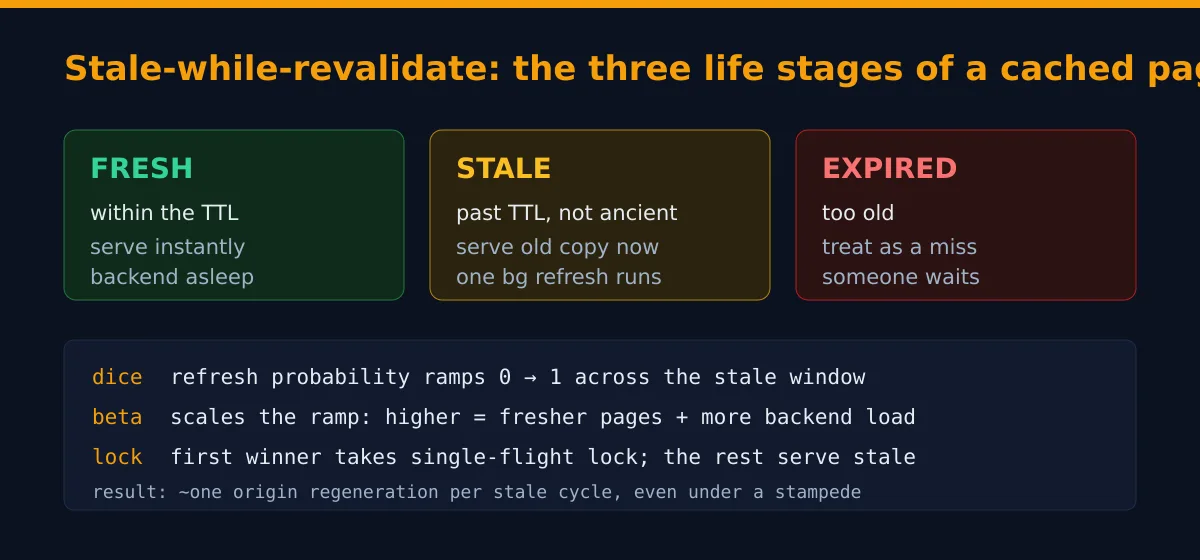
That middle stage is stale-while-revalidate, SWR for short. The naive alternative, the one every junior writes first, is “when the cache expires, the next request rebuilds it.” Sounds reasonable. It’s a trap. Picture your most popular page expiring at noon. At noon plus one millisecond, a thousand requests arrive, all see an empty cache, and all charge at your backend simultaneously to rebuild the same page. That’s a thundering herd, also lovingly known as a cache stampede or the dogpile. I’ve watched one take down a database that was, on paper, massively over-provisioned. The post-mortem was short. “It’s always the cache.” Right next to “it’s always DNS.” SWR kills the herd because nobody ever stares at an empty slot. (If you want the formal version, serve-stale is codified in RFC 9111, the HTTP caching spec.)
The dice and the beta knob
When exactly does cache-turbo refresh a stale copy? Not the instant it goes stale (a page that gets one hit an hour shouldn’t refresh the microsecond it expires). It rolls dice, and the dice get loaded the longer the copy has been stale. The model is a linear ramp across the stale window: probability zero the moment it goes stale, effectively one by the time it’s about to expire. Every reader rolls independently, so a barely-stale page almost always gets served as-is and a nearly-expired one almost certainly triggers a refresh.
The cache_turbo_beta directive scales how eager that ramp is. It’s fixed-point integer math (beta times 1000, so no floats in the hot path; the people who’ve profiled nginx workers know why that matters). At beta=1000 the probability tracks the elapsed fraction directly. Crank it to 2000 and pages refresh earlier and more often. Drop it to 500 and they coast deeper into staleness first. Higher beta means fresher pages and more backend load; lower beta means staler pages and a backend that gets to nap. That’s the entire tradeoff.
Single-flight: who actually does the work
The dice decide whether a refresh should start. They don’t decide who, because under a real burst several readers win the dice in the same instant, and if all of them refreshed you’d have reinvented the stampede. So there’s a hard lock. The first reader to claim the refresh takes a single-flight lock (cache_turbo_lock_ttl sets how long it’s held), and everyone else who rolled a winner just serves stale. One refresh per cycle, full stop. If the refreshing request dies or the backend hangs, the lock expires on its own and the next reader tries. No deadlock, no stuck entry haunting you for a week.
The same lock guards the cold miss too, not just refreshes. With cache_turbo_lock on (the default) the first request for an uncached key goes to the origin and the rest wait for it to fill the slot, instead of all stampeding a page that simply isn’t there yet; cache_turbo_lock_timeout caps how long a waiter waits before giving up and going itself. So both ends of a page’s life, the cold birth and every stale refresh, collapse to roughly one origin request.
The SWR math here was lifted, deliberately, from the same algorithm our WordPress object-cache work uses. Same constants, same dice. Edge cache and object cache speak one language and tune the same way. That was not an accident.
Redirects, negative caching, and “cache forever”
By default cache-turbo stores a 200 OK to a GET (never a HEAD, which would store an empty body, and never a mutating POST/PUT/DELETE). But you can give other status codes a TTL of their own and cache those too:
cache_turbo_valid 30s;              # the default / 200 TTL
cache_turbo_valid 301 302 308 1h;   # cache redirects
cache_turbo_valid 404 410 1m;       # negative caching
cache_turbo_valid 0;                # "cache forever" until purged
Negative caching matters more than it sounds: a flood of requests for a missing URL can hammer your backend just as hard as a popular one, and a 1-minute cache on a 404 turns that into one origin hit a minute. A TIME of 0 means the copy stays fresh indefinitely and is only updated when you purge it. One sharp edge: cache_turbo_valid replaces, it doesn’t merge, so if a nested location sets any cache_turbo_valid of its own it discards the whole inherited set, redirect and 404 lines included. Re-state every status line you still want in the child block.
There’s also a freebie you never configure: conditional requests. If the origin gave the cached 200 an ETag or Last-Modified, cache-turbo answers an If-None-Match or If-Modified-Since with a bodyless 304 Not Modified straight from cache, no origin round trip, when the client’s copy is still current. It only does this from a fresh entry, never a stale one, because a stale copy hasn’t been revalidated and can’t honestly claim “still current.”
And when php-fpm falls over: stale-if-error
Here’s the failure mode that earns this cache its keep. Your PHP-FPM pool maxes out, or a deploy briefly returns 502, or the database has a bad thirty seconds. What do your visitors see? With a plain cache: the error, in full colour. With cache-turbo: nothing, if it can help it.
The everyday case is already covered for free by the stale-while-revalidate you set up in Step 3. When a page is past its TTL but still inside its stale window, the visitor is served the old copy instantly while one background request goes to refresh it. If that background request comes back 500/502/503/504 or simply times out, cache-turbo shrugs and leaves the good copy exactly where it was — the failed refresh never overwrites it, and the visitor never sees the error. The backend gets to fall over in private. That’s stale-if-error, and you don’t type anything to get it.
For outages longer than the stale window, let the origin ask for more grace. If your app (or the nginx in front of it) sends Cache-Control: stale-if-error=600 on a page, cache-turbo will keep serving that stale copy through up to ten minutes of origin 5xxs, marking the served response X-Cache: STALE-IF-ERROR so you can see exactly when it kicked in (it shows up as STALE in $cache_turbo_status too). A ten-minute backend outage becomes a non-event for every page that was warm when it started.
When your origin never sends stale-if-error (i.e. always)
Here’s the problem with the paragraph you just read: real stacks don’t emit stale-if-error. WordPress doesn’t. PHP doesn’t. Discourse and Magento don’t. RFC 5861 has been around for years and the field adoption is roughly nobody. So the grace window has to be your decision, declared in nginx:
location / {
    cache_turbo            ct;
    cache_turbo_valid      1h;    # fresh for an hour
    cache_turbo_keep_stale 6h;    # origin down? serve stale up to 6h past expiry
    proxy_pass http://backend;
}
Past the TTL, with the origin unavailable, the visitor still gets the page for as long as that window covers them. After it closes the error surfaces normally. It’s off by default on purpose: six-hour-old content is the right answer for a brochure site and the wrong one for a bank balance, and only you can say which this is. An origin that does send its own stale-if-error wins outright — keep_stale is the last resort for the common case where it sends none, not a floor that widens a window the origin already scoped. A response marked must-revalidate suppresses it entirely, because that directive forbids serving stale at all.
Then: what counts as “down”? By default, any 5xx — which covers a dead origin, since nginx turns a refused connection into a 502 and a hung one into a 504 before this module sees anything. It does not cover a half-broken origin: a bad deploy that 404s every page, a trigger-happy rate limiter answering 429. Those are perfectly valid HTTP as far as a cache is concerned. Widen the trigger set yourself:
cache_turbo_keep_stale 6h;
cache_turbo_use_stale  error timeout http_404 http_429;
Tokens are off, error, timeout, http_403, http_404, http_429, http_500, http_502, http_503, http_504. One sharp edge that will bite someone: naming tokens replaces the default, it doesn’t extend it. Writing out http_500 http_502 http_503 http_504 looks like the default spelled in full, but it’s narrower — the default also covers the 5xx statuses with no token of their own (501, 505, 507, 508, 510, 511), and those stop falling back the moment you name anything. Also note error and timeout are vocabulary compatibility with proxy_cache_use_stale, not behavioural parity: this module decides at the response header filter, where a refused connection and a genuine 502 are the same number, so error behaves as http_502 and timeout as http_504. Write whichever reads better.
The circuit breaker: stop knocking on a door nobody’s answering
Serving stale shields your visitors. It doesn’t stop every one of those requests still going out and poking a backend that’s already on the floor — which is often what keeps it there. That’s the breaker’s job:
location / {
    cache_turbo                   ct;
    cache_turbo_valid             5m;
    cache_turbo_keep_stale        24h;   # deep stale reserve for an outage
    cache_turbo_background_update on;    # SWR during normal operation

    cache_turbo_breaker           on;
    cache_turbo_breaker_threshold 3;     # 3 failures...
    cache_turbo_breaker_window    30s;   # ...within 30s trips it
    cache_turbo_breaker_open      2m;    # stay open 2m, then probe once

    proxy_pass http://backend;
}
Three 5xx inside thirty seconds and the breaker trips open. While open it does not contact the origin at all — that’s the entire point — and answers from the cached copy, fresh if it’s under five minutes old, stale if it’s older, marked X-Cache: STALE-BREAKER. When the two-minute window elapses exactly one request is promoted to probe the origin: probe succeeds, breaker closes, traffic resumes; probe fails, another window. Your backend gets a genuinely quiet two minutes to finish restarting instead of being resuscitated and re-killed by its own traffic every second.
A URI with nothing cached has nothing to fall back on, so those get a 503 carrying a Retry-After that tracks cache_turbo_breaker_open. Same once a copy ages past the 24-hour keep_stale window: serving indefinitely old data is an explicit choice, never a default.
One honest limit, because a cache is not a magician: it can only shield pages it already has a copy of. A page nobody had requested yet, hit for the first time during the outage, has nothing cached to fall back to, so that visitor still gets the error. Caching can’t invent a page it never saw. Which is the best argument there is for cache warming (Step 7’s ?url= verb): a warm cache is also your outage insurance. Two more limits worth planning around rather than discovering at 3 a.m.: if the origin dies after the response headers are on the wire, the client already has a 200 and a partial body and nothing can retract it; and L1 lives in shared memory, so an nginx restart empties it (a reload doesn’t). For the cold-URL case, prefer nginx’s own error_page 502 503 504 /maintenance.html; — one mechanism, under your control, works whether or not this module is in the location.
Step 4: the cache key is already clean (here’s how to tune it)
A cache key is the string that decides whether two requests are “the same page.” Get it wrong in one direction and you cache too little (every URL looks unique, hit rate is garbage). Wrong the other way and two different pages collide, and people get served each other’s content. This is the part people historically got wrong, so cache-turbo now ships a sane key by default: $host$uri$cache_turbo_normalized_args. Host plus path plus normalized args. You get the right behaviour without typing anything.
What “normalized” buys you for free: it sorts the args (so ?b=2&a=1 and ?a=1&b=2 hit one slot) and drops a built-in denylist of tracking junk: utm_*, fbclid, gclid, msclkid, mc_eid, _ga, ref, plus sid, sessionid and tmp_*. Marketing slaps ?utm_source=twitter on every link, and a dumb cache would treat /post-42?utm_source=twitter and /post-42?utm_source=facebook as two different pages that render identically, caching the same HTML a dozen times while your hit rate quietly bleeds out. cache-turbo collapses them onto one slot out of the box. Add your own params to drop, or nuke them all:
One trap before you tune anything: a front-controller redirect changes $uri. In a typical PHP vhost, try_files $uri $uri/ /index.php?$args; performs an nginx internal redirect before the module runs in the PHP location, so by then $uri is /index.php — not the clean URL the visitor asked for. With the default key, every page on the site collapses onto one entry and visitors get served each other’s content. Behind a front controller, set the key explicitly:
location ~ \.php$ {
    cache_turbo     ct;
    cache_turbo_key $host$request_uri;   # original path + query, survives the redirect
}
$request_uri is the untouched original request line, so it survives the redirect. It does trade away the argument normalization described below (every distinct query string gets its own slot); if you want both, split the original path out of $request_uri with a map and append $cache_turbo_normalized_args. The same post-redirect $uri is what the CMS presets’ URI tier and cache_turbo_bypass_uri match on, so a clean-path guard like cache_turbo_bypass_uri /members/; matches nothing after the redirect — when a route rule is load-bearing, classify $request_uri with a map and feed the result to cache_turbo_bypass and cache_turbo_no_store instead. Cookie, dynamic-argument and Set-Cookie guards are unaffected. Static vhosts with no front controller need none of this; the default key is already correct there.
cache_turbo_normalize_strip     sid sessionid "tmp_*";   # extra args to drop (trailing * = prefix)
cache_turbo_normalize_strip     *;                       # or: a bare * matches every arg = drop all
Then the opposite problem: variants that genuinely differ and must not share a slot. The cache keys on the request, not on the response’s Vary header, so if your page differs by gzip-vs-brotli or mobile-vs-desktop and you don’t say so, the first variant stored wins for everyone. You have two ways to fix it. If you know the axes up front, declare them with a vary bucket:
cache_turbo_normalize_vary encoding device; # keep gzip ≠ brotli, mobile ≠ desktopThe encoding bucket splits by Accept-Encoding class and ranks zstd above brotli (we ship the zstd module, so a zstd-capable client gets its own slot); device splits mobile from desktop by sniffing the User-Agent. Or, if you’d rather learn the axes from the response, turn on auto-Vary:
cache_turbo_auto_vary on; # read the response's own Vary and split automaticallyThat reads the response’s own Vary header and splits the cache by the named request header, honouring a safe whitelist (Accept-Encoding, User-Agent device class, Accept-Language, Origin). Anything it can’t safely key on (Vary: *, Cookie, Authorization, or any header off the whitelist) is treated as uncacheable rather than stored under a key that ignores the varied axis. Pick one mechanism per axis: declaring an axis with normalize_vary and letting auto_vary learn it splits the cache on it twice for no benefit. Add only the axes your page actually varies on; an extra one halves your hit rate for nothing.
One safety move for origins you don’t fully trust: if the normalizer might merge two genuinely-private URLs that differ only by a sessionid the origin forgot to mark private, set an explicit raw key and skip the stripping and sorting entirely — cache_turbo_key $scheme$host$request_uri;. Every distinct query then gets its own slot. Belt-and-braces for an upstream that’s careless about per-user marking; the normalized default is fine if your origin is well-behaved.
Step 5: pick a preset, or let it tune itself
Four knobs (valid, beta, lock_ttl, stale window) is three more than most people want to think about on a Tuesday. So pick a vibe:
cache_turbo        ct;
cache_turbo_preset aggressive;| Knob | micro | conservative | balanced (default) | aggressive |
|---|---|---|---|---|
| fresh TTL | 1s | 30s | 60s | 300s |
| beta (refresh eagerness) | 1000 | 500 | 1000 | 3000 |
| lock_ttl | 1s | 10s | 5s | 3s |
| stale-window multiplier | ×2 | ×2 | ×4 | ×8 |
The stale window works out to valid × (multiplier − 1). Balanced plus a 60-second valid means fresh for 60s, served stale for another 180s, then expired. Any explicit knob still beats the preset, so cache_turbo_preset balanced followed by cache_turbo_valid 120s does exactly what you’d hope.
Microcaching: the micro preset for APIs and PHP-FPM
That first column, micro, is the one people sleep on, and it’s quietly the best trick in the box. Microcaching means a deliberately tiny TTL, about a second, on endpoints you’d normally call “too dynamic to cache.” The page is fresh for only one second, so the data is near-real-time, but during that second a burst of N requests is served from RAM and the backend is hit once. On a hammered /api or a PHP app, backend load drops from “every request” to “roughly one per endpoint per second,” and the content is at most a second or two stale. Nobody notices the staleness; everybody notices the server not falling over.
Because cache-turbo runs in the ACCESS phase and captures the body in a filter, it’s upstream-agnostic: the exact same directives microcache a proxy_pass JSON API and a fastcgi_pass PHP-FPM app. And since only GET is cached, mutations sail straight through untouched. For a CMS there’s a shortcut that auto-skips the admin, login and logged-in-cookie surfaces for you:
location ~ \.php$ {
    cache_turbo               ct;
    cache_turbo_preset        micro;          # valid 1s + lock_ttl 1s + ×2 stale, in one word
    cache_turbo_lock          on;             # collapse the per-second burst to ONE origin hit
    cache_turbo_backend       wordpress;      # auto-skip wp-admin, login + logged-in cookies
    cache_turbo_cache_control respect;        # pin the 1s TTL regardless of app headers
    cache_turbo_no_store      $cookie_PHPSESSID;

    include      fastcgi_params;
    fastcgi_pass unix:/run/php/php-fpm.sock;
}
The cache_turbo_backend directive takes one or more of 34 app presets, and you stack them with a space or a |, so cache_turbo_backend wordpress woocommerce; is a WooCommerce shop. The roster covers CMSes (wordpress, drupal, joomla, typo3, ghost, wagtail, kirby, plone, umbraco, spip, textpattern, bludit, dotclear), shops (woocommerce, magento, shopware6, opencart), forums (xenforo, discourse, phpbb, flarum, invision, smf, vanilla, punbb, phorum, yabb, mybb, vbulletin), wikis (mediawiki, wikijs) and trackers (redmine, bugzilla, mantisbt), with classicpress, backdrop and mantis accepted as aliases. There is deliberately no generic or auto union: you name the apps you actually run, because a preset that only half-covers your stack (say, it knows WordPress but silently caches your Drupal admin) is worse than one you chose on purpose. A request that then looks like a session — login cookie, admin URI, dynamic arg — skips the cache entirely. Presence of a cookie isn’t always enough to tell a member from a guest, so a few presets match the cookie’s value: phpbb hands every visitor a _u cookie and only a logged-in member’s is anything other than 1, and XenForo goes further by folding its style, theme-variation and language cookies into the key as shared variants while bypassing only the identity cookie. Vary the variant, bypass the identity. The docs/ directory carries a per-app page for each preset, plus pages on the apps we deliberately ship no preset for and on the caching plugins (WP Rocket, W3 Total Cache, LiteSpeed, WP Super Cache and friends) that fight this module if you leave them switched on. One catch worth knowing: enabling any CMS preset defaults cache_turbo_cache_control to honor, so an app emitting Cache-Control: max-age=600 would override your 1s unless you pin it back with cache_turbo_cache_control respect, as above. For the per-user safety net, cache_turbo_bypass and cache_turbo_no_store let you name a session cookie so a logged-in GET is never collapsed onto the anonymous slot.
Autotune: let it read the load
If you genuinely can’t be bothered to pick numbers, turn on autotune:
cache_turbo_autotune on;This one grew up since the early builds. It measures how long your backend actually takes to regenerate a page, and when the origin is genuinely under load it dials three things: it picks beta from the measured cost (clamped to your preset’s band), it widens the serve-stale window so a stale entry stays serveable longer before becoming a hard miss, and it widens the single-flight lock_ttl so a slow regen isn’t re-claimed mid-flight. All three are bounded at four times their configured value, and the load factor it’s using is published per-zone as cache_turbo_autotuned_load (1000 = baseline, up to 4000). The instant your backend is no longer struggling, it snaps everything back. So a traffic spike transparently buys the cache more headroom and tighter dogpile control, and it all reverts on its own once the spike passes.
The one thing autotune will never touch is the fresh TTL. A client is never told “fresh” about content older than your cache_turbo_valid contract; only the best-effort stale grace and the dogpile window stretch. It recomputes every 30s off the live shared-memory stats. Watch it work by exposing $cache_turbo_beta as a header and watching the number drift as your backend’s mood changes. Closest this module gets to a party trick.
What an nginx page cache should and shouldn’t store
Before you go to production, know the safety rails, because a cache that serves the wrong person’s page is not a performance feature, it’s a data breach with good latency. cache-turbo only stores a 200 OK to a GET, and it flatly refuses anything that looks per-user: a request carrying an Authorization header (which is also never served a cached copy, so an anonymously-primed page never leaks to a credentialed caller), a response that sets a cookie (Set-Cookie), or a response marked Cache-Control: private, no-store, no-cache, max-age=0, or s-maxage=0. It also honours request Cache-Control: no-cache forces a revalidation, no-store runs the request without storing, and only-if-cached answers 504 rather than touch the origin. Those signals mean a page belongs to one specific human. Someone caches a page with a logged-in username in the corner, and suddenly every visitor is “Hi, Dave.” The defaults exist so you have to go out of your way to make that mistake. Don’t go out of your way.
Step 6: add a shared L2 for a fleet
One nginx box is happy on L1 alone. The moment you have several, you want them to share a cache so one box warming a page warms everybody, and a rebooted box refills from the shared tier instead of stampeding the origin like a cold herd. That’s L2. One line:
# plain, same box
cache_turbo_redis redis://127.0.0.1:6379/0;

# ACL user, password, db 2, remote
cache_turbo_redis redis://cache:s3cret@10.0.0.5:6379/2;

# TLS, verifying the server cert against the system CA by default
cache_turbo_redis rediss://redis.internal:6380/0;

# TLS with a private CA and an overridden verified name
cache_turbo_redis rediss://10.0.0.5:6380/0 tls_ca=/etc/ssl/redis-ca.pem tls_name=redis.internal;
The contract that keeps it fast: write-through on store, one GET on an L1 miss, and it never touches Redis on an L1 hit. The hot path stays in local RAM; Redis only catches the misses. rediss:// (two s’s) means TLS, verification is on by default (the correct default, leave it alone unless you can say out loud why you’re turning it off), and the password sits in your nginx config so chmod 600 it and keep it out of git, same as every secret you’ve been tempted to commit at 2 a.m. and regretted. There’s a keepalive=N option to pool idle connections per worker if you want to skip the per-op reconnect. If you want a hardened Redis to point it at, our Valkey package is the obvious backend. (And if you’re wondering why compressing secret-adjacent responses is its own footgun, the BREACH attack is the cautionary tale.)
Already running memcached instead of Redis? Point the L2 there with cache_turbo_memcached 127.0.0.1:11211 prefix=mc:; — same write-through-on-store, sync-GET-on-miss model, native client, no libmemcached. It’s the deliberately lean option: memcached has no sorted sets, no SCAN and no atomic SET-NX, so it can’t do tag purges, whole-keyspace purges or the cross-node single-flight lock (per-box single-flight still works), and values over its 1 MiB ceiling stay L1-only. Use Redis if you need tags or cluster-wide dogpile protection; reach for memcached if you already run one and just want a simple shared object tier. The two are mutually exclusive in the same block.
Sitting behind a CDN
Add Cloudflare or Fastly in front and your origin suddenly needs three TTLs: one for the browser, one for the CDN edge, one for this shared cache. Plain Cache-Control carries two. RFC 9213 adds targeted cache-control headers for exactly this, and under cache_turbo_cache_control honor cache-turbo reads them at higher priority than Cache-Control: Surrogate-Control first (Fastly, Akamai), then CDN-Cache-Control (Cloudflare), then Cache-Control, then legacy Expires. So an origin sending Cache-Control: max-age=60 plus Surrogate-Control: max-age=3600 gets a one-hour entry here and a one-minute one in the browser. A targeted no-store/private vetoes the shared store the same way a plain one does, which lets an origin keep a page out of this cache while still letting browsers hold it. Both targeted headers are stripped before storing, so a HIT never replays them at the next tier down.
The other direction is invalidation. Edges that speak the surrogate-key spec purge by tag, and cache_turbo_surrogate_key on mirrors your cache_turbo_tag list back downstream as a Surrogate-Key header, keeping the edge copy and the shm copy purge-synced from one tag list:
cache_turbo_tag           $upstream_http_x_cache_tags;  # origin names the tags
cache_turbo_surrogate_key on;                           # re-emit them to the CDN
The header rides every response, hits included, not just the one that populated the cache — a CDN POP that lost its copy refills from a cache-turbo HIT, and if that hit carried no tags the edge object would be untagged and would quietly survive the next tag purge. It needs no Redis: you can front a pure-L1 cache with a tag-purging CDN and still get synced invalidation.
Step 7: wire up the admin endpoint, and lock it down
You get a built-in control panel: stats, purging, and cache warming. Point a location at the zone, and optionally let it answer the PURGE method too:
location = /_cache {
    cache_turbo_admin ct;
    cache_turbo_purge on;        # also accept PURGE <uri>
    allow 127.0.0.1;
    deny  all;
}
Curl it for JSON stats, and purge in three flavours: one page, everything sharing a tag, or the whole zone. With cache_turbo_purge on you can also drop a single URL with a PURGE request to it directly, which beats reconstructing the cache key by hand:
$ curl localhost/_cache
{"hits":1240,"misses":83,"stale_serves":12,"refreshes":11,"evictions":0,"l2_hits":61,"l2_misses":22,"cost_ms":34,"autotuned_beta":1700,"autotuned_load":1000}

$ curl -X POST  'localhost/_cache?key=example.com/blog/post-42'  # one entry (verbatim key)
$ curl -X PURGE 'localhost/blog/post-42'                         # ...or just PURGE the URL
$ curl -X POST  'localhost/_cache?tag=post-42'                   # everything tagged
$ curl -X POST  'localhost/_cache?all=1'                         # the nuclear option
$ curl -X POST  'localhost/_cache?url=/,/blog/,/about'           # warm cold pages
Tag purging is the good stuff. Set cache_turbo_tag from a response header (your backend emits something like X-Cache-Tags: post-42 author-dave category-nginx) and you can invalidate every page touched by one author or one category in a single call. It needs Redis on, because the tag index lives in its sorted sets. This is the difference between “I edited a post” and “I have to flush everything and re-warm forty thousand pages.” One footnote on ?key=: it hashes the string verbatim, so it has to equal the entry’s full cache-key value (for the default key that’s <host><uri><normalized-args>, e.g. example.com/blog/post-42), not just the path. The PURGE method exists precisely so you don’t have to think about that.
Now the part where I get loud, and it’s the one line of this whole guide I’ll state without a hedge. That allow/deny is not optional. The endpoint purges your cache and fires server-side fetches to local paths. Left public, ?all=1 is a denial-of-service button with a friendly URL, and ?url= pointed at the wrong place is a server-side request forgery primitive someone finds with a scanner inside a week. An admin endpoint with no gate isn’t a convenience, it’s an incident waiting for a CVE number.
Step 8: scrape it with Prometheus
The same endpoint speaks Prometheus. Add ?format=prometheus and point a scrape at it, every sample labelled by zone so one job watches many zones:
$ curl 'localhost/_cache?format=prometheus'
cache_turbo_hits_total{zone="ct"} 1240
cache_turbo_misses_total{zone="ct"} 83
cache_turbo_stale_serves_total{zone="ct"} 12
cache_turbo_refreshes_total{zone="ct"} 11
cache_turbo_evictions_total{zone="ct"} 0
cache_turbo_l2_hits_total{zone="ct"} 61
cache_turbo_l2_misses_total{zone="ct"} 22
cache_turbo_lock_waits_total{zone="ct"} 9
cache_turbo_min_uses_skips_total{zone="ct"} 4
cache_turbo_bypasses_total{zone="ct"} 5
cache_turbo_sie_serves_total{zone="ct"} 2
cache_turbo_origin_failures_total{zone="ct"} 3
cache_turbo_breaker_opens_total{zone="ct"} 1
cache_turbo_breaker_serves_total{zone="ct"} 14
cache_turbo_regen_cost_ms{zone="ct"} 34
cache_turbo_autotuned_beta{zone="ct"} 1700
cache_turbo_autotuned_load{zone="ct"} 1000
The number you’ll stare at is hit ratio: rate(cache_turbo_hits_total[5m]) / (rate(cache_turbo_hits_total[5m]) + rate(cache_turbo_misses_total[5m])). At 0.98 your backend is asleep and you’re winning. At 0.40 something’s wrong with your key, probably a Vary axis you forgot to split back in Step 4. Watch cache_turbo_evictions_total too: if it’s climbing, the zone from Step 2 is too small and the LRU is throwing out pages you wanted. The l2_hits/l2_misses pair tells you how much work Redis is saving the origin, bypasses_total isolates the requests you skipped to origin on purpose (a cache_turbo_bypass predicate or a CMS preset) from genuine misses, and autotuned_load climbing toward 4000 is your live “the backend is under pressure right now” gauge. The resilience counters are the ones to alert on rather than stare at: origin_failures_total and sie_serves_total tell you the origin is misbehaving and how many visitors were shielded from it, while any movement on breaker_opens_total means the circuit breaker actually tripped and breaker_serves_total counts the requests answered without the origin being touched at all. A rising breaker_serves_total with a flat error rate is the system working exactly as designed, and it is also the clearest page-me signal in the set. There’s a ready-made Grafana dashboard shipped in tools/grafana-dashboard.json: import it, pick your Prometheus datasource, and you get hit ratios, L1/L2 request rates, regen cost and autotuned beta with a per-zone template variable. And gate the scrape behind the same allow/deny; your metrics are nobody else’s business.
Step 9: verify it actually works
Reload nginx (nginx -t first, always, because the missing semicolon you can’t see will take the site down on reload), then curl the URL twice and grep for the header:
$ curl -s -o /dev/null -D- localhost/ | grep -i x-cache   # 1st: nothing, it was a miss
$ curl -s -o /dev/null -D- localhost/ | grep -i x-cache
X-Cache: HIT                                             # 2nd: served from RAM
Use GET and throw the body away, not curl -sI: the module deliberately never stores HEAD responses, so a -I probe reports a miss forever on a perfectly healthy cache.
That header is your whole debugging story. HIT means fresh from cache. STALE means an old copy while a refresh runs in the background. STALE-IF-ERROR means the refresh came back broken and you were handed the good copy anyway; STALE-BREAKER means the circuit breaker is open and the origin isn’t being contacted at all. No header at all means it went to the backend. When someone swears the cache “isn’t working,” this settles the argument in one curl. (If you’d rather not advertise cache state to the public, strip the X-Cache header downstream with the standard nginx header tooling; the RFC-meaningful Age still goes out.) For logs rather than curl, drop $cache_turbo_status into a log_format — it records HIT, STALE, MISS, BYPASS (a cache_turbo_bypass or CMS-preset skip) or EXPIRED per request, so you can chart cache outcomes straight from the access log.
Optional: stack it over nginx’s disk cache
Remember L1 holds your hot set, not the whole site? Here’s where that resolves. You can run cache-turbo and nginx’s built-in proxy_cache together, because they sit at different layers. cache-turbo runs in the ACCESS phase in shared memory; proxy_cache runs later, in the content phase, on disk. On a cache-turbo hit the request finalizes before it ever reaches proxy_pass, so the disk cache never runs. On a miss it flows through proxy_cache as usual and cache-turbo captures whatever comes back into shm. So cache-turbo becomes an L0 over the disk L1:
location / {
    cache_turbo       ct;
    cache_turbo_valid 30s;
    proxy_cache       disk;
    proxy_cache_valid 200 10m;
    proxy_pass        http://app;
}
Two things bite if you stack carelessly. The caches store and purge independently (same page can live in shm and on disk, and purging one ignores the other), so keep the disk TTL at or above the shm TTL. And cache-turbo strips the disk cache’s Age, X-Cache and X-Cache-Status before storing, so an L1 hit never replays a frozen age; cache-turbo’s own X-Cache is the source of truth, read $upstream_cache_status for the disk layer’s opinion. Rule of thumb: don’t double-cache the same content. shm for hot HTML that benefits from SWR, Redis and tag purge; disk for a huge corpus that won’t fit in RAM.
So how fast is it, really?
Numbers, because “it’s fast, trust me” is what every README says. The repo ships a benchmark harness (tools/bench.sh) that stands up one nginx with four edges sharing the same origin and payloads — no cache at all, nginx’s own proxy_cache, cache-turbo in RAM, and cache-turbo with a Redis tier — primes each so it’s actually serving from cache, then hammers it with wrk and checks the hit ratio is genuinely 100% before believing a single number. Here’s a stock-nginx build serving cached pages, requests per second (higher is better):
payload     no cache     proxy_cache   cache-turbo (RAM)
tiny 200B   23,000       493,000       605,000   (+23% over proxy_cache)
med  200KB  14,700        41,400        56,800   (+37%)
large 4MB    1,000         2,510         2,750   (+10%)
Two separate wins hide in that table. First, caching at all is the giant one: on a small page, 23k requests/sec without a cache becomes 600k with one, because a hit skips the entire backend round-trip. That’s the 20-to-25× that makes this whole exercise worth it, and you get it from proxy_cache too. Second, cache-turbo beats nginx’s own disk cache by 23–37% on small and medium pages, with lower median and tail latency, because a shared-memory hit never touches the disk. The edge shrinks to ~10% on a 4MB body — at that size the wall-clock is dominated by copying four megabytes out the socket, which every contender pays equally, so the cache machinery stops being the bottleneck. The Redis tier serves at the same speed as plain RAM, by design: an L1 hit never calls Redis, so the L2 only earns its keep when a different box needs the page.
Fair-play caveat, because benchmarks lie by omission: these are loopback, single-box, best-case (100% hit, one hot key) numbers. Treat the gaps between the columns as the real signal, not the absolute rps — your network, TLS and traffic mix will move every number, but the shape holds. Run tools/bench.sh on your own box if you want your own truth; that’s what it’s there for.
cache-turbo vs proxy_cache: when to pick which
Speed isn’t the whole story, and nginx’s built-in proxy_cache is a fine, battle-tested cache. Here’s the honest split.
Where cache-turbo wins:
- It’s faster, and it serves in the access phase from RAM, so it can sit as an L0 in front of
proxy_cacherather than replace it. - Stale-while-revalidate and stale-if-error are built in and on by default — the resilience from the last two sections.
proxy_cachecan serve stale, but only after you wrestleproxy_cache_use_staleand friends into shape. - Dogpile protection that crosses machines.
proxy_cache_lockcollapses a stampede per box; cache-turbo’s single-flight also coordinates a whole fleet through the Redis lock. - A shared L2. A cluster of nginx boxes share one Redis/memcached cache, so one box warming a page warms them all.
proxy_cacheis per-box disk, every node cold on its own. - One cache for every upstream. The same directives microcache a
fastcgi_passPHP-FPM app and aproxy_passAPI — stock nginx makes you runfastcgi_cacheandproxy_cacheas two separate systems with two separate configs. (Caching dynamic and PHP-FPM responses isn’t the win here — nginx does that fine — the unified config and the single-flight that makes a 1-second TTL safe is.) - An actual circuit breaker.
proxy_cachecan serve stale on a 5xx; it cannot stop talking to a dying origin.cache_turbo_breakertrips open, stops contacting it entirely, and probes once per window until it recovers. - Operator-declared outage grace.
cache_turbo_keep_stale+cache_turbo_use_stalegive you a serve-stale window even though your app has never emittedstale-if-errorin its life. - CDN citizenship: RFC 9213 targeted cache-control headers on the way in,
Surrogate-Keytag mirroring on the way out. - Operational extras: tag-based purging, auto-Vary, CMS auto-classify across 34 app presets, scan-resistant eviction, and a JSON + Prometheus admin endpoint baked in.
Where proxy_cache still wins:
- It’s already in nginx. Nothing to compile or package; cache-turbo is a third-party module you build or install (prebuilt here, but still a moving part).
- Its cache is on disk, so it survives a reload or restart and holds far more than fits in RAM. cache-turbo’s L1 is shared memory, cleared on every reload — the Redis L2 softens that, but it’s another service to run.
- A huge cold corpus — big media, a long-tail archive — belongs on disk. Don’t pin gigabytes of rarely-touched files in shared memory.
- Maturity.
proxy_cachehas a decade of every weird edge case shaken out of it.
Short version: hot HTML and dynamic apps lean cache-turbo; a giant on-disk archive leans proxy_cache; and when in doubt, stack them — cache-turbo for the hot set in RAM, proxy_cache as the deep disk tier behind it.
Do I still need Varnish if I run cache-turbo?
For most sites, no. Varnish is a separate daemon on a separate port with its own config language (VCL) and its own process to monitor and restart. cache-turbo gives you the same in-memory page cache plus stale-while-revalidate and a Redis or memcached tier, inside nginx itself. Reach for Varnish only if you need VCL’s full request-mangling power or an edge tier fully decoupled from your web server.
What is stale-while-revalidate, in one sentence?
When a cached page passes its freshness TTL, cache-turbo keeps serving the old copy immediately while exactly one background request fetches a fresh one, so visitors never wait on a refresh and the backend never gets stampeded by a thundering herd.
What is microcaching and when should I use it?
Microcaching is a deliberately tiny cache TTL, about one second, on otherwise-dynamic endpoints like a JSON API or a PHP app. The data stays near-real-time, but a burst of requests inside that second is served from RAM and the backend is hit roughly once. cache-turbo ships it as the ‘micro’ preset (valid 1s, lock_ttl 1s, ×2 stale window); it drops backend load from ‘every request’ to ‘about one per endpoint per second’ with content at most a second or two stale.
Will it ever cache a logged-in user’s page and serve it to someone else?
Not by default, and you have to work to break that. cache-turbo only caches a 200 OK to a GET, and refuses any response to a request that carried an Authorization header (such a request is never served a cached copy either), any response that sets a cookie, and any response marked Cache-Control: private, no-store, no-cache, max-age=0, or s-maxage=0. For cookie-session apps add cache_turbo_no_store on the session cookie. The danger only appears if you override those defaults or use a cache key that ignores a real Vary axis.
Do I have to run Redis to use it?
No. L1, the per-box shared-memory cache, is always on and needs nothing extra. Redis (or memcached) is an optional L2 tier that lets a fleet of nginx boxes share one cache and survive reboots without stampeding the origin. Redis is also required for tag-based purging and the cross-node lock; memcached is the leaner option without those. A single server is perfectly happy on L1 alone.
How is this different from nginx’s built-in proxy_cache?
proxy_cache is a disk cache in the content phase. cache-turbo is a shared-memory cache in the access phase, with stale-while-revalidate, single-flight refresh, an optional Redis or memcached tier, auto-Vary and tag-based purging. They stack: cache-turbo becomes an L0 in front of proxy_cache’s on-disk L1. Use cache-turbo for hot HTML that benefits from RAM speed and SWR; use proxy_cache for a large on-disk corpus that won’t fit in memory.
Why must I lock down the admin endpoint?
Because it purges your cache and fires server-side fetches to local paths. Left public, POST /_cache?all=1 is a one-line denial-of-service against your own cache, and the ?url= warming verb is a server-side request forgery primitive. Always gate the admin (and Prometheus) location with allow/deny or authentication. Never expose it to the internet.
Is cache-turbo faster than nginx’s built-in proxy_cache?
On the repo’s loopback benchmark, yes: about 23% more requests per second on small pages and 37% on medium ones, with lower median and tail latency, because a shared-memory hit never touches disk. The gap narrows to roughly 10% on multi-megabyte bodies, where the time goes to copying the bytes out the socket rather than to cache lookup. Both are vastly faster than running no cache at all (20 to 25 times). The numbers are best-case single-box figures; run the bundled tools/bench.sh to measure on your own hardware.
What happens to cached pages if PHP-FPM or my backend returns a 5xx?
For any page cache-turbo already holds, the visitor is shielded. Stale-while-revalidate means a page past its TTL is served from the old copy while one background request refreshes it; if that refresh returns 500/502/503/504 or times out, the failed response never overwrites the good copy and the visitor never sees the error. This stale-if-error behaviour is automatic. To extend it beyond the normal stale window you have two options: have the origin send Cache-Control: stale-if-error=600, or — since almost no real stack does — set the grace window yourself with cache_turbo_keep_stale 6h, choosing which failures count with cache_turbo_use_stale (default: any 5xx). Add cache_turbo_breaker on to stop hammering a dead origin entirely: after N failures in a window it trips open, serves everything from cache marked X-Cache: STALE-BREAKER, and promotes exactly one probe request per open window. The one thing none of it can do is shield a page it has never cached, so warm critical URLs ahead of time.
Related reading
- nginx-cache-turbo-module on GitHub: full source, the CMS preset registry, and the CI/fuzz setup.
- Valkey explained: the Redis fork that actually won: the L2 tier’s natural backend, and why we package it hardened.
- What is zstd? nginx, Angie, history and browser support: the encoding the Step 4 vary bucket ranks above brotli.
- What is the BREACH attack?: why compressing secret-adjacent responses is its own footgun.
- Database Boost: the other end of the slow-backend problem, on the database side.
One last thing, because it’s the mistake everyone makes once. Before you ship cache_turbo_preset aggressive to production, set a short cache_turbo_valid and watch your X-Cache headers and eviction counter for an afternoon. The cache that serves stale content for five minutes because you fat-fingered a TTL is the cache that gets blamed for a bug that doesn’t exist. Ask me how I know.