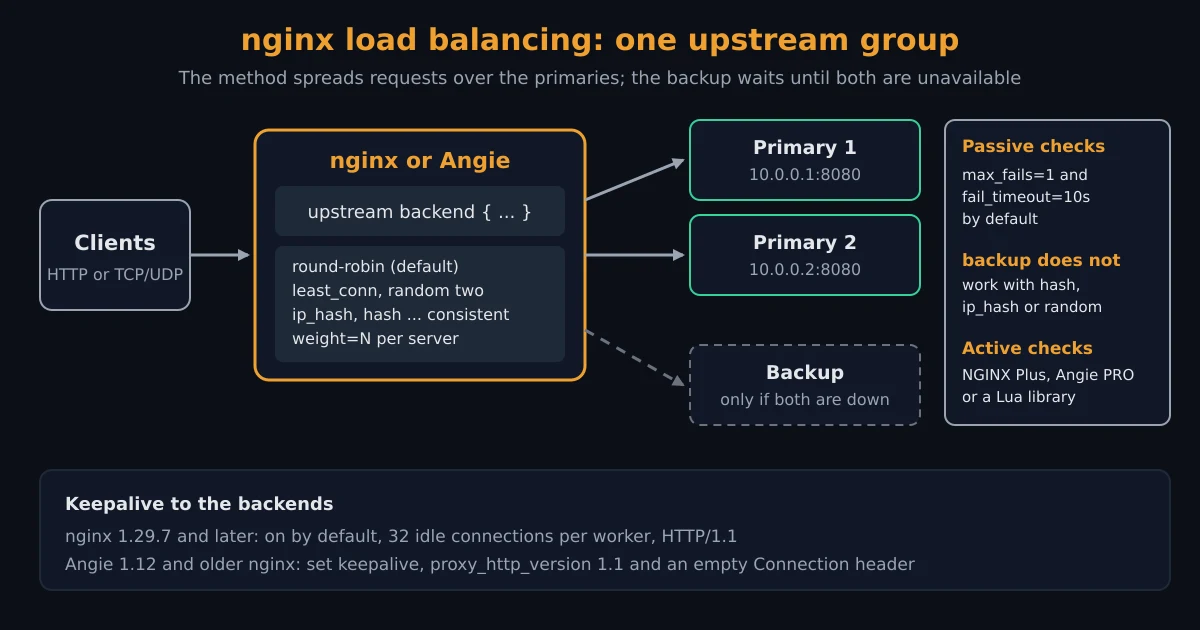
An nginx upstream block turns one backend into a group. nginx spreads requests over the servers, stops sending traffic to one that fails, and can keep a spare in reserve. This guide covers methods, weights, health checks, keepalive, failover, sticky sessions and TCP and UDP balancing.
It is written for the nginx and Angie packages from this repository on Debian and Ubuntu. The directive reference is the ngx_http_upstream_module documentation.
It also covers three things many guides get wrong. Open-source nginx has no active health checks. A backup server does not work with the hash methods. And nginx 1.29.7 changed the keepalive defaults, while Angie did not.
Updated 2026-11-23: active health checks in Angie need Angie PRO. The keepalive section now covers the nginx 1.29.7 defaults, and the failover example no longer sends plain HTTP to port 443.
Five load balancing methods
Open-source nginx has five built-in methods. The wrong one can leave one backend overloaded while the others sit idle.
1. Round-robin (the default)
upstream backend {
    server 10.0.0.1:8080;
    server 10.0.0.2:8080;
    server 10.0.0.3:8080;
}
Requests go to each backend in turn, taking weights into account. It needs no configuration. It suits stateless backends of about the same size, where every request takes about the same time. It fits badly when one backend is slower, for example because of a slow database or a different availability zone.
2. Least connections
upstream backend {
    least_conn;
    server 10.0.0.1:8080;
    server 10.0.0.2:8080;
    server 10.0.0.3:8080;
}
nginx sends the next request to the backend with the fewest active connections, again taking weights into account. Choose it when request times vary a lot: file downloads, long API calls or WebSockets.
3. IP hash (sticky by client address)
upstream backend {
    ip_hash;
    server 10.0.0.1:8080;
    server 10.0.0.2:8080;
    server 10.0.0.3:8080;
}
The same client address lands on the same backend while that backend is up. That gives session affinity when backends keep session state locally. Fixing that in the application is better, but it is not always possible.
One detail most guides skip: for IPv4, nginx hashes only the first three octets of the address. Every client in the same /24 network, or behind one office or mobile NAT, goes to the same backend. For IPv6 nginx uses the whole address.
To take a server out without reshuffling clients, mark it down instead of deleting the line.
4. Hash on any variable
upstream backend {
    hash $request_uri consistent;
    server 10.0.0.1:8080;
    server 10.0.0.2:8080;
    server 10.0.0.3:8080;
}
This works like IP hash, but on any key: the request URI, a cookie, a header or a combination. Without consistent, adding or removing a server can move most keys to another backend. With it, nginx uses ketama consistent hashing and only a few keys move. That keeps cache hit rates up, so this is the method for caching tiers keyed on the URL, such as Varnish farms or image processors.
5. Random with two choices (nginx 1.15.1 and later)
upstream backend {
    random two least_conn;
    server 10.0.0.1:8080;
    server 10.0.0.2:8080;
    server 10.0.0.3:8080;
}
nginx picks two servers at random, taking weights into account, then sends the request to the one with fewer active connections. This is known as the “power of two choices”. It has been in open-source nginx since 1.15.1. Only the least_time variant needs NGINX Plus.
Weighted distribution: when backends are not equal
Got one 16-core backend and two older 8-core ones? Give the big one a higher weight:
upstream backend {
    server 10.0.0.1:8080 weight=3;   # 3x the share of traffic
    server 10.0.0.2:8080 weight=1;
    server 10.0.0.3:8080 weight=1;
}
Weights are relative: only the ratio counts, and the default is 1. Round-robin, least_conn and random all take weights into account. They help when you move traffic to new hardware step by step.
Health checks: passive and active
Passive health checks, in open-source nginx
upstream backend {
    server 10.0.0.1:8080 max_fails=3 fail_timeout=30s;
    server 10.0.0.2:8080 max_fails=3 fail_timeout=30s;
    server 10.0.0.3:8080 max_fails=3 fail_timeout=30s backup;
}
With these settings, nginx marks a server unavailable after three failed attempts within 30 seconds. It then keeps the server out for 30 seconds before trying it again. The backup server only gets requests when the primary servers are unavailable.
You get passive checks even without these parameters. The defaults are max_fails=1 and fail_timeout=10s, so a single failure takes a server out for ten seconds. Set max_fails=0 to turn the counting off.
What counts as a failure is set by proxy_next_upstream. Connection errors and timeouts always count. An HTTP 500, 502, 503 or 504 reply only counts if you list it in that directive. Passive checks learn from real traffic, so a failing backend is only noticed when requests hit it.
Active health checks: NGINX Plus, Angie PRO or Lua
upstream backend {
    zone backend 64k;
    server 10.0.0.1:8080;
    server 10.0.0.2:8080;
    server 10.0.0.3:8080;
}

server {
    location / {
        proxy_pass http://backend;
        health_check interval=5s fails=2 passes=2 uri=/healthz;
    }
}
This example is NGINX Plus syntax. nginx probes /healthz on each server every five seconds. It marks a server down after two failed probes and brings it back after two good ones. Open-source nginx does not have the health_check directive and will not load this config.
Angie has active checks too, through its upstream_probe directive. That directive belongs to Angie PRO, as the Angie upstream documentation marks it. The free Angie packages do not include it.
For active checks on open-source nginx, this repository ships two Lua libraries: lua-resty-upstream-healthcheck and lua-resty-healthcheck. Both need the Lua module (libnginx-mod-http-lua) and probe upstream servers in the background. You set them up in Lua code rather than with one directive.
Keepalive: reuse backend connections
Without connection reuse, nginx opens a new TCP connection to the backend for every request, with a full handshake each time. A keepalive pool keeps idle connections open and reuses them:
upstream backend {
    server 10.0.0.1:8080;
    server 10.0.0.2:8080;
    keepalive 64;                # Cache up to 64 idle connections per worker
    keepalive_requests 1000;     # Recycle each connection after 1000 requests
    keepalive_timeout 60s;       # Close idle connections after 60s
}

server {
    location / {
        proxy_pass http://backend;
        proxy_http_version 1.1;          # Default since nginx 1.29.7
        proxy_set_header Connection "";  # Not sent by default since 1.29.7
    }
}
Since nginx 1.29.7, upstream keepalive is on by default with 32 idle connections per worker. nginx also speaks HTTP/1.1 to backends by default and stops sending Connection: close. The nginx packages from this repository are 1.31.10, so the two proxy lines above are only there to be explicit.
Angie 1.12 and nginx before 1.29.7 still need all three: the keepalive line, proxy_http_version 1.1 and the empty Connection header. Without them, the connection closes after every request. Our reverse proxy guide covers the same difference.
Three more details:
keepalivelimits idle connections per worker process, not the total. Keep it small enough that the backend can still accept new connections.- Before nginx 1.29.7, a method such as
least_connorhashmust come before thekeepaliveline. - PHP-FPM speaks FastCGI, not HTTP. For a
fastcgi_passupstream, keepalive needsfastcgi_keep_conn on;instead of the two proxy lines.
Failover with backup servers
A tiered setup keeps spare servers idle until every primary server is unavailable:
upstream backend {
    server 10.0.0.1:8080;            # Primary
    server 10.0.0.2:8080;            # Primary
    server 10.0.0.3:8080 backup;     # Secondary, only used if both primaries are down
    server 192.0.2.10:8080 backup;   # Off-cluster emergency
}
Watch out: the nginx documentation says backup cannot be used with hash, ip_hash or random. If you need both affinity and a spare, keep the spare as a normal server, or use cookie-based sticky sessions on NGINX Plus or Angie.
When a request fails, nginx passes it to the next server, so many backend failures never reach the user. This only works if nginx has not sent anything to the client yet. By default nginx does not retry a POST or PATCH request that already reached a backend.
A host name in a server line is resolved once, when nginx loads the configuration. Since 1.27.3, open-source nginx can follow DNS changes. Add resolve to the server line, a zone to the upstream and a resolver directive. To add or drain servers at run time without a reload, this repository ships the libnginx-mod-http-dynamic-upstream module.
Sticky sessions
When the application needs session affinity, there are two patterns:
# IP-hash sticky (free, fragile behind NAT)
upstream backend {
    ip_hash;
    server 10.0.0.1:8080;
    server 10.0.0.2:8080;
}

# Cookie-based sticky (NGINX Plus / Angie)
upstream backend {
    server 10.0.0.1:8080;
    server 10.0.0.2:8080;
    sticky cookie srv_id expires=1h domain=.example.com path=/;
}
These are alternatives: two upstream blocks with the same name cannot live in one configuration. The cookie version is NGINX Plus syntax. It survives NAT and mobile networks and is easy to reset.
Angie has a free equivalent in its Upstream Sticky module, with its own parameters, so check its documentation before you copy the line. Open-source nginx has no sticky directive, and this repository does not ship a third-party sticky module. On nginx, use ip_hash or hash on a suitable key.
TCP and UDP load balancing (stream module)
nginx balances more than HTTP. The stream module handles plain TCP and UDP: MySQL replicas, DNS resolvers, SMTP and other TCP services. On Debian and Ubuntu it is a separate package, libnginx-mod-stream for nginx and angie-module-stream for Angie.
stream {
    upstream mysql_read {
        least_conn;
        server 10.0.0.10:3306;
        server 10.0.0.11:3306;
        server 10.0.0.12:3306;
    }

    server {
        listen 3306;
        proxy_pass mysql_read;
        proxy_connect_timeout 5s;
    }

    # UDP example: DNS load balancing
    upstream dns_servers {
        server 10.0.0.20:53;
        server 10.0.0.21:53;
    }

    server {
        listen 53 udp reuseport;
        proxy_pass dns_servers;
        proxy_responses 1;
    }
}
The same methods, weights and passive health checks apply. proxy_responses 1 tells nginx to expect one reply per DNS query. For QUIC, see our HTTP/3 on nginx guide.
Picking a method quickly
- Stateless API backends, similar response times: round-robin (the default).
- Response times that vary, file downloads, long polls:
least_conn. - Session affinity, every client with its own address:
ip_hash, or cookie sticky on NGINX Plus or Angie. - Cache tier keyed on the URL:
hash $request_uri consistent. - Close to least connections, picked at random:
random two least_conn.
Logging which backend served what
Add the upstream variables to your access log, so you can trace a problem back to one backend:
log_format upstreamlog '$remote_addr $upstream_addr "$request" '
                       '$status $body_bytes_sent '
                       'rt=$request_time uct=$upstream_connect_time '
                       'urt=$upstream_response_time';

access_log /var/log/nginx/upstream.log upstreamlog;
$upstream_addr shows which backend handled the request. If nginx tried more than one, the addresses are separated by commas. $upstream_response_time shows how long receiving the response from the backend took.
Common mistakes
- Missing keepalive lines on Angie or older nginx: every request opens a new backend connection.
- No timeouts: a hung backend can hold a request for a long time. Set
proxy_connect_timeout,proxy_read_timeoutandproxy_send_timeoutexplicitly. - Sticky sessions without health checks: when a backend dies, every user stuck to it loses their session.
- Round-robin on mixed hardware: the old machine becomes the bottleneck. Use
weightorleast_conn. - A backup server with a hash method:
backupdoes not combine withhash,ip_hashorrandom. - Expecting active checks for free:
health_checkis NGINX Plus andupstream_probeis Angie PRO. On open-source nginx, use the Lua libraries or rely on passive checks.
Related posts
- nginx reverse proxy configuration guide: proxy_pass, headers and timeouts in front of the load balancer.
- nginx rate limiting guide: protect each backend from abuse.
- HTTP/3 on nginx for Debian and Ubuntu: QUIC and UDP on the front end.
- Angie web server guide: what the free Angie packages add.
- nginx and Angie on Kubernetes: load balancing inside a cluster with an ingress controller.
- WordPress, nginx and PHP-FPM configuration: the FastCGI workload behind many of these upstream blocks.