nginx Brotli compression needs two things: the module package and a few lines in the http block. This guide covers both for nginx and Angie from the myguard APT repository. It then shows how to check that responses come back as br, and how to pre-compress static files so nginx does not compress them on every request.
Brotli is a compression format from Google, standardised in 2016 as RFC 7932. It combines LZ77, Huffman coding and second-order context modelling, which gzip lacks. Every current major browser supports it. See the Brotli reference implementation for the format itself.
This post sticks to setup. For how Brotli, zstd and zlib-ng gzip compare and which to run where, read zstd vs Brotli vs zlib-ng on nginx.
Three details most Brotli guides miss
- Our package enables one load file,
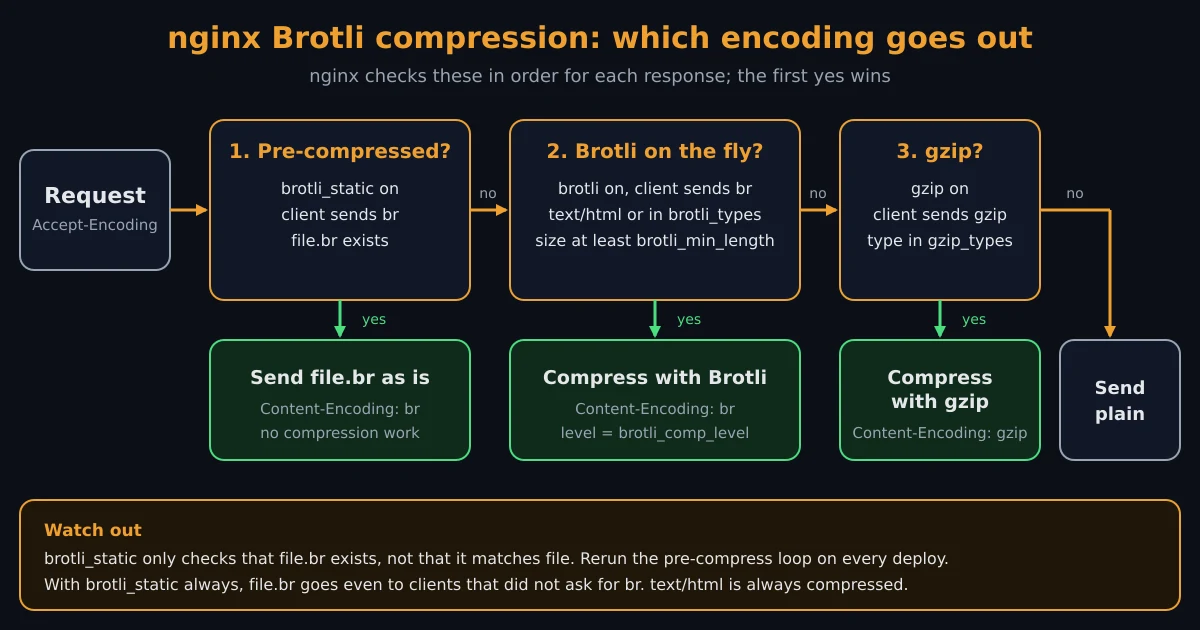
50-mod-http-brotli.conf, and it loads both modules. Guides that name two separate files, this one included until November 2026, send you looking for files that are not there. text/htmldoes not belong inbrotli_types. It is always compressed, and listing it makes nginx warn about a duplicate MIME type.brotli_staticonly checks that the.brfile exists. After a deploy, a stale.brfile is still served as is.
Step 1: install the Brotli module
# Add the myguard repository if not already done
wget https://raw.githubusercontent.com/eilandert/deb.myguard.nl/main/myguard.deb
dpkg -i myguard.deb
apt-get update

# Install NGINX with the Brotli module
apt-get install nginx libnginx-mod-http-brotli

# Or for Angie:
apt-get install angie angie-module-http-brotli
New to the myguard repository? Follow the two-minute setup guide. Angie uses the same module and the same directives. The package also recommends the brotli command-line tool, which you need later for pre-compression.
Step 2: check that the module is loaded
The package enables the module for you. Check the load file:
ls /etc/nginx/modules-enabled/ | grep brotli
# Should show: 50-mod-http-brotli.conf (it loads both the filter and the static module)
Correction (23 November 2026): earlier versions of this post expected two files, 50-mod-http-brotli-filter.conf and 50-mod-http-brotli-static.conf. The package installs one, which loads both modules.
If the file is missing, add these lines at the top of nginx.conf, before the http block:
load_module modules/ngx_http_brotli_filter_module.so;
load_module modules/ngx_http_brotli_static_module.so;
On Angie the same load file ships as /usr/share/angie/modules-available/mod-http-brotli.conf.
Step 3: configure Brotli
Add this inside the http block in nginx.conf:
http {
    # Brotli dynamic compression (on-the-fly)
    brotli             on;
    brotli_comp_level  6;        # 0-11, sweet spot is 4-6
    brotli_min_length  256;      # Don't compress tiny responses
    brotli_types
        text/plain
        text/css
        text/javascript
        text/xml
        text/x-component
        application/javascript
        application/json
        application/xml
        application/rss+xml
        application/atom+xml
        application/vnd.ms-fontobject
        image/svg+xml
        font/truetype
        font/opentype;

    # Brotli static files (serve pre-compressed .br files)
    brotli_static on;

    # Keep gzip as fallback for browsers that don't support Brotli
    gzip            on;
    gzip_comp_level 6;
    gzip_min_length 256;
    gzip_vary       on;
    gzip_types
        text/plain text/css text/javascript application/javascript
        application/json application/xml image/svg+xml font/opentype;
}
What the directives do, from the ngx_brotli README:
brotli_comp_leveltakes 0 to 11 and defaults to 6. Levels 4 to 6 suit on-the-fly compression. Level 11 is too slow for that and belongs to pre-compressed files.brotli_min_lengthdefaults to 20 bytes. The 256 above skips tiny responses, where compression gains little.brotli_typesadds types totext/html, which is always compressed.brotli_statictakeson,offoralways. Withalways, nginx sends the.brfile even to clients that did not ask for Brotli. Keepon.
Keep gzip on as well. nginx then serves Brotli to clients that accept it and gzip to older clients that do not.
Step 4: test and reload
nginx -t && systemctl reload nginxThen check a response:
# curl with Brotli accept header
curl -H 'Accept-Encoding: br,gzip' -I https://example.com
# Look for: Content-Encoding: br

# Check Chrome DevTools: Network tab > select a request > Response Headers > Content-Encoding: br
Browsers only advertise br over HTTPS, so test the HTTPS URL in a browser. curl sends whatever Accept-Encoding you give it, so it gets br over plain HTTP too. The response also carries Vary: Accept-Encoding, which keeps the Brotli and gzip copies apart in caches.
Pre-compress static assets
Files that do not change between deploys, such as CSS and JavaScript, can be compressed once at level 11. From then on, nginx sends the .br file and does no compression work for it.
# Pre-compress all JS and CSS files in your web root
find /var/www/html -name '*.js' -o -name '*.css' | while read f; do
    brotli -Z -f "$f" -o "${f}.br"   # -Z = level 11
    gzip -9 -k -f "$f"               # -k = keep original, for fallback
done
Install the brotli tool first if the module package did not pull it in:
# Install the brotli CLI tool
apt-get install brotli
With brotli_static on, a request for app.js with Accept-Encoding: br gets app.js.br as is. Two catches:
- nginx only checks that
app.js.brexists, not that it matchesapp.js. Run the loop again on every deploy, or the old file goes out. - The
.gzcopies are only used withgzip_static on, which the config above does not set. Our nginx package is built without gzip_static, so on it that line failsnginx -tand you can drop thegzipline from the loop. Our Angie package has gzip_static.
Update 23 November 2026: the nginx package in our repository (1.31.10-1myguard1) is built without the gzip_static module, so gzip_static on; fails nginx -t with “unknown directive”. Our Angie package includes it.
Brotli for WordPress
WordPress pages are mostly HTML, CSS and JavaScript, so they compress well. PHP responses are compressed on every request, so keep the level at 4 to 6 rather than 11. Theme and plugin assets are static files and can be pre-compressed with the loop above.
Brotli and zstd side by side
The myguard repository also ships a zstd nginx module. Both can run in one http block:
apt-get install libnginx-mod-http-brotli libnginx-mod-http-zstd

# In http block:
brotli on;        # For browsers (HTML, CSS, JS)
brotli_types text/css application/javascript image/svg+xml;

zstd on;          # For API clients that support it
zstd_types application/json application/x-ndjson;
zstd_comp_level 3;
Correction (23 November 2026): this snippet used to list text/html in brotli_types, which makes nginx warn about a duplicate MIME type.
Which one to use for what is covered in the compression comparison.
Upstreams that send Brotli
Sometimes the upstream already sends Brotli and the client does not accept it. libnginx-mod-http-unbrotli (angie-module-http-unbrotli on Angie) decompresses those responses for such clients. It also lets filters such as sub run on Brotli-compressed upstream bodies.
Related posts
- zstd vs Brotli vs zlib-ng: which compression to run where on nginx
- zstd nginx module: what it does and 22 bug fixes: the other modern compression module
- nginx dynamic modules overview: every module the repository ships
- nginx and Angie expert guide: performance tuning, including compression
- nginx vs Apache benchmark 2026: a performance comparison of the two servers
- How to add the myguard APT repository: where the Brotli module comes from