For about eight years, every single package we built, nginx, Angie, Postfix, Dovecot, rspamd, MariaDB, all of it, got dumped into one giant shared folder per Debian release. One pool/. One index. Everything piled together like a teenager’s bedroom floor where the clean laundry and the dirty laundry have become philosophically indistinguishable. It worked. It also meant that if you only wanted our hardened nginx, your machine still had to download and parse an index listing twelve thousand other .deb files it would never install, and because everything shared one index, an apt upgrade could cheerfully hand you a brand-new Postfix or MariaDB you never asked for, just because it was sitting in the same pile. The new deb.myguard.nl APT repository layout fixes exactly that, one per-package tree, one index per package.
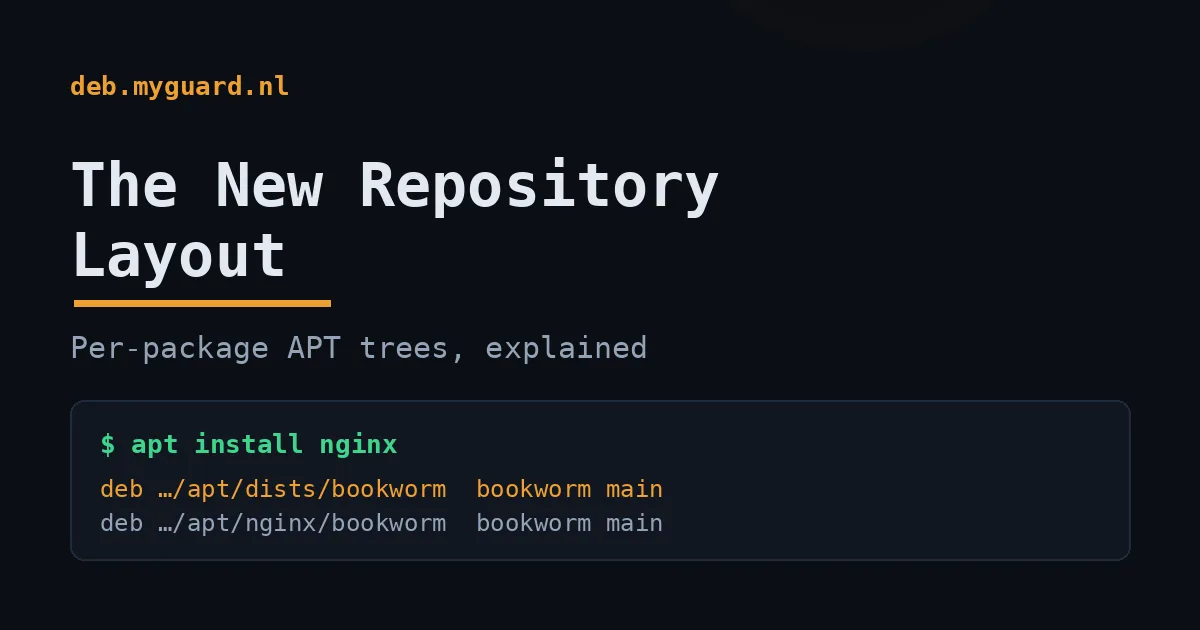
We just fixed that. The repository at deb.myguard.nl/apt now publishes itself in clean, separate trees: one per distribution, and one per package. Same signing key, same packages, same versions, just sorted. This is the story of why a package repository is shaped the way it is, what was wrong with the old shape, and how to use the new one. I’m going to explain it like you’re sixteen and have never set up an APT repo, because honestly most people who run them never had it explained either.
Let’s start with the thing nobody tells you.
What an APT repository actually is (and where the deb.myguard.nl APT repository layout fits)
Here’s the big secret about APT repositories: they’re just a web server with files on it. That’s it. There’s no database, no API, no clever server-side magic. When you run apt update, your computer downloads a couple of plain text files over HTTP, reads them, and goes “ah, okay, here’s what’s available.” When you run apt install nginx, it downloads a .deb file, which is itself just a fancy .tar archive, and unpacks it.
If you can serve a folder of files over HTTP, you can run an APT repository. People act like it’s wizardry. It’s a glorified python3 -m http.server with some rules about folder names.
Those rules matter, though, so let’s look at them. A repository has two important parts:
- The
pool/: this is where the actual.debfiles live. The packages themselves. The cargo. - The
dists/: this is the index. It’s a set of text files that say “for Debian bookworm, here are the packages we have, here are their versions, here are their SHA256 hashes, and here’s a cryptographic signature proving I really wrote this list.”
When your machine runs apt update, it’s downloading the dists/ index. It never downloads the whole pool/, that would be insane, it’s gigabytes. It downloads the catalogue, decides what it needs, and then fetches only those specific .deb files from the pool/. Think of dists/ as the restaurant menu and pool/ as the kitchen. You read the menu; you don’t walk into the kitchen and eat everything.
The line you put in /etc/apt/sources.list.d/ is just an address telling your machine where the menu is:
deb [signed-by=/etc/apt/keyrings/deb.myguard.nl.gpg] https://deb.myguard.nl/apt/dists/bookworm bookworm mainThat reads as: “Go to this URL, look in the dists/bookworm menu, the suite is called bookworm, and I want the main component.” Hold that thought. The shape of that URL is the entire point of this article.
The old layout, and why it was a teenager’s bedroom floor
Back in 2022 we moved from a tool called reprepro to aptly for managing the repo. (Different tools, same job: take a pile of .deb files, generate the signed index, publish it.) And the way it got set up, every Debian and Ubuntu release published straight into the web root. All of them. Into the same physical directory.
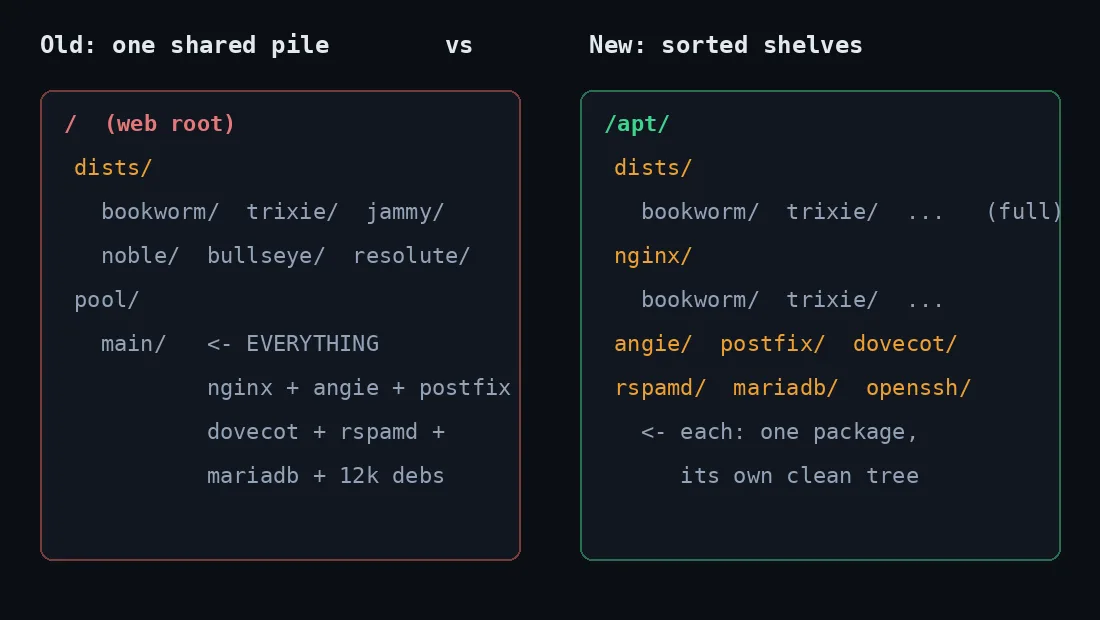
So on disk it looked like this, one dists/ with every release crammed in side by side, and crucially, one shared pool/ holding the .deb files for everything:
/                       ← the web root, served at deb.myguard.nl
├─ dists/
│   ├─ bookworm/      ← Debian 12 index
│   ├─ trixie/        ← Debian 13 index
│   ├─ jammy/         ← Ubuntu 22.04 index
│   ├─ noble/         ← Ubuntu 24.04 index
│   └─ ...
└─ pool/
    └─ main/          ← EVERY .deb for EVERY release, all together
It worked fine. APT is perfectly happy with this. But it had two real problems, and they got worse as we added more packages.
Problem one: you got the whole buffet whether you wanted it or not. Say you run a mail server and you just want our Postfix and Dovecot and rspamd. You add the repo, and now apt update pulls down an index that also lists nginx, Angie, MariaDB, a hundred and eight nginx modules, OpenSSL builds, and a pile of shared libraries. Your apt-cache search results get polluted with stuff you’ll never touch. Your apt pinning has to be more careful. It’s noise. A 2 a.m. “why is libnginx-mod-http-vod showing up on my mailserver” kind of noise.
Problem two, and this one actually scared me once, the shared pool/ is a loaded footgun. When everything publishes to the same directory with the same prefix, the publishing tool treats them as one big shared object store. Drop or rebuild one release’s publication, and the tool happily wipes the shared dists/ and pool/ out from under every other release at the same time. I learned this the way everyone learns these things: by doing it once, watching twelve thousand .deb files vanish from the published tree, and feeling my soul briefly leave my body. (They were recoverable from the database. My blood pressure was not.)
So: one messy room, where touching one thing could knock over everything else, and where every guest had to look at all your junk. Time to get some shelves.
The new deb.myguard.nl APT repository layout: shelves, not a pile
The fix is conceptually simple and it’s the same fix your mum suggested for your bedroom: put things in separate, labelled containers. Everything still lives under /apt/, but now it’s sorted two ways at once.
First, the full per-distribution trees. Each release gets its own isolated folder with its own dists/ and its own pool/. Nothing shared. Nothing that can knock over a neighbour:
/apt/dists/
├─ jammy/        ← Ubuntu 22.04 — its own dists/ + pool/
├─ noble/        ← Ubuntu 24.04
├─ bullseye/     ← Debian 11
├─ bookworm/     ← Debian 12
├─ trixie/       ← Debian 13
└─ resolute/     ← Ubuntu 26.04 LTS
This is the one most people want. It’s everything we build for your release, in one source line, completely separated from every other release. The URL is /apt/dists/<codename>, so for Debian 12 it’s https://deb.myguard.nl/apt/dists/bookworm.
Second, and this is the genuinely nice new bit, the per-package trees. Each package gets its own tree, sliced again by release:
/apt/
├─ nginx/
│   ├─ bookworm/    ← just nginx + its deps, for Debian 12
│   ├─ trixie/
│   └─ ...
├─ angie/
├─ postfix/
├─ dovecot/
├─ rspamd/
├─ mariadb/
└─ openssh/
So if you want only our nginx and nothing else cluttering your apt index, you point at /apt/nginx/<codename> and that tree contains nginx, its modules, and the handful of libraries it actually depends on. Nothing else. A mail admin points at /apt/postfix/bookworm and /apt/dovecot/bookworm and never sees a single nginx module.
The old shared layout is still live at the site root, by the way. We didn’t rip it out. It’s marked “being retired” but it keeps working so nobody’s automation breaks the day they read this. You’ve got time to move over. We’re not monsters.
/apt/.How aptly pulls this off without copying everything ten times
Here’s a question that should bug you: if there’s a full bookworm tree and a separate nginx/bookworm tree, are we storing the nginx .deb twice? Disk is cheap but it’s not free, and copying the same 200 MB of nginx modules into six package trees across six releases adds up fast.
The answer is no, and the trick is hardlinks. When aptly publishes a tree, it doesn’t copy the .deb file into the pool/, it creates a hardlink. A hardlink is a second name for the exact same bytes on disk. Same inode, two directory entries. The file appears in both /apt/dists/bookworm/pool/ and /apt/nginx/bookworm/pool/, costs the disk space of one copy, and if you edit one you edit both (you won’t, published .deb files are immutable). It’s the filesystem equivalent of one band member being in two bands. Same person, two posters.
The per-package trees are built with a technique aptly calls a snapshot pull. We take a snapshot of the whole release, then pull out just one source package and the things it actually depends on. The pull follows hard Depends, not the soft Recommends and Suggests, which is a detail that matters more than you’d think. The first time we built these, we left dependency-following turned all the way up, and Postfix’s “Suggests: a mail reader” dragged the entire Dovecot package set into the Postfix tree. Postfix politely suggesting you might also enjoy a different mail server is true, philosophically, and completely useless in a per-package repo. So: hard dependencies only. Each tree contains the package, its real libraries, and nothing it merely thinks you’d like.
One more detail, because someone always asks: not every package exists for every release. MariaDB only builds for trixie and resolute, because those are the only base systems shipping the MariaDB 11.x build dependencies we need. OpenSSH is wired up but not always populated. The build script just skips a release cleanly when a package isn’t there, instead of publishing an empty broken tree. No 404 surprises.
The signing key: why your computer trusts us at all
Quick detour into the most important file you’ll never look at. Remember how the dists/ index includes “a cryptographic signature proving I really wrote this list”? That signature is made with a GPG key, and your machine needs our public half of that key to check it. No key, no trust, and modern APT will flat-out refuse to install anything.
This is the bit that stops a random person on your coffee-shop WiFi from intercepting your apt update and feeding you a backdoored nginx. Even over plain HTTP, APT verifies every index and every package against the signature. The transport can be untrusted; the math can’t be faked. (This is also why our backup mirror on port 8888 can serve plain HTTP without it being a security problem, the signature check doesn’t care how the bytes arrived.)
Our key lives at one obvious address: https://deb.myguard.nl/deb.myguard.nl.gpg. It’s an RSA 4096-bit key, born 2020-12-27, valid through May 2028. We serve it already in the binary format APT wants, so you don’t even need to run gpg --dearmor on it, just save it into the keyrings folder:
sudo install -d -m 0755 /etc/apt/keyrings
curl -fsSL https://deb.myguard.nl/deb.myguard.nl.gpg \
  | sudo tee /etc/apt/keyrings/deb.myguard.nl.gpg >/dev/null
Notice we put it in /etc/apt/keyrings/ and reference it with signed-by= in the source line, rather than dumping it in the old /etc/apt/trusted.gpg.d/ where it would be trusted for every repo on your system. Scoping the key to one repo is the modern, correct way to do this. It means our key can only ever vouch for our packages. If you’re the paranoid type, and around here that’s a compliment, verify the fingerprint after you save it:
gpg --no-default-keyring --keyring /etc/apt/keyrings/deb.myguard.nl.gpg --fingerprintIt must read D18B 8E5A DF7D 55CE 2A00 D581 67F9 C3D8 456D 7F62, character for character. If it doesn’t, stop, and don’t run apt update, something fetched you the wrong key.
Actually using it: three ways, pick your fighter
Right, theory’s over. Here’s how you actually add the thing. All three methods use the same key from the step above and end up cryptographically identical, they differ only in how much of the repo you pull into your apt index.
Option 1: the full release tree (recommended)
You want everything we build for your release. This is the default and what most people should use.
apt-get update
apt-get -y install lsb-release ca-certificates curl

CODENAME=$(lsb_release -cs)
echo "deb [arch=amd64 signed-by=/etc/apt/keyrings/deb.myguard.nl.gpg] https://deb.myguard.nl/apt/dists/$CODENAME $CODENAME main" \
  | sudo tee /etc/apt/sources.list.d/deb.myguard.nl.list

sudo apt-get update
sudo apt-get install nginx     # or: angie, postfix, rspamd, ...
The $(lsb_release -cs) bit just prints your release codename (bookworm, noble, whatever) so the same commands work everywhere. No editing required.
Option 2: one package only
You want our nginx and literally nothing else in your apt index. Point at the package’s own tree:
CODENAME=$(lsb_release -cs)
echo "deb [arch=amd64 signed-by=/etc/apt/keyrings/deb.myguard.nl.gpg] https://deb.myguard.nl/apt/nginx/$CODENAME $CODENAME main" \
  | sudo tee /etc/apt/sources.list.d/deb.myguard.nl-nginx.list

sudo apt-get update
sudo apt-get install nginx
Swap nginx for angie, postfix, dovecot, rspamd, mariadb or openssh. You can stack several, give each its own file in sources.list.d/ (like deb.myguard.nl-postfix.list) so they’re easy to manage and remove later. Want to see every tree that exists right now? Just open deb.myguard.nl/apt in a browser and click around. It’s a plain directory listing. The whole menu, visible.
Option 3: the lazy way (the bootstrap package)
If you trust us and just want it working now, we ship a tiny .deb that does the key install, the source line, and the apt pinning for you:
apt-get update
apt-get -y install lsb-release ca-certificates curl

curl -fsSLO https://deb.myguard.nl/myguard.deb
sudo dpkg -i myguard.deb
sudo apt-get update
Its install script detects your codename, writes the signed-by source pointing at the new /apt/dists/<codename> tree, drops in the signing key, and sets pinning so our builds win version ties. It’s a normal .deb, if you want to audit it, dpkg-deb -R myguard.deb out/ and read the postinst yourself. We’d respect you more for it.
A word on pinning (the thing that decides who wins)
Here’s a subtlety that trips people up. Say Debian ships nginx 1.22 and we ship a hardened nginx 1.31. You’ve added our repo. Which one does apt install nginx give you? By default APT picks the highest version number, but version comparison across repos gets weird fast, and you don’t want to leave it to chance.
That’s what pinning is for. A pin file in /etc/apt/preferences.d/ says “packages from this origin get priority.” The bootstrap package sets this up automatically, pinning on the repository’s Origin field, which, across all our trees, is deb.myguard.nl. (Getting that Origin consistent across the new per-distro trees was its own small adventure; when you split a repo into pieces, every piece has to remember its own name, and the first build forgot. Fixed now.) If you set the repo up by hand and want our builds to take priority everywhere, the how-to page has the exact pin snippet.
If you only want, say, our nginx but Debian’s everything-else, you can pin more narrowly, or just use the per-package tree from Option 2, which sidesteps the whole question by only offering one package in the first place. Sometimes the cleanest pin is not needing one.
Why this matters beyond tidiness
It would be easy to file this under “cosmetic spring cleaning,” but there’s real engineering payoff.
Smaller, faster apt update. A per-package tree’s index lists a handful of packages, not twelve thousand. If you’re provisioning a fleet of mail servers and they each only need the Postfix tree, every apt update across that fleet parses a tiny index instead of the whole catalogue. Multiply by a few hundred machines and a few times a day and it stops being theoretical.
Blast radius. Separate trees with separate pools mean a publishing mistake on one can’t nuke the others. The footgun from the old layout is structurally gone, not “we’ll be careful,” but “the tool physically can’t reach the neighbour’s files.” That’s the difference between a safety habit and a safety property, and the second one is the only kind you can trust at 2 a.m.
Clarity. You can browse to deb.myguard.nl/apt and see the shape of what we publish. Which packages, which releases, what’s in each. A repo you can read with your eyes is a repo you can reason about. No guessing, no spelunking through one enormous flat Packages file.
If you want the practical, no-theory version of all this, just the commands to copy, the how-to-use page is the cheat sheet. And if you came here because you’re setting up a hardened stack from scratch, the nginx modules we ship and the ModSecurity + OWASP CRS guide are the obvious next stops. Mail people: the rspamd explainer pairs nicely with the Postfix and Dovecot trees.
A package repository is just a folder of files on a web server. But the shape of that folder is a promise about how much junk you have to accept to get the one thing you wanted. We just made that promise a lot smaller.
Frequently asked questions
What is the difference between /apt/dists/<codename> and /apt/<package>/<codename>?
/apt/dists/<codename> is the full tree for one release, everything we build for, say, Debian bookworm, in one source line. /apt/<package>/<codename> is a single package’s tree (just nginx, or just rspamd) plus its real dependencies, and nothing else. Use the full tree if you want our whole stack; use a package tree if you want exactly one thing without cluttering your apt index. Both use the same signing key and the same codename.
Do I still have to use the old mixed repository at the site root?
No. The old flat layout at the deb.myguard.nl root still works and is kept live so existing setups don’t break, but it is being retired. New installs should point at /apt/dists/<codename> (full release) or /apt/<package>/<codename> (single package). There’s no rush, migrate when convenient, but the new trees are the recommended path.
Why isn’t MariaDB (or OpenSSH) available for my release?
Some packages are only built for the releases whose base system ships the build dependencies we need. MariaDB 11.x, for example, is published only for trixie and resolute. The build pipeline cleanly skips a release where a package can’t be built rather than publishing an empty or broken tree, so you’ll simply not see that package’s tree for unsupported releases. Browse deb.myguard.nl/apt to see exactly what exists.
Where do I get the signing key and where should it go?
The key is at https://deb.myguard.nl/deb.myguard.nl.gpg, already in APT’s binary format (no gpg --dearmor needed). Save it to /etc/apt/keyrings/deb.myguard.nl.gpg and reference it with signed-by= in your source line. That scopes the key to our repository only, instead of trusting it system-wide. The fingerprint is D18B 8E5A DF7D 55CE 2A00 D581 67F9 C3D8 456D 7F62 (RSA 4096, valid through May 2028).
Does splitting the repo into trees waste disk space by duplicating packages?
No. aptly publishes with hardlinks, so a package that appears in both the full release tree and a per-package tree is the same bytes on disk under two names, it costs the space of one copy. Splitting the repo costs essentially no extra storage; it only changes how the indexes are organised.
Can I mix several single-package trees on one machine?
Yes. Give each its own file in /etc/apt/sources.list.d/ (for example deb.myguard.nl-nginx.list and deb.myguard.nl-postfix.list). They share the same keyring and don’t interfere. This is handy when you want, say, our nginx and our rspamd but Debian’s version of everything else.
Is the plain-HTTP mirror on port 8888 safe to use?
Yes. APT verifies every index and every package against the GPG signature regardless of how the bytes were transported, so an untrusted plain-HTTP connection can’t feed you a tampered package, the signature check would fail. The port 8888 mirror serves the identical signed trees as a fallback when the main HTTPS endpoint is unavailable.
Related reading
- How to Add the myguard APT Repository (Debian & Ubuntu): the copy-paste cheat sheet for everything above.
- NGINX Modules, optimized & extended: the full list of what’s in the nginx tree.
- How to Install ModSecurity and OWASP CRS on NGINX: turn your new nginx into a web application firewall.
- Rspamd Explained: the brains behind the Postfix and Dovecot trees.