The spam world’s three best crowd-sourced filters — DCC, Razor and Pyzor — all ship as command-line tools written in C, Perl and Python, and every one of them blocks while it talks to a server in another country. A single razor-check costs you about 367 milliseconds of dead air. rspamd, meanwhile, is asynchronous to its bones. Shell out to a blocking CLI from inside its single-threaded worker and you’ve bolted a ball and chain to your fast scanner: one razor-check, and the thousand messages queued behind it all wait for the privilege.
So we did the thing that actually fixes it: we rewrote all three clients from scratch in Go and linked them into one static binary. No fork(), no interpreter start per message, no Perl or Python or set-UID C binary anywhere near your mail. Just Go code that speaks each wire protocol byte-for-byte identically to the original, answers rspamd over a single non-blocking HTTP call, and ships as a ~6 MB distroless image instead of a 268 MB one. This is the story of that port, and why it looks the way it does.
The thing is rspamd-dcc-razor-pyzor: a standalone Docker backend that runs all three networks in-process in one Go binary — gozer — and answers rspamd over one HTTP endpoint, plus the Lua plugin that talks to it. The image runs no rspamd of its own. Yours stays exactly where it is.
Why rspamd needs a sidecar for Razor and Pyzor
rspamd has a built-in DCC module. Good. It has nothing for Razor, and nothing for Pyzor. That’s the gap, and the obvious way to close it is a trap: write a tiny Lua rule that shells out to razor-check, watch it work in testing, ship it. Then traffic ramps and rspamd’s worker — the one event loop doing all the scanning — parks itself on a blocking read() waiting for a Razor server abroad to answer. While it waits it does nothing else. Not your message, not anyone else’s.
rspamd’s whole design is the opposite of that: it fires DNS, RBL and module checks concurrently and stitches the answers back as they land. One synchronous shell-out punches a hole straight through that model. The fix is old and boring — don’t do slow work in the hot path. Move the clients out of the worker, put an HTTP boundary in front of them, and let the plugin make a normal non-blocking request like every other rspamd module. One request out, three networks queried behind it, and the event loop never stops turning. rspamd logs it as a “slow asynchronous rule,” which sounds alarming and is actually the system telling you it’s working: slow, yes, but asynchronous, so nothing waits on it.
DCC, Razor and Pyzor, and what each one actually knows
If you’ve never met these three, here’s the short version. They’re collaborative-filtering networks, and they all answer a different flavour of the same question: “have a lot of other people seen this exact message too?” Spam is bulk by nature — the thing that makes it profitable, blasting one message to ten million inboxes, is also the thing that gives it away.
DCC (Distributed Checksum Clearinghouse) counts. It hashes the fuzzy “bulk” body and asks the network how many times that checksum has been reported. A personal email scores one; a newsletter to a million people scores in the millions. DCC doesn’t say “spam,” it says “bulk” — and it’s the fastest of the three, a single lean UDP round-trip.
Razor (Vipul’s Razor) is signatures. It computes a fuzzy fingerprint and checks it against a collaboratively maintained catalogue of known spam. It’s the slowest of the trio, because a check is a multi-step conversation — discovery, greeting, server state, then the lookup.
Pyzor is the same idea in different clothes: a digest of the message against a public server that counts sightings and whitelist hits — and in practice the quickest to answer.
None of these replaces your Bayes classifier or your RBLs. They’re a separate layer of evidence, and they catch the one thing statistical filters are weakest on: brand-new spam that’s textually clean but going out in enormous volume. For the full map of where these sit in a modern stack, we wrote it up in Rspamd Explained. This post is about wiring three of those layers in without setting your scanner on fire.
One Go binary, three protocols, zero forks
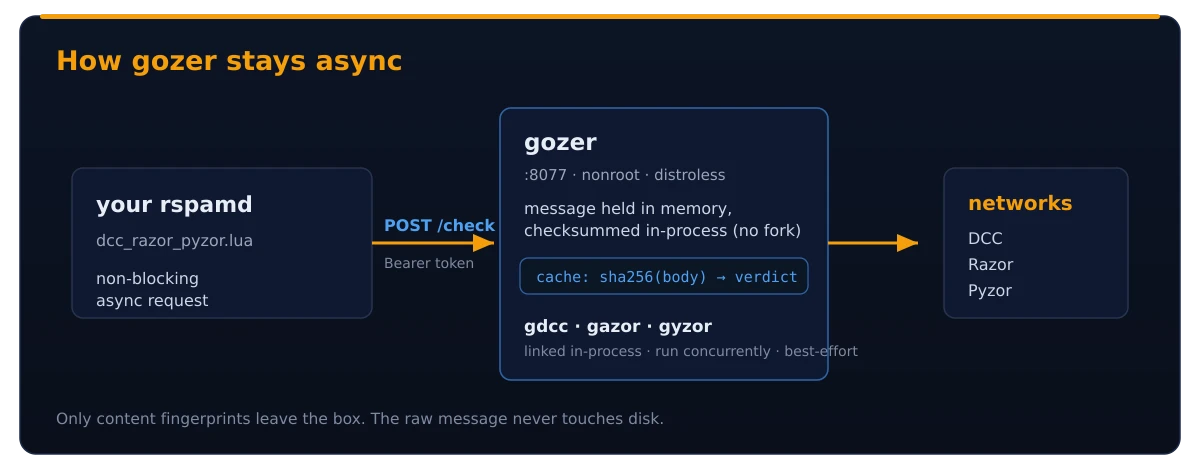
The first version was a Python shim, spamcheck_shim.py, that forked the perl razor-check, the python pyzor and the C dccproc once per message. It worked, but it dragged a perl + python + dcc toolchain and an s6 supervisor into the image, and every check paid an interpreter start (plus a set-UID dccproc). So all three clients were rewritten from scratch in Go and linked straight into the backend:
- gdcc — a clean-room Go DCC client; computes the message checksums byte-for-byte identically to
dccproc. - gazor — a Go Razor2 client; speaks the discovery/signature protocol of the perl
razor-agents. - gyzor — a Go Pyzor client; reproduces the SHA1 digest of the python client.
Each speaks its wire protocol byte-for-byte compatibly with the reference perl/python/C client, and each is gated by parity tests against the real razor, pyzor and dccproc in its own CI — so the servers see identical fingerprints and the switch is invisible on the wire. gozer imports all three (it lives in its own repo, pulled into the image build as a submodule), listens on :8077 as a non-root user, and on each /check runs the three networks concurrently in-process: no subprocess, no fork, no stdin pipe. A single /check still costs you roughly the slowest backend, not the sum — Razor sets the pace; DCC and Pyzor finish in its shadow.
What disappeared is the entire scaffolding: no s6 supervisor, no shell, no Perl or Python runtime, no dcc package and no set-UID dccproc, no dccifd daemon (gozer’s DCC client talks to the servers directly). The image is FROM a distroless/static base with gozer as the entrypoint, and it dropped from about 268 MB to roughly 6 MB — with no interpreter left in the message-parsing path, and nothing running as root over attacker-controlled bytes. That’s the real payoff of the Go port: not just speed, but an image with almost nothing left in it to attack.
The design rule we care most about is best-effort. Every backend can fail on its own without taking the others, or the container, down. If Razor’s servers fall off the internet at 3 a.m., gozer shrugs, returns whatever DCC and Pyzor had, and the healthcheck stays green because it only depends on gozer’s own /health (probed by gozer health, since the distroless image ships no shell or curl). A dead network degrades your scoring; it doesn’t degrade your availability.
The message never touches disk
This is the part we’d argue with you about. gozer keeps the message in memory and computes every checksum in-process. Nothing gets written to a temp file — not in /tmp, not in a tmpfs, not anywhere. Every spool file is a tiny liability: a window where the plaintext of someone’s email sits on a filesystem, waiting for a backup job to copy it, a log to mention it, or a forensic tool to find it after you thought it was gone. The cleanest way to never leak a temp file is to never write one.
The cache follows the same rule: it stores sha256(body) → verdict and nothing else. The hash, not the body. Point it at Redis instead of memory and the property holds — the shared cache stores hashes too, never content. And no, a tmpfs overlay would do nothing for speed here: there is no per-message disk write to accelerate, because there isn’t one. The latency is network round-trips to DCC, Razor and Pyzor, full stop.
The only thing that ever leaves the container is what collaborative filtering fundamentally needs: content fingerprints — DCC checksums, Razor signatures, Pyzor digests. Not the message. The networks get a hash of what your mail looks like, never the mail itself (and on a spam report, a submission, which is the entire point of reporting).
Hardening, because the defaults will get you fired
Every default in container-land is tuned for “does the demo work,” not “will this survive a hostile internet.” So the bundled compose ships the opposite. gozer runs non-root with bounded concurrency (GOZER_MAX_CONCURRENT defaults to 8), and every POST is token-authenticated: send the secret as Authorization: Bearer <token> or X-DRP-Token: <token>, get a 401 if it’s wrong. The detail we’re proud of: if you forget to set a token at all, gozer doesn’t fail open — it returns 503 to every POST and refuses to do anything. A spam backend that accepts unauthenticated “report this as spam” calls from anywhere on your network is a poisoning vector with a bow on it.
The compose file also runs the container read-only, with cap_drop: ALL, no-new-privileges, and no published host port. Read that last one twice: the backend is reachable only by containers on the same Docker network, by service name. It is not one iptables mistake away from the public internet. If you’ve ever found a Redis open to the world because someone published a port “just to test,” you know why that matters — the test port is forever. None of this is exotic; it’s the baseline every container that touches untrusted input should run with, and turning the safety on costs you four lines of YAML.
Performance and the cache that earns its keep
Numbers, measured from the build host against the public servers (anonymous; your mileage varies with distance): Pyzor about 50 ms, DCC about 170 ms, Razor about one second — Razor’s multi-step discovery handshake dominates. gozer queries all three concurrently, in-process, so a cold /check costs you roughly the Razor figure, and as an asynchronous rule that latency never blocks the scanner.
Here’s where it gets good, precisely because spam is bulk: the same campaign hits your server over and over, same body, a thousand recipients in an hour. gozer caches verdicts keyed on sha256(body), with a 300-second TTL (GOZER_CACHE_TTL) and a 4096-entry LRU (GOZER_CACHE_SIZE) by default. The first copy of a bulk body pays the full cold cost; every copy after it, within the TTL, comes back in well under a millisecond — the in-process cache hit is about 55 nanoseconds with zero allocations, flagged with X-DRP-Cache: hit in the response. No fork, no CLI, no round-trip, no concurrency slot consumed.
That’s the whole game on bulk traffic. In a synthetic end-to-end benchmark driving the full request path (auth, the concurrency gate, the cache, single-flight de-duplication and dispatch), gozer sustains roughly 30,000 checks per second at a 90% cache-hit ratio — where the backends see only about one message in nine — versus about 12,000 per second when every check misses. The property that makes the spammer’s life cheap makes your scanner’s life cheap too. Running more than one scanner? Point GOZER_REDIS_URL at a shared Redis or Valkey and every scanner shares one cache; the first box to see a campaign warms it for all of them. /report and /revoke are never cached, because reporting is a side effect you don’t want to silently swallow.
Wiring it up: backend, plugin, and Dovecot feedback
Three pieces. The backend container, the rspamd plugin, and the optional Dovecot reporting glue. Take them in order.
The backend
gozer refuses every POST until it has a token, and it isn’t published to the host, so the only sane way to run it is with the bundled compose:
cd docker
mkdir -p secrets && openssl rand -hex 32 > secrets/drp_token.txt
docker compose up -d
Containers on the same Docker network now reach it at http://rspamd-drp:8077. The image is on Docker Hub as eilandert/rspamd-dcc-razor-pyzor if you’d rather pull than build. Test it by POSTing a raw message (--data-binary keeps the bytes intact, since the fingerprints are computed over them):
TOKEN=$(cat docker/secrets/drp_token.txt)

# scan a message
curl -s --data-binary @message.eml \
  -H "Authorization: Bearer $TOKEN" http://rspamd-drp:8077/check
# {"dcc":{"action":"unknown","bulk":null},"razor":{"hit":false},"pyzor":{"count":42,"wl":0}}

# user feedback — X-DRP-Token works in place of the Bearer header
curl -s --data-binary @spam.eml -H "X-DRP-Token: $TOKEN" http://rspamd-drp:8077/report
curl -s --data-binary @ham.eml  -H "X-DRP-Token: $TOKEN" http://rspamd-drp:8077/revoke
The plugin
The Lua plugin is not baked into the backend image, on purpose: it belongs in your rspamd, not in this one. Drop it in and tell it where the backend lives:
cp rspamd/plugins/dcc_razor_pyzor.lua  /etc/rspamd/plugins/
cp rspamd/local.d/dcc_razor_pyzor.conf /etc/rspamd/local.d/
cp rspamd/local.d/groups.conf          /etc/rspamd/local.d/
echo 'dofile("/etc/rspamd/plugins/dcc_razor_pyzor.lua")' >> /etc/rspamd/rspamd.local.lua
Then set the backend URL and the same token in local.d/dcc_razor_pyzor.conf:
url   = "http://rspamd-drp:8077/check";
token = "the-shared-secret";
Restart rspamd and you get three new symbols, scored in groups.conf: DRP_DCC_BULK when DCC says the body is bulk, DRP_RAZOR on a Razor signature match, and DRP_PYZOR when Pyzor sightings clear the threshold.
One gotcha that will eat your afternoon: rspamd resolves URLs through its own configured resolver, not the system one. If you’ve pointed it at an RBL-only unbound that can’t see Docker service names, rspamd-drp won’t resolve and you’ll get a confusing silence rather than a clean error. The fix is to put the backend’s IP in url instead of the service name. It’s always DNS. It’s genuinely always DNS.
Dovecot feedback
/check is for scanning. /report and /revoke are for human feedback: someone drags a message into Junk (spam, report it) or rescues one back out (ham, revoke it). Real human corrections are the best signal you’ll ever get. Sieve can’t speak HTTP, so a little wrapper called drp-report bridges the gap, triggered by imapsieve; the eilandert/dovecot image already bakes it in. On any other Dovecot host you copy three files, compile two sieve scripts, and drop the URL and token into an env file (sieve scrubs the environment, so it can’t come from a shell variable). Move into Junk fires POST /report; move out fires POST /revoke. And drp-report always exits 0, on purpose, so a reporting hiccup never bounces a message or blocks the IMAP move — the worst case is one un-reported spam, not a stuck mailbox.
Where this fits with the rest of the spam stack
Collaborative filtering is one layer, not the layer. It answers “is this bulk” and “has the crowd flagged this,” and it’s brilliant at catching high-volume campaigns the instant they start — and nearly useless against a targeted message sent to you and only you, because there’s no crowd to have seen it yet. That’s why it pairs so well with rule-based scoring, which catches the textual tells a single message gives off regardless of volume. The other half of our setup is rspamd-kam-rules, a native-Lua converter that brings 3,200-odd SpamAssassin KAM.cf rules into rspamd without the Perl spamassassin module; we wrote that up in KAM.cf in Rspamd. Rules catch the content signature, DCC/Razor/Pyzor catch the volume, Bayes catches the statistical drift, and between them very little gets through.
Everything’s open: gozer and the deployment repo on GitHub, the gdcc / gazor / gyzor Go clients each in their own repo, the image on Docker Hub, and the lot tracked in the dockerized monorepo. The full list of repos and images lives on the where to find us page.
Frequently asked questions
Do I need to run rspamd inside this container?
No, and that’s the whole point. The image runs no rspamd of its own. Your rspamd stays in its own container or on its own host; you drop the shipped Lua plugin into it and point the plugin’s url at this backend over HTTP. The backend is a sidecar that does one job, scoring mail against DCC, Razor and Pyzor, and answers your existing scanner over port 8077.
Why rewrite DCC, Razor and Pyzor in Go instead of calling the CLIs?
The reference clients are C, Perl and Python tools that block while they talk to a remote server, and shelling out to them from rspamd’s single-threaded worker stalls the whole event loop. Rewriting them in Go (gdcc, gazor, gyzor) lets gozer query all three in-process, with no fork and no interpreter start per message, and collapses the image from about 268 MB of perl/python/dcc/s6 to a roughly 6 MB distroless static binary. Each Go client is gated by parity tests against the real client, so the servers see identical fingerprints.
Will this slow down my mail scanning?
Not in a way that blocks anything. The plugin makes a non-blocking asynchronous request, so the rspamd event loop never waits on it. A cold check costs roughly the slowest backend (Razor, about a second) because all three run concurrently in-process, but that latency runs alongside the rest of the scan. And because bulk mail repeats, the verdict cache turns most checks into an about 0.4 ms lookup with an X-DRP-Cache: hit header.
Is my email content sent to these networks or written to disk?
Neither. The raw message never leaves the container and never touches disk. gozer holds the message in memory and computes every checksum in-process (Go, no subprocess), so there is no temp file. The only data that leaves are content fingerprints: DCC checksums, Razor signatures and Pyzor digests, which is exactly what collaborative filtering needs. The cache stores only a sha256 hash of the body, never the body, whether in memory or Redis.
What happens if DCC, Razor or Pyzor is down?
Each backend is best-effort and independent. If one network is unreachable it simply doesn’t contribute a score, and the other two still answer. The container’s healthcheck depends only on gozer’s own /health endpoint, so a dead upstream degrades your scoring without affecting availability. Your mail keeps flowing; you just lose one source of evidence until the network comes back.
How do I report spam and ham back from my users?
Use the /report and /revoke endpoints, wired through Dovecot with imapsieve. When a user moves a message into Junk, a sieve script calls POST /report to flag it across all three networks; moving it back out calls POST /revoke to mark it ham (Razor and Pyzor support un-reporting; DCC does not). The eilandert/dovecot image bakes the glue in, and the drp-report wrapper always exits 0 so a failed report never blocks a mailbox move.
Can multiple rspamd instances share one backend?
Yes. Point each scanner’s plugin at the same backend URL, and set GOZER_REDIS_URL on the backend to a shared Redis or Valkey so all of them share one verdict cache. The first instance to see a campaign warms the cache for the rest, which matters a lot when you’re scanning the same bulk run across several nodes.