In February 2022, Microsoft started blocking VBA macros in Office files that arrive from the internet. The malware crews did not pack up and go home. They moved to ISO images, LNK shortcuts, OneNote blobs, and a long tail of booby-trapped .doc and .xlsm files aimed at every mail server still running a 2019 config. The macros that still reach an inbox are the ones nobody bothered to open and inspect. Inspecting them is the job we are wiring up today.
If you run a mail server, you know the feeling. A user forwards you a “weird invoice”, you open it in a sandbox six hours too late, and there it is: an auto-exec macro that would have phoned home the moment someone clicked Enable Content. The fix is not hope. The fix is to crack every Office attachment open at the gateway and read its macros before your users ever see them. Rspamd can do exactly that, with a little help from a tool called olefy and the Python library underneath it.
This post walks the whole pipeline: what olefy is, how rspamd talks to it, where the stock setup quietly falls apart under load, and the wrapper we built — olefied — to make it survive a real mail stream. Want the wider spam-filtering picture first? Our rspamd explainer covers Bayes, neural nets, RBLs and the rest. This one zooms all the way in on a single module.
Why Office macros still get people killed (figuratively)
A VBA macro is just code. Word and Excel will happily run it, and for thirty years that has been a feature, not a bug. Finance teams automate spreadsheets with it; attackers automate your ruin with it.
The classic attack chain is depressingly short. Spam lands. The victim opens the attachment. The document looks blank or “broken”, so the victim clicks the yellow Enable Content bar to fix it. The macro fires, pulls a second-stage payload off some compromised WordPress site, and now you are hosting someone else’s botnet.
The macro itself almost never carries the real weapon — it carries a downloader, usually obfuscated to hell so a plain string search finds nothing. Think Base64 inside a string-reverse inside a split-and-concatenate, eventually calling WScript.Shell or spawning PowerShell with -enc. You cannot catch that by grepping the file for “powershell”. You have to actually parse the OLE structure, pull the macro streams out, and look at what the code does.
That parsing is exactly what oletools does. It is a Python toolkit by Philippe Lagadec that has been the reference for Office-document forensics for over a decade. The piece we care about is olevba: hand it a file and it digs out every macro, decodes the obvious obfuscation, and flags the suspicious calls — auto-exec triggers, shell-outs, suspicious URLs, the works. It speaks fluent malware-analyst. The catch: it is a command-line Python program, and your mail filter is a long-running C daemon scanning thousands of messages a minute. It is not about to fork a Python interpreter for every attachment.
How rspamd hands a file to olevba
Rspamd does not call olevba directly — spinning up Python per message would melt your box by lunchtime. Instead it has an external-services mechanism (the oletools module, part of the external_services family) that talks to a small network service over a TCP socket. You point rspamd at a host and port, it streams the attachment bytes across, and it gets back a verdict it can turn into a symbol and a score.
That little network service is olefy. Carsten Rosenberg and Dennis Kalbhen at Heinlein Support wrote it precisely to bridge the gap: a long-lived socket daemon that pays the expensive Python startup once and then runs olevba on demand. Rspamd connects, sends a tiny header plus the raw document, and olefy shells out to olevba, scrapes its JSON, and ships it back.
The wire protocol is deliberately dumb, which is a compliment. A request looks like this:
OLEFY/1.0
Method: oletools
Rspamd-ID: a1b2c3

<raw bytes of the .docm here>
Header lines, a blank line, then the file. The client half-closes the connection to say “that’s all the bytes”, olefy runs the scan, writes back a JSON array, and closes. There is also a health check: send PING\n\n and a healthy olefy answers PONG. That is the entire contract — you can test it with nc and a sacrificial document, which is the kind of debuggability you learn to treasure after your third opaque enterprise appliance.
Wiring it into rspamd is four lines:
# external_services.conf  (or oletools.conf)
oletools {
  servers  = "olefy:10050";
  timeout  = 15s;
  max_size = 5M;
}
Set the server, give it a timeout so a slow scan cannot wedge the whole message, cap the size so nobody feeds you a 2 GB “spreadsheet”, reload rspamd, done. Macros in attachments now get parsed and scored. For about a week, you feel clever.
Where stock olefy quietly falls over
Here is the part nobody puts in the README. Olefy is a single-threaded asyncio server, and when a request comes in it runs olevba as a blocking subprocess on the event loop. Read that again. While one document is being scanned, the entire daemon is frozen and every other connection waits. On a quiet personal server you will never notice. On a mail relay during a Monday-morning malware blast, you have just turned your parallel filter into a single-file queue — and olevba on a nasty document can take a second or three.
It gets worse. There is no scan timeout. None. olevba is a big pile of parsing code chewing on hostile input, and hostile input is the entire point of the exercise. Feed it a malformed or maliciously crafted document and it can hang — and stock olefy will wait for that subprocess forever. The upstream answer is a systemd unit that restarts the service every four hours, which is the software equivalent of rebooting the router when the wifi gets weird. It works, in the sense that a brick works as a paperweight.
And the input buffer is unbounded. A client that opens a connection and dribbles bytes without ever closing will grow that buffer until the kernel gets unhappy, the OOM killer wakes up, looks around, and shoots your scanner in the head. Then your external_services calls start timing out, rspamd logs a wall of errors, and you are reading this at 3 a.m. wondering why “the spam filter” is down — when the spam filter is fine, and the macro scanner is the corpse.
None of this is a knock on olefy. It does one job, the code is clean, and it was written for a workload of “one mail server, reasonable volume” — for which it is perfect. The trouble starts when you put it in front of real throughput and expect it to behave like a service instead of a script. So we wrapped it.
olefied: the same olefy, built to take a beating
We kept Heinlein’s olefy.py exactly as it is — not a line changed. olefied is a thin front-end that sits in front of one or more unmodified olefy processes and fixes the operational problems without touching the thing that already works. The whole front-end is one file, olefyd.py, and the design is the boring-on-purpose kind that survives contact with production.
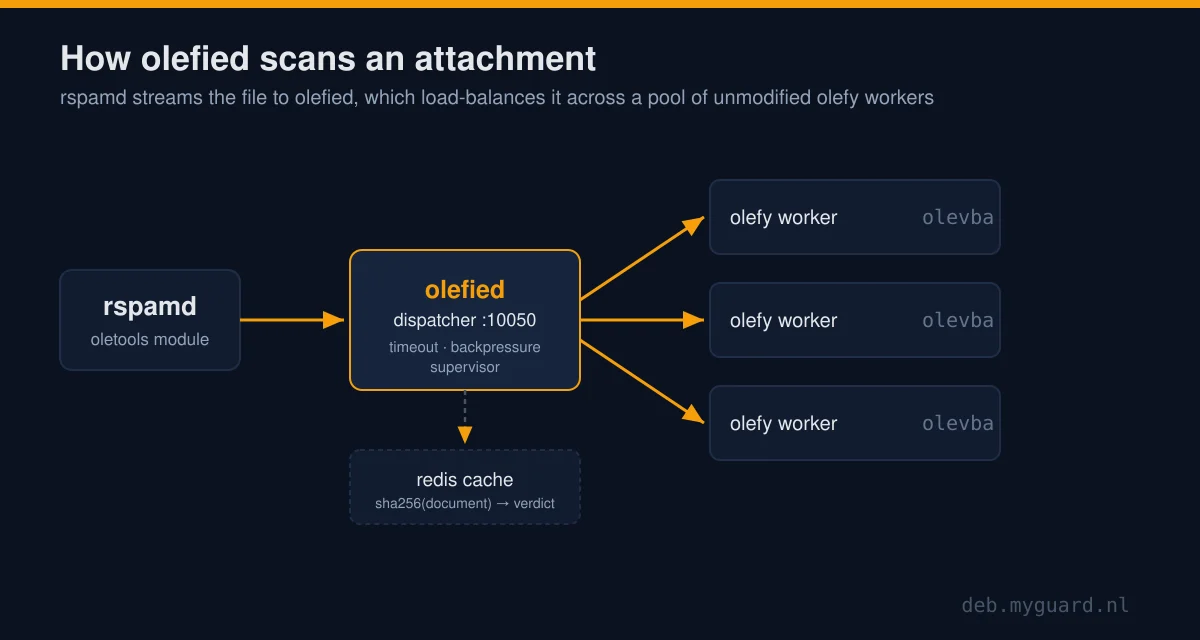
Concurrency. olevba is CPU-bound, so the right model is a pool, not a thread pile. olefied launches a set of olefy worker processes (one per CPU by default), each on loopback with its own private scratch directory, and load-balances scans across them from an idle queue. One in-flight scan per worker: a request grabs a free worker, runs, hands it back. When every worker is busy, the next request waits a short, bounded time and then gets a clean “busy” answer instead of piling onto an ever-growing backlog. That is backpressure — the difference between a service that degrades and one that face-plants.
The scan timeout, the big one. Every scan is wrapped in a hard deadline. Blow the deadline and olefied assumes that worker is wedged on a poison document, kills it, and spawns a fresh one. The bad message gets an error verdict, the worker is back in under a second, and the other workers never even noticed. No four-hour restart cron. No frozen daemon. The thing that pages you at 3 a.m. simply stops being a thing.
Limits and self-healing. Uploads are capped, so the dribble-forever trick hits a wall instead of your RAM. Connections are capped too, which bounds how much memory all those in-flight uploads can hold at once. And a small supervisor loop watches the pool: any worker that has died — or come back but gone mute — gets recycled. The pool heals itself while you sleep, which is the only time pools ever break.
Through all of this the wire protocol is untouched. PING still returns PONG; an OLEFY/1.0 request still gets the same JSON back. Your existing rspamd config does not change one character — you point it at olefied instead of olefy, and nothing downstream can tell the difference, except that it stops falling over.
The cheapest scan is the one you don’t run
Here is the trick that buys the most headroom, and it is almost embarrassing: the same attachments show up over and over. A malware campaign sends the identical .xlsm to ten thousand mailboxes. A mailing list staples the same footer document to every digest. People forward the same quarterly report around the company until the heat death of the universe. Scanning that file a thousand times to get the same answer a thousand times is CPU you are paying for and throwing away.
So olefied has an optional result cache, backed by redis. Point it at a redis URL and successful scans get cached, keyed by a SHA-256 of the document body. The next time that exact document arrives, the answer comes straight out of redis and no worker is touched at all.
The key hashes the document only, not the per-message Rspamd-ID header, so the same attachment in different mails is one cache entry, not ten thousand. The oletools version is baked into the key too, so the day you upgrade oletools, the old cache transparently stops matching — you are never served stale verdicts from a parser that has since learned new tricks.
Two things matter here, and we got both right:
- Only successful scans are cached. Errors, timeouts and busy responses are never stored, because caching a transient failure is how you turn a blip into an outage that outlives its cause.
- The cache can never take the scanner down. If redis is slow or dead, the lookup is treated as a miss and the scan just runs. The cache is an accelerator, not a dependency.
On real mail you will see hit rates in the 30–70% range, and every hit is a scan you did not pay for. Run several copies of olefied behind a load balancer and they all share one redis, so a document scanned by one replica is free for all the others.
How fast is it, really
Throughput here is not a vibe, it is arithmetic. olevba is CPU-bound and a worker scans one document at a time, so per container the ceiling is roughly:
sustainable msg/s = workers / average_scan_secondsA small attachment scans in something like 50–200 milliseconds, so a single worker handles maybe 5–20 documents a second. Give the container more cores and the worker count rises with them. Need more than one box can do? Run more replicas behind your TCP load balancer — they are stateless, so total throughput is just the sum, climbing in a straight line until you run out of CPU. The cache bends that line further in your favour by removing scans entirely.
Do not take my word for it, and do not take a vendor’s either — measure it on your own hardware with your own documents, because your attachment mix is not mine. olefied ships a small benchmark script: paste a representative file into sample.bin, run it with a concurrency and a request count, and it prints messages per second plus p50 and p95 latency. Warm the cache first if you want the hit-path numbers. Benchmark one replica in isolation, then multiply. The honest number you get beats the optimistic number somebody put on a slide.
Running it without making yourself a target
You are about to run a fully untrusted-input parser as a network service. Treat the container as hostile territory, because its entire job is to eat hostile files. The image runs as a non-root user, ships as a multi-stage build with no compiler or build tools in the final layer, and binds the workers to loopback only so the sole exposed thing is the dispatcher. It runs happily read-only with a tmpfs for scratch. Here is the hardened invocation:
docker run -d --name olefied --init \
  --read-only --tmpfs /tmp:rw,mode=1777,size=512m \
  --cap-drop ALL \
  --security-opt no-new-privileges \
  --memory 1g --cpus 4 \
  -e OLEFIED_WORKERS=4 \
  -p 10050:10050 \
  eilandert/rspamd-olefy
Drop all capabilities, forbid privilege escalation, set memory and CPU limits so a runaway scan cannot starve its neighbours, and in a real mail stack keep it on an internal network with no published port. If any of that container hardening is new to you, our Docker hardening guide walks through every flag and why it earns its place. The --init flag adds a PID-1 reaper as belt-and-suspenders; olefied already waits on the workers it spawns, but reaping is cheap insurance.
One detail I am quietly proud of: the image pulls olefy.py and its requirements fresh from Heinlein’s upstream at build time instead of carrying a vendored copy, so every rebuild tracks their latest. It is built daily alongside the rest of our dockerized images, so you are never more than a day behind upstream oletools and its parser fixes. Prefer to pin a known revision for a reproducible build? Pass a build argument and you get exactly that. The image is on Docker Hub; the source, the dispatcher, the tests and the benchmark live on GitHub.
Frequently asked questions
Do I still need this if Microsoft blocks macros by default now?
Yes. The default-block only applies to files marked as coming from the internet, and only in recent Office versions with the policy intact. Plenty of documents arrive without that mark, plenty of installs have the policy disabled by some helpful admin, and attackers actively work around it with container formats. Scanning at the mail gateway catches what the endpoint policy misses, and it catches it before a human is in the loop.
What is the difference between olefy and olefied?
olefy is Heinlein Support’s original socket daemon that bridges rspamd to oletools’ olevba. olefied is our wrapper around it: it runs a pool of unmodified olefy workers and adds a scan timeout, backpressure, an input cap, self-healing and an optional redis cache. Same wire protocol, same olefy underneath, built to handle real throughput.
Will olefied break my existing rspamd configuration?
No. The wire protocol is identical, so rspamd’s oletools external-service config does not change. You point the servers line at olefied instead of olefy and reload. PING still returns PONG and scan requests get the same JSON back.
Is the redis cache safe? What if redis goes down?
It is non-fatal by design. If redis is slow or unreachable the lookup is treated as a cache miss and the scan runs normally, so the cache can never take the scanner offline. Only successful scans are cached, never errors or timeouts, and keys include the oletools version so an upgrade invalidates old entries automatically.
How many messages per second can it actually handle?
Per container, roughly workers divided by the average scan time. A worker does one scan at a time and a typical scan is 50 to 200 ms, so figure 5 to 20 messages per second per worker, times your core count. Scale out with stateless replicas behind a load balancer, and let the redis cache remove repeat scans entirely. Benchmark it on your own documents with the included script rather than trusting any single number.
Does olevba run the macros?
No, and this is the whole point. olevba statically parses the document, extracts the macro source, decodes common obfuscation and flags suspicious behaviour. It never executes the code. You get the analysis without detonating the payload, which is exactly what you want at a mail gateway.
Where to go next
- Rspamd explained — the full spam-filtering picture: Bayes, neural nets, RBLs, Pyzor, Razor and where olefy fits in.
- Docker hardening for self-hosters — every flag in that hardened run command, explained.
- Our dockerized images — how the daily-rebuilt image factory works, olefied included.
- Where to find us — every repo, Docker image and GitHub project in one place.
- olefied on GitHub and on Docker Hub, built on Heinlein’s olefy.
So: the next “weird invoice” that lands in your queue gets its macros read by a machine that never clicks Enable Content, never gets tired, and never wonders if this one is fine. Go point rspamd at it — then back up your config before you touch the timeout.