Let’s be honest about how most of us do TLS certificates on NGINX. You install certbot. You wire up a cron job — or a systemd timer, if you’re feeling fancy. You pick a challenge plugin, point it at a webroot, cross your fingers, and bolt on a deploy hook that runs nginx -s reload afterwards. Then you spend the next two years quietly hoping none of those four moving parts ever drifts out of alignment, because when a renewal silently fails you find out the traditional way: from a customer, at 2 a.m., because expired certificates have an unerring instinct for the worst possible moment — via a browser screaming that your site can’t be trusted.
nginx-autocert-module deletes that entire apparatus. It’s an open-source dynamic module — one we wrote ourselves — that builds a complete ACME client into NGINX itself. You write one directive, autocert on;, and the server obtains, serves, and renews its own Let’s Encrypt certificates. No certbot. No cron. No reload. This is the complete guide to what it is, how it pulls that off, every directive it understands, and why a handful of its design choices are genuinely interesting rather than merely convenient.
It’s a long read, because this is the page we want to be the reference for the module. Grab a coffee. We’ll start from absolute zero and end somewhere only the people who hold the private keys usually get to stand.
What is ACME, and what is nginx-autocert-module?
Quick refresher, because we promised to start from nothing. ACME — Automatic Certificate Management Environment — is the protocol Let’s Encrypt uses to hand out TLS certificates. Instead of filling in a form and paying a certificate authority, your server proves it controls a domain by answering a challenge, and the CA signs a certificate in return. That’s the whole idea: control the domain, get the cert.
Certbot is just one program that speaks ACME. It’s not the protocol — it’s a client. A perfectly good one, but a separate, standalone thing that lives next to your web server and has to be told, repeatedly, what your web server is doing.
nginx-autocert-module is a different ACME client — one that happens to live inside your web server. It ships as a single .so file you load with load_module. Once loaded, it reads the server_names you already declared in your vhosts, asks Let’s Encrypt for a certificate for each, serves them, and renews them on a schedule it runs internally. You don’t maintain a list of domains anywhere. Your existing config is the list. Add a vhost, get a certificate. Delete it, stop renewing. The config is the single source of truth, the way it always should have been.
If you’ve read our guide to the Angie web server, you’ll know Angie — and commercial NGINX Plus — already ship a native acme directive. Open-source mainline NGINX has nothing of the sort. This module fills exactly that gap: it gives plain, free, upstream NGINX the one feature people most often reach for a paid fork or a sidecar tool to get.
The one line that does everything
Here’s a complete, working TLS server. Read it twice, because the thing that’s missing is the entire point:
load_module modules/ngx_http_autocert_module.so;

http {
    resolver 1.1.1.1;                 # the ACME engine needs DNS to reach the CA

    server {
        listen 80;                    # the CA validates here, over HTTP-01
        listen 443 ssl;
        server_name example.com www.example.com;

        autocert on;                  # ← the whole feature. Both names get a cert.
        # no ssl_certificate line — the module supplies it
    }
}
Notice there is no ssl_certificate line. None. And here’s the thing every NGINX admin’s brain just flagged: normally NGINX flatly refuses to start a listen ssl; server without one. It’s a hard, boot-stopping error. So how does this even come up?
The module seeds the server with a throwaway self-signed bootstrap certificate the instant NGINX starts. The listener comes up immediately, handshakes succeed (your browser will grumble about the self-signed cert for a few seconds, that’s expected), and the very first time a real certificate lands on disk it gets swapped in transparently. Your server is never down waiting for issuance. And if you do already have an ssl_certificate line — say you’re migrating from certbot — the module leaves it in place as the pre-issuance fallback (it only seeds the bootstrap cert when there’s nothing else) and overrides it per-connection once the real Let’s Encrypt cert arrives. Zero-downtime by construction.
Why put the ACME client inside the server at all?
Reasonable question. Certbot works. Millions of servers run it. Why reinvent the wheel and stuff it inside NGINX?
Three reasons, and they compound.
One: the config is already the source of truth. An external client has to be told your domains — a CLI flag, a config file, an Ansible template, something that has to be kept in sync with your actual vhosts by hand. Every “I forgot to add the cert for the new subdomain” outage traces back to that gap. When the client lives in the server, the gap can’t exist. The names it provisions are literally the names the server is configured to answer for.
Two: no reload on renewal. We’ll dedicate a whole section to this below, because it’s the headline trick — but the short version is that an in-server client can swap a renewed certificate into a live listener without an nginx -s reload. An external client fundamentally cannot; it can only rewrite a file and ask NGINX to re-read it.
Three: the ACME client lives inside NGINX, not bolted on beside it. Certbot runs as root (or close to it), writes keys to disk, and trusts a deploy hook to do the reload. The module instead runs the whole ACME engine — network chatter with the CA, the renewal clock, the key handling — on a single NGINX worker, the same way Angie‘s built-in acme and the official Rust nginx-acme do. No separate daemon, no cron, no deploy hook. More on exactly how next.
How it actually works under the hood
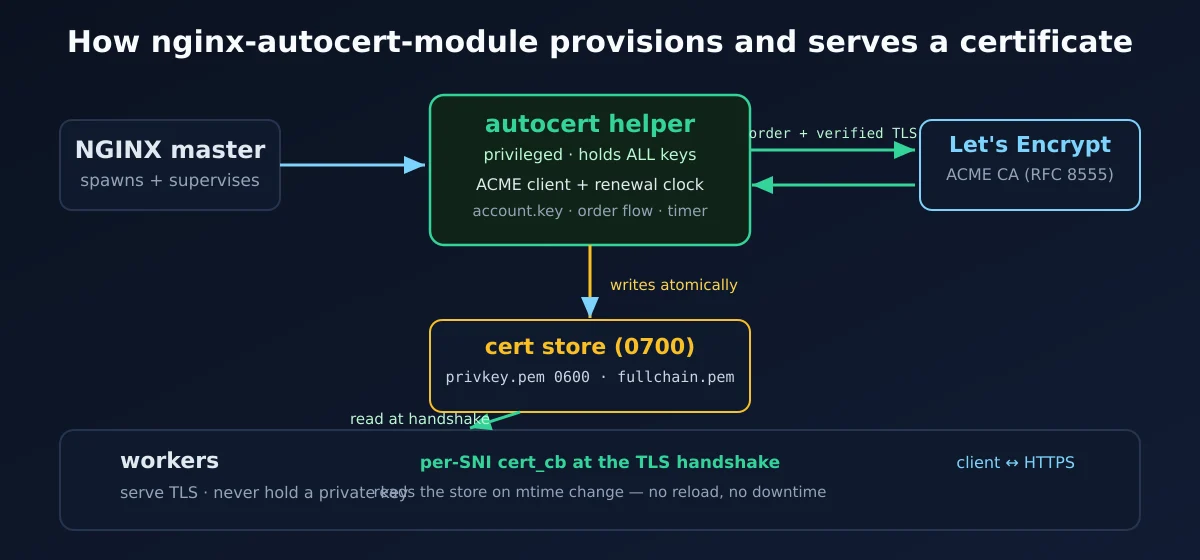
This is where the module gets opinionated in a good way. All the ACME machinery — talking to Let’s Encrypt, the renewal clock, building CSRs — runs on one NGINX worker (worker 0), driven by a timer on NGINX’s own event loop. Exactly one worker ever runs it: an flock on a lock file in the certificate store hands the role cleanly from one process to the next across a reload or upgrade, so two copies never race the CA or fight over the account. Every other worker only serves challenges and certificates. (Running NGINX with master_process off;? The single process is worker 0, so it works there too.)
The keys live in one place: the account key and every certificate’s private key are generated and held by that single ACME worker, and on disk they sit in a store directory owned by the worker user, mode 0700, with each private key at 0600. NGINX reads a certificate back at handshake time; nothing outside that worker user can read the key material. It’s the same model the rest of the in-server ACME ecosystem (Angie, nginx-acme) settled on — run the client where NGINX already runs, keep the store locked down to the service user, and don’t spread key material across every process on the box.
And it isn’t a hacked-up background thread or a forked shell script. The engine is just a timer on a normal NGINX worker’s event loop, so it shuts down on the same QUIT and TERMINATE signals as every other worker, survives reloads, and if that worker ever crashes the master respawns it and the ACME role re-arms automatically on the new one — the respawned worker simply re-takes the lock and rebuilds the timer. It behaves like a first-class part of NGINX because, structurally, it is one. (Getting the single-runner hand-off right across reloads — so exactly one worker drives ACME at any instant, with no gap and no overlap — was the fiddly part. This is, in fact, a deliberate rewrite of an earlier design that used a separate privileged helper process; that helper turned out to be the odd one out versus how Angie and nginx-acme work, and the source of a nasty cold-start crash. The gory details are in the project’s commit history if you enjoy that sort of pain.)
When a name needs a certificate, the engine walks the full RFC 8555 dance, end to end:
- Register (or reuse) an ACME account, keyed by an ECDSA account key.
- Open an order listing the domains it wants certified.
- Fetch the authorization for each domain and answer its domain-control challenge.
- Poll the CA until validation flips to
valid. - Send a certificate signing request (CSR) built fresh for that domain.
- Poll the order until it’s
valid, then download the signed chain.
It writes the result atomically into a per-domain directory: private key at 0600, full chain at 0644, all under a 0700 store owned by the worker user. Workers read only the certificate and chain, only at handshake time, never the account key. The atomic write uses Linux’s renameat2, so a renewal half-finishing — power loss mid-download — never leaves a worker reading a truncated certificate; it sees the old complete one until the new complete one is fully in place. On the rare filesystem that can’t do an atomic swap, the module keeps the existing cert and retries rather than risk serving a mismatched key/cert pair.
The headline trick: no reload on renewal
Here’s the feature that makes this more than a certbot reskin, and the reason an in-server client is worth the trouble.
With the traditional stack, renewing a certificate means rewriting a file and then telling NGINX to reload so it re-reads that file. At one or two domains, who cares. At a few hundred, that reload becomes a recurring, slightly racy event you’d really rather not fire off a timer: every reload spins up a fresh set of workers, drains the old ones, and for a beat your connection-handling capacity wobbles. Do it for a cert renewal and you’re paying a whole-server hiccup to update one file.
nginx-autocert-module doesn’t reload at all. Certificates are loaded per-SNI, at the TLS handshake, straight from disk — and a worker only re-reads a certificate file when its modification time changes (and at most once a second per name, so the check costs nothing). So when the engine renews a certificate, it just writes the new file. The next client to connect for that hostname triggers a fresh read; everyone already connected keeps using the cached one. The renewal takes effect on the next handshake, with zero reloads, zero dropped connections, and zero capacity wobble.
The clock that drives all this runs on that same ACME worker. It sweeps periodically — at most every 12 hours, at least every 60 seconds — checks each certificate’s expiry, marks one “due” once it enters the autocert_renew_before window (7 days by default) and reissues it. One order at a time, so a server with hundreds of domains doesn’t open hundreds of simultaneous ACME orders and trip a rate limit. Quiet, paced, and invisible until the day you notice you haven’t thought about certificate expiry in months.
Three ways to prove you own the domain
ACME needs you to demonstrate control of each domain before it’ll sign anything. The module supports three challenge types, and you pick with a single directive.
HTTP-01 — the default
HTTP-01 serves a magic token at /.well-known/acme-challenge/<token> on port 80. The CA fetches that URL; if it gets the right token back, you’ve proven control. The module answers it with a built-in handler — no location block, no webroot directory, no separate listener to babysit. The token lives in shared memory (so any worker can answer the CA, not just worker 0) and is dropped the instant validation passes. It’s the path of least resistance and it works for the overwhelming majority of setups.
TLS-ALPN-01 — for the port-80 refuseniks
TLS-ALPN-01 (RFC 8737), set with autocert_challenge tls-alpn-01;, is the cooler one. It validates entirely inside the TLS handshake. When Let’s Encrypt connects negotiating the special acme-tls/1 ALPN protocol, the module presents a one-off certificate carrying a magic extension, and that is the proof — no HTTP request, no port 80 involved at all.
The payoff: you never have to open port 80. For anyone running a locked-down, HTTPS-only edge — where 80 is firewalled shut on principle — that’s a genuine win, not a party trick. It was also surprisingly fiddly to implement correctly, because NGINX doesn’t give you a polite way to chain its ALPN selection callback; you have to thread your handshake-time certificate in without breaking the normal path. (And it fails closed: under acme-tls/1 the module would rather drop the handshake than ever hand back the ordinary bootstrap cert.) Worth it, though.
Two honest caveats before you firewall off port 80, though. First, tls-alpn-01 has to land on NGINX itself. The entire proof happens inside the TLS handshake, so if anything terminates TLS in front of NGINX — a reverse proxy, a load balancer, a CDN like Cloudflare — it swallows that special acme-tls/1 handshake and validation quietly fails. Behind a fronting layer, stick with HTTP-01 or DNS-01. Second, not every CA speaks it. tls-alpn-01 is an optional extension (RFC 8737, separate from the core ACME spec); Let’s Encrypt supports it, but plenty of commercial CAs don’t — the module asks, and if the CA doesn’t offer the challenge the order simply fails. That’s precisely why HTTP-01, which every CA supports, is the default. And one more thing worth filing away: the challenge type is chosen once for the whole server (it’s an http{}-level switch), so you can’t run one vhost on tls-alpn-01 and another on HTTP-01 — flip it and every autocert vhost moves together.
DNS-01 — the wildcard challenge, and it needs no open port whatsoever
DNS-01, switched on with autocert_challenge dns-01;, proves control a third way (it’s the DNS-01 method from RFC 8555 §8.4): instead of answering on port 80 or inside the handshake, it publishes a special TXT record at _acme-challenge.yourdomain.com and lets the CA look it up in public DNS. Think of it as leaving a signed note somewhere only the domain’s real owner could reach — the CA never knocks on your server’s door at all, it just goes and reads the note.
This is the only challenge that does two things the other two simply can’t. First, it needs no inbound port at all — not 80, not even 443. Validation happens entirely in DNS, so a box that exposes nothing to the CA (sitting behind a load balancer, on a private network, whatever) can still get certificates. Second — and this is the one everybody actually wants — it’s the only way to get a wildcard certificate. *.example.com, one cert covering every subdomain you’ll ever invent. Let’s Encrypt flatly refuses to issue a wildcard over HTTP-01 or TLS-ALPN-01; it’s DNS-01 or nothing, by the rules of the protocol itself.
There’s a catch, and it’s an honest one: every DNS provider has a different API, so the module can’t ship a one-size-fits-all “publish this record” button. Instead you hand it two small hook scripts — one to add the TXT record, one to remove it — and the module runs them at the right moments:
http {
    autocert on;
    autocert_contact admin@example.com;
    autocert_challenge dns-01;
    autocert_dns_hook_add    /etc/nginx/acme/publish.sh;
    autocert_dns_hook_remove /etc/nginx/acme/unpublish.sh;
    autocert_dns_propagation_delay 30s;   # give DNS a moment to catch up

    server {
        listen 443 ssl;
        server_name app.example.com;
        autocert on;
        autocert_wildcard *.example.com;     # this vhost is covered by the wildcard
    }
}
That autocert_wildcard line is the clean way to ask for a wildcard: you declare *.example.com as the certificate’s name without stuffing a *. into server_name (which would also turn the vhost into a catch-all for every subdomain). Drop the same line into several concrete-name vhosts — or declare it once in http{} — and they all share one wildcard certificate; any concrete name it covers (like app.example.com) is served from the wildcard, not issued as its own cert. You can still put *.example.com straight in server_name if you actually want that vhost to be the subdomain catch-all — both work, dns-01 only.
Each hook is run directly — a real fork() + execve(), no shell in the middle, so there’s nothing to quote-escape or inject — and gets exactly two arguments: $1, the full record name to create, already prefixed for you (e.g. _acme-challenge.example.com — you do not add the _acme-challenge label yourself, it’s handed to you ready to use; a leading *. on a wildcard is stripped first), and $2, the TXT value to put in it. Your script does whatever your provider’s API wants (a single curl to their endpoint, usually) and exits 0 on success. The module waits autocert_dns_propagation_delay for the record to spread across DNS, asks the CA to check, then calls your remove-hook to clean up. A failure in the remove-hook is non-fatal — the record just expires by its TTL. Provider credentials go in as environment variables, exactly the way certbot’s manual-hook mode does it — you’re not learning a new convention.
One nuance worth knowing: that hook runs on the same ACME worker, so keep it quick — a single API call, not a “sleep and poll until the record shows up” loop. The waiting is the module’s job (autocert_dns_propagation_delay), not the hook’s, and each hook is hard-killed if it overruns autocert_dns_hook_timeout (30s by default). A wildcard *.example.com is stored under a _wildcard_.example.com directory and served for any single-label subdomain that connects.
Certificates for bare IP addresses
Here’s one most people don’t even know is possible: you can get a publicly-trusted TLS certificate for a raw IP address — no domain name involved at all. It’s real, it’s standardised (RFC 8738), Let’s Encrypt started issuing them, and the module speaks it natively.
You don’t flip a switch for it. If a vhost’s server_name is an IP literal — IPv4 like 203.0.113.10 or IPv6 like [2001:db8::1] — the module notices, and instead of asking the CA to certify a hostname it asks it to certify the address. The certificate’s SAN carries an iPAddress entry rather than a dNSName, and everything else — issuance, serving per-SNI, renewal — happens exactly the way it does for a domain.
http {
    resolver 1.1.1.1;

    server {
        listen 443 ssl;
        server_name        203.0.113.10;   # a bare IP, not a hostname
        autocert on;
        autocert_profile   shortlived;      # required by Let's Encrypt for IP certs
        autocert_renew_before 2d;           # IP certs are short-lived (~6 days)
    }
}
Two rules the protocol imposes, and the module enforces them for you. First, IP certificates can’t use DNS-01 — there’s no domain to publish a TXT record under, so it’s HTTP-01 or TLS-ALPN-01 only. Pair an IP server_name with dns-01 and the module rejects the config at boot rather than let you find out the hard way. Second, Let’s Encrypt only issues them under its shortlived profile — certificates with roughly a six-day lifetime — which is exactly what the new autocert_profile directive is for.
autocert_profile name; asks the CA to issue the order under a named issuance profile (the ACME Profiles draft). It’s a general knob — set it to whatever profile string your CA advertises — but the one everyone reaches for is shortlived, because it’s the price of admission for IP certificates on Let’s Encrypt. Because those certs live only about six days, drop autocert_renew_before to something well under that (2 days is comfortable) so the renewal clock keeps ahead of expiry. The module’s own scheduler already paces renewals tightly for short-lived certs, but the directive is yours to tune.
Pick your CA: staging, commercial CAs, and several at once
Let’s Encrypt is the default, and for most people it’s the only certificate authority they’ll ever type. But here’s a thing people forget: ACME is a protocol, not a company. Let’s Encrypt was just the first to make it famous. Plenty of other CAs speak the same language — and this module is happy to talk to any of them, one at a time or all at once. There’s exactly one rule to keep straight, and we’ll get to it once the fun part has sunk in.
Staging first, because you’ll thank yourself. Let’s Encrypt has strict rate limits, and burning through them while you’re still debugging your config earns you a multi-hour timeout to sit and think about what you’ve done. autocert_staging on; points the module at Let’s Encrypt’s staging environment instead — same protocol, same flow, certificates that aren’t browser-trusted (so don’t ship them) but cost you nothing against your real quota. Get everything green against staging, flip it off, get the real thing. (One caveat: autocert_staging on; and autocert_ca are mutually exclusive in the same scope — staging is a CA choice, so asking for both is a config error the module rejects at boot.)
Commercial CAs and External Account Binding (EAB)
A different CA entirely. Point autocert_ca at any ACME directory URL and that’s who signs your certificates. Some commercial CAs — ZeroSSL, Sectigo, Google’s Trust Services — require something called External Account Binding: before they’ll issue, you prove the ACME account belongs to an account you already hold with them, using a key ID and an HMAC secret from their dashboard. Two directives, autocert_eab_kid and autocert_eab_hmac_key, carry exactly that:
http {
    autocert_ca           https://acme.zerossl.com/v2/DV90;
    autocert_eab_kid      "your-key-id";
    autocert_eab_hmac_key "the-base64url-secret-from-their-dashboard";
}
Multiple CAs in one NGINX, at the same time
And here’s the genuinely new trick. Those CA directives don’t only live in the http{} block — you can drop them inside an individual server{} to pin that one vhost to a different CA. So a.example.com can get its certificate from Let’s Encrypt while b.example.com gets one from ZeroSSL, in the same NGINX, at the same time. Under the hood the module keeps a separate ACME account — its own account key, its own renewal bookkeeping — for each CA, so the two never interfere.
The one rule that ties this together: a server{} that overrides the CA owns its whole CA identity and inherits nothing CA-specific from the global default — not the trust anchor, not the EAB secret. That’s deliberate, not an oversight: silently lending CA-A’s private EAB key to CA-B would be exactly the kind of credential leak you don’t want a config doing behind your back. So a vhost that switches CAs simply repeats whatever autocert_ca_trusted_certificate or autocert_eab_* it needs, right there. And because one hostname can only hold one certificate, the module refuses to start if two vhosts claim the same name but point it at different CAs — an honest error at boot beats a coin-flip at runtime.
ECDSA, RSA, or both — and the CA is treated as the enemy
Two decisions worth calling out, because they’re the kind of thing that separates “a tool that works” from “a tool you’d hand your private keys to without flinching.”
First: you pick the key type, and you can serve two at once. Leaf certificates are ECDSA P-384 by default — smaller keys, faster signatures, less work on the handshake hot path, and squarely where the CAs and the wider ecosystem are heading. Want P-256 instead? autocert_key_type p256;. Stuck supporting some ancient client that predates the invention of the elliptic curve? autocert_key_type rsa2048; — or rsa3072 (alias rsa), or rsa4096. And when you have to please both the modern world and that one crusty embedded box in the corner that nobody’s allowed to reboot, hand the directive both — autocert_key_type p384 rsa2048; — and the module issues, stores and serves a dual EC+RSA pair for every vhost. OpenSSL then quietly hands each client whichever cert its handshake actually supports: ECDSA to anything from this decade, RSA to the fossil. You write one line; the negotiation is somebody else’s problem. The one rule: at most one EC type and one RSA type — asking for two of the same family is a config error, because there’s no sane reason to want it.
(One deliberate exception. The ACME account key — the one that signs your requests to the CA — stays ECDSA P-384 no matter what you choose for the leaf. It’s the module’s identity to the CA, it never touches a browser, and forcing RSA on it would just be slower for precisely zero benefit. The leaf follows your config; the account key knows better than to ask.) If you care about modern crypto on your edge, you’ll also enjoy our write-ups on getting an A+ on SSL Labs and post-quantum TLS on NGINX and Angie.
Second — and this is the part security folks will appreciate — the module treats everything the CA says as hostile network input. That sounds paranoid until you remember the CA’s responses arrive over the network, and anything that arrives over the network can be tampered with, malformed, or hostile if the connection is ever compromised. So the module ships its own depth-bounded JSON parser and a strict base64url decoder that rejects garbage rather than silently truncating it — which is exactly what NGINX’s permissive built-in decoder would happily do, and exactly the kind of silent-truncation behaviour that turns into a security bug three years later. Every single ACME request verifies the CA’s certificate chain and hostname; there is no “skip verification” escape hatch, not even a hidden one for testing.
One more turn of the same screw: the ACME client is origin-pinned. A CA directory hands back a pile of follow-up URLs — where to fetch a nonce, open an order, finalize it, download the chain — and a naïve client just goes wherever those URLs point. The module doesn’t. Every one of those URLs is checked to make sure it stays on the same origin (scheme, host and port) as the autocert_ca directory you configured; anything pointing somewhere else is refused before a single account-signed request goes out. So a compromised or hostile directory response can’t quietly redirect your worker — carrying its signed credentials — at some other server that merely happens to sit in the trust store. Real CAs keep everything on one origin, so you’ll never notice this is happening; it only ever bites an attacker.
Certificates for hosts you don’t know at config time
Everything so far assumes you can name your domains in nginx.conf. Plenty of setups can’t. A reverse proxy that learns its backends from Docker labels, a control panel that adds a vhost when a customer clicks a button, a gateway whose server_name is a regex or a bare catch-all — none of those have a name list to read at config load, and the old answer was to write out a config file and reload NGINX every time a host appeared.
Since 1.3.0 there’s a shared-memory API for exactly this. Another module asks for a certificate at runtime, autocert orders it, renews it, persists it and serves it. The registry is a named shared-memory zone (autocert_requests), the consumer calls ensure() when it sees a host it cares about, and that’s the whole contract. Nothing happens unless a consumer module attaches to the zone, so if you don’t have one, this feature costs you nothing and does nothing. The full interface is in docs/API.md in the repo.
One design detail there is worth stealing even if you never touch the API: provisioning keys off autocert on rather than off how many names got collected at config time. A label-driven gateway matching hosts with a regex contributes exactly zero issuable names at parse time, so the requests zone, the challenge zone with its port-80 handler and the ACME account were all quietly never created, and the module sat there looking enabled while being incapable of issuing anything.
The registry is also bounded at 64 entries, and those entries now age out. A host learned at runtime used to stay forever, so a gateway churning through more than 64 distinct hostnames wedged at the cap until you restarted it. autocert_runtime_ttl evicts anything idle past its window (default 7 days) and frees the slot; the certificate stays on disk, so a host that comes back reuses it instead of burning a fresh order. Names from your config are never swept. Set it to 0 and you get the old behaviour, cap and all.
There’s also a cert_cb delegation hook, which exists because OpenSSL allows exactly one cert_cb per SSL_CTX and offers no getter to chain through. Load a second module that installs its own and autocert’s serving path silently breaks: certificates keep issuing, they land in the store, and every single connection gets the self-signed bootstrap certificate with nothing in the log to tell you why. That’s the kind of bug that eats an afternoon, so the module now chains properly instead of losing a coin flip with whatever else you loaded.
Verifying what the CA actually sent you
New in 1.3.0, and off unless you ask for it: autocert_ca_issuance_certificate names a trust anchor that every freshly issued chain has to verify against before it’s allowed to replace the certificate you’re currently serving. The module already checked that the leaf matched the key it generated, covered the right name and was inside its validity window. It never checked who signed it.
Mind the distinction, because it bit us during development. This is not autocert_ca_trusted_certificate. That one anchors the CA’s TLS endpoint — the connection you make to it. This one anchors the certificates it hands back. A CA is perfectly entitled to serve its API under one root and sign your certificate under another, and Pebble (Let’s Encrypt’s test server) does exactly that, so pointing this at your transport bundle is a fine way to reject every issuance you attempt. Point it at the issuing CA or its root; an intermediate works as the anchor.
It’s opt-in for a boring reason: there’s no safe default. Falling back to the system trust store would break every private-CA deployment that hasn’t configured an anchor, which is most of them. And be honest about the threat model — an attacker who already controls a CA in your trust store can just issue a valid certificate for your domain, so this doesn’t stop them. What it does is fail loudly when a CA misbehaves or gets compromised into signing under an unrelated issuer, instead of quietly replacing a working certificate with one no browser will accept.
The directive reference
Everything you can configure, in one place. Most people will only ever touch the first one. The CA-selector directives near the top can also go inside a single server{} to give that vhost its own CA; the rest are http{}-wide.
| Directive | Context | What it does |
|---|---|---|
autocert on|off; |
http, server | Master switch. The per-server form opts that vhost into issuance for its server_names. |
autocert_contact email; |
http, server | ACME account contact email — picked per CA group (the first non-empty contact from a vhost that uses that CA wins). |
autocert_wildcard *.example.com; |
http, server | Declare a wildcard SAN without a *. in server_name. In http{} it covers every vhost; in a server{} it adds to that one. Several vhosts sharing it get one cert; a concrete name it covers is served from the wildcard, not issued separately. dns-01 only. |
autocert_ca url; |
http, server | ACME directory URL — which CA signs. Default Let’s Encrypt production. Set inside a server{} to pin that vhost to its own CA. |
autocert_staging on|off; |
http, server | Use Let’s Encrypt’s staging CA — no rate-limit cost, certificates not browser-trusted. Mutually exclusive with autocert_ca in the same scope. |
autocert_ca_trusted_certificate file; |
http, server | Trust anchor for verifying the CA endpoint’s TLS — only needed for a private or self-signed ACME server. (Let’s Encrypt, staging included, verifies fine against the system trust store.) |
autocert_eab_kid id;autocert_eab_hmac_key key; |
http, server | External Account Binding for commercial CAs (ZeroSSL, Sectigo, Google). Both or neither; the HMAC key is base64url as the CA gives it. |
autocert_challenge http-01|tls-alpn-01|dns-01; |
http | Domain-control method. Default http-01. tls-alpn-01 avoids port 80; dns-01 issues wildcards and needs no inbound port. |
autocert_dns_hook_add path;autocert_dns_hook_remove path; |
http | DNS-01 only: absolute paths to the scripts that publish and remove the _acme-challenge TXT record. Both required under dns-01. |
autocert_dns_propagation_delay time; |
http | DNS-01 only: how long to wait after publishing before asking the CA to check. Default 10s. |
autocert_dns_hook_timeout time; |
http | DNS-01 only: max runtime for one hook before it’s killed. Default 30s. |
autocert_profile name; |
http, server | ACME issuance profile requested in the order (ACME Profiles draft). Let’s Encrypt needs shortlived to issue an IP-address certificate. Omitted when unset (CA default profile). Restricted to A-Z a-z 0-9 . _ -. |
autocert_key_type type [type]; |
http | Key type(s) for issued leaf certs. Default p384. Accepts p384, p256, rsa2048, rsa3072 (alias rsa), rsa4096 — the OpenSSL/long names (secp384r1, secp256r1, …) work too. List one EC and one RSA type (e.g. p384 rsa2048;) to issue and serve a dual EC+RSA pair per vhost; OpenSSL picks per handshake. Two of the same family is rejected. The ACME account key stays P-384 regardless. |
autocert_renew_before time; |
http | How long before expiry to renew. Default 7 days; must be between 0 and 89 days (a larger window would push the renew point before issuance and reissue on every sweep, so it is rejected at config load). |
autocert_store_layout default|certbot; |
http | On-disk layout. default: <path>/<domain>/{privkey,fullchain}.pem. certbot: a certbot-style live/ tree. |
autocert_store_path dir; |
http | Root of the certificate store. Per-domain dirs and per-CA account keys live underneath, owned by the worker user (0700). |
autocert_resolver addr; |
http | DNS resolver the ACME engine uses to reach the CA. Falls back to the http{} resolver if unset. |
autocert_resolver_timeout time; |
http | Timeout for those DNS lookups. Default 30s. |
autocert_ca_issuance_certificate file; |
http, server | Trust anchor the issued chain must verify against before it can replace the live certificate. Off unless set. Not the same as autocert_ca_trusted_certificate, which anchors the CA’s TLS endpoint — a CA may sign under a different root than it serves its API under, and pointing this at the transport bundle then rejects every issuance. Give it the issuing CA or its root. |
autocert_runtime_ttl time; |
http | Idle TTL for names learned through the runtime request API. Default 7 days. A host idle longer is evicted and its slot in the bounded 64-entry registry freed; the cert stays on disk, so a returning host reuses it. Config names are never swept. 0 disables eviction (the registry can then wedge at the cap). |
The canonical, always-current reference lives in the project’s README — see the link at the end — but the table above covers everything in normal use.
How it compares: certbot, Angie, and this module
Not a fight — a “pick the right tool” table. All three speak ACME; they differ in where the client lives and what that buys you.
| certbot + cron | Angie native acme |
nginx-autocert-module | |
|---|---|---|---|
| Where the client runs | External process | Inside the server | Inside the server (on worker 0) |
| Reload on renewal | Yes (deploy hook) | No | No |
| Domain list source | Maintained by hand | Server config | Server config (server_name) |
| Works on mainline NGINX | Yes | n/a (it’s a fork) | Yes |
| Where keys live | On disk (root) | In the server | One worker, 0700 store |
| RSA option | Yes | Yes | Yes — EC, RSA, or dual |
| Wildcards / DNS-01 | Yes | Yes | Yes |
| Multiple CAs at once | Yes (separate configs) | Yes | Yes (per-vhost, + EAB) |
| IP-address certs (RFC 8738) | Yes | No | Yes (auto, shortlived profile) |
The honest summary: if you’re on Angie, use Angie’s built-in acme — it’s excellent, and while this module also runs and is fully tested on Angie, Angie’s own is the natural choice there. On mainline NGINX, this module gives you the in-server, no-reload experience — wildcards, multiple CAs and all — without switching forks. It’s the one that didn’t exist until we wrote it.
Frequently asked questions
Do I still need certbot or a cron job?
No. nginx-autocert-module is the ACME client, and it runs its own renewal timer inside NGINX. There’s nothing external to install or schedule — no certbot package, no cron line, no systemd timer.
Does NGINX reload when a certificate renews?
No. Renewed certificates are written to disk atomically and picked up at the next TLS handshake via a modification-time check. No nginx -s reload, no dropped connections, no capacity wobble.
Which certificates does it request — do I list domains somewhere?
There’s no separate list. It provisions the concrete server_names already declared in any vhost that has autocert on;. Regex names are skipped, and a wildcard like *.example.com is only picked up when that vhost uses the DNS-01 challenge (the only challenge that can certify a wildcard).
Can it issue wildcard certificates?
Yes — over DNS-01. Set autocert_challenge dns-01;, supply the two DNS hook scripts (autocert_dns_hook_add / autocert_dns_hook_remove), and list *.example.com as a server_name. The protocol forbids wildcards over HTTP-01 or TLS-ALPN-01, so DNS-01 is the only route — that’s a Let’s Encrypt rule, not a module limitation.
Can I get certificates without opening port 80?
Yes, two ways. autocert_challenge tls-alpn-01; validates entirely inside the TLS handshake (RFC 8737), so port 80 stays shut. autocert_challenge dns-01; goes further and needs no inbound port at all, since validation happens in DNS. Otherwise HTTP-01 serves the challenge on port 80.
Can I use a CA other than Let’s Encrypt, or several at once?
Yes. Point autocert_ca at any ACME directory URL; for commercial CAs that need External Account Binding, add autocert_eab_kid and autocert_eab_hmac_key. And because those directives also work inside a server{}, different vhosts can use different CAs in the same NGINX — each gets its own account and renewal bookkeeping. One name must map to one CA, though: the module won’t start if two vhosts claim the same hostname under different CAs.
Can I get RSA certificates — or both RSA and ECDSA at once?
Both. Leaf keys are ECDSA P-384 by default, P-256 via autocert_key_type p256;, or RSA via autocert_key_type rsa2048; / rsa3072 (alias rsa) / rsa4096 (the OpenSSL names like secp384r1 are accepted too). Need to cover both modern and legacy clients on the same vhost? List one of each — autocert_key_type p384 rsa2048; — and the module issues and serves a dual EC+RSA pair, letting OpenSSL hand each client whichever it supports. The one fixed point: the ACME account key is always ECDSA P-384, whatever the leaf is.
Where are the private keys, and who can read them?
One NGINX worker (worker 0) runs the ACME engine and generates the account key(s) and every certificate key. On disk they live under <autocert_store_path>/ at 0600, inside a 0700 store owned by the worker user — so make sure that directory is writable by the user NGINX drops to (the user directive). If you’re upgrading from an older build whose store was created by root, chown it to the worker user once before restarting.
Will NGINX start if I haven’t gotten a certificate yet?
Yes. A listen ssl; autocert on; server with no ssl_certificate starts immediately behind a self-signed bootstrap certificate, then swaps in the real one per-SNI the moment issuance completes.
What happens if Let’s Encrypt rate-limits me?
The scheduler backs off per-domain — exponential, from 60 seconds up to an hour — and honours a CA Retry-After header on HTTP 429, waiting the later of the two deadlines before retrying. It won’t get your account throttled. (And while you’re testing, autocert_staging on; keeps you off the production quota entirely.)
How do I test this without burning my Let’s Encrypt rate limits?
Set autocert_staging on;. It points the module at Let’s Encrypt’s staging CA — same protocol, same flow, but the certificates aren’t browser-trusted and cost nothing against your real quota. Get everything green against staging, flip it off, and the next sweep fetches the real thing. (Staging and autocert_ca are mutually exclusive in the same scope — staging is itself a CA choice.)
I’m already running certbot — can I migrate without downtime?
Yes. Keep your existing ssl_certificate line: the module treats it as the pre-issuance fallback and overrides it per-connection the moment its own certificate lands, so there’s no window where the site is certless. If you want the on-disk layout to match what certbot gave you, set autocert_store_layout certbot; and the store mirrors a certbot-style live/ tree. Once you’re happy, you can drop the old certbot timer entirely.
Can it get a certificate for a bare IP address?
Yes. Put an IP literal in server_name (IPv4 or [IPv6]) and the module issues a certificate for the address under RFC 8738 — the SAN is an iPAddress, not a hostname. Let’s Encrypt requires its shortlived profile for these, so add autocert_profile shortlived;, and since they live only ~6 days, set autocert_renew_before well under that (e.g. 2d). IP certs can’t use DNS-01 — there’s no domain to publish under — so it’s HTTP-01 or TLS-ALPN-01 only, and the module rejects an IP-plus-dns-01 config at boot.
Does it work with HTTP/3 and the rest of a modern NGINX stack?
Yes. It’s a standard dynamic module and doesn’t care what else you’ve loaded. Pair it with our HTTP/3 and QUIC setup guide and the certificates it issues are served over whichever protocols your listeners speak.
Can it issue certificates for vhosts that don’t exist in nginx.conf?
Yes, since 1.3.0, but not on its own. There’s a shared-memory API (autocert_requests) another module calls at runtime to say “I’ve just learned about this host, get me a certificate.” Autocert takes it from there. The registry holds 64 entries and idle ones age out after autocert_runtime_ttl (7 days by default), so a gateway churning through hostnames doesn’t wedge at the cap. With no consumer module attached, none of this machinery is created and the feature costs nothing.
Does the module check who signed the certificate it just got?
Only if you tell it to. It has always verified that the leaf matches the key it generated, covers the right name and is currently valid. Chain verification against a trust root is autocert_ca_issuance_certificate, added in 1.3.0 and off by default because there is no safe default — falling back to the system store would break every private-CA setup. Point it at the CA’s issuing certificate or its root, and note it is deliberately separate from autocert_ca_trusted_certificate, which anchors the CA’s TLS endpoint rather than the certificates it issues.
Where to get it
The module is open source and lives on GitHub: github.com/myguard-labs/nginx-autocert-module. The README there has the full directive reference, the annotated config, build instructions, and the CI matrix we run on every change.
It’s BSD-2-Clause, the same licence as NGINX and Angie themselves, so it drops into a commercial build without a lawyer meeting. If you evaluated it before and went looking for the licence file, check again — earlier releases shipped under different terms, and redistributors should read the current LICENSE rather than assume the old one carried over.
The easy way: install it from our APT repository. If you’re on Debian or Ubuntu, you don’t have to compile a thing. Add the deb.myguard.nl modules repository (that page walks you through the one-time sources.list setup), then:
sudo apt update
sudo apt install libnginx-mod-http-autocert
That drops the module’s .so into place and wires up the load_module line for you — flip on autocert in your config and you’re done. It’s also bundled into our nginx-full (and angie-full) meta-package, so if you install that, autocert is already aboard with no extra step. Rather build it yourself against your own NGINX source? The README’s build section has the single configure line you need.
Related reading
- Angie Web Server: The Complete Guide — review, native ACME, migration, API and HTTP/3.
- TLS Configuration for NGINX and Angie — the complete guide to an A+ on SSL Labs.
- Post-Quantum Cryptography with NGINX and Angie — ML-KEM and hybrid TLS.
- HTTP/3 and QUIC on NGINX — real-world setup, tuning and gotchas.
- NGINX APT Repository for Debian & Ubuntu — 100+ modules, no compiling.