The average compromised webmail container gets popped not through some elegant zero-day, but because it ran as root, mounted its filesystem read-write, kept every Linux capability it was born with, and answered to a user-agent string of sqlmap/1.8 without so much as a raised eyebrow. That’s not a hack. That’s an open door with a “Welcome” mat and the keys taped to the frame. This is how to build a hardened Roundcube Docker image instead: one that assumes every request, every plugin, and every logged-in user is hostile until proven otherwise.
I’ve spent enough years watching default container images get owned to develop a particular kind of contempt for the phrase “it works out of the box.” Of course it works out of the box. So does a bank vault with the door left open. The question was never whether it works. The question is what happens when someone who isn’t you starts poking it. And the honest answer, for most webmail Docker images on the registry, is: nothing good, very quickly, and you’ll find out from your logs three weeks later, assuming you read your logs, which, let’s be honest, you don’t.
So we built eilandert/roundcube: a hardened Roundcube Docker image that runs as a non-existent user, can’t change the ownership of a single file, treats its own root filesystem as carved in granite, and has a web application firewall bolted to the front that assumes, correctly, that the internet is full of people who want to ruin your day. This is the tour. Bring coffee.
What a hardened Roundcube Docker image actually is (and why you’d containerise it)
Roundcube is webmail. It’s the thing that turns a raw IMAP mailbox into a browser interface that normal humans can use without learning mutt keybindings or developing a thousand-yard stare. You point it at an IMAP server for reading mail and an SMTP server for sending it, give it a database to remember contacts and preferences, and it hands your users a clean, fast, plugin-extensible inbox in any browser. It’s PHP. It’s been around since 2008. It is, by webmail standards, genuinely lovely software.
Here’s the thing the marketing pages won’t tell you: Roundcube is a PHP application that sits directly between the public internet and your users’ email. Read that sentence again. Every credential, every private message, every password-reset link in someone’s inbox is on the other side of this login form. That makes it one of the highest-value targets you can self-host. A compromised blog is embarrassing. A compromised webmail is a credential-harvesting machine that hands an attacker the keys to every other account those users own, because where do you think password reset emails go?
Containerizing it is the right call. You get a reproducible, version-pinned, throwaway runtime that you can rebuild from scratch in ninety seconds and that doesn’t leave PHP extensions rotting on your host for the next decade. But, and this is the entire point of this post, a container is not a security boundary by default. Out of the box, Docker gives a process inside the container root, a writable filesystem, and a frankly alarming pile of capabilities. If your “hardened” webmail image is really just upstream Roundcube with a Dockerfile that says USER root and calls it a day, you have containerized the blast radius, not contained it.
The Luser’s Container vs. Ours: Running as Nobody
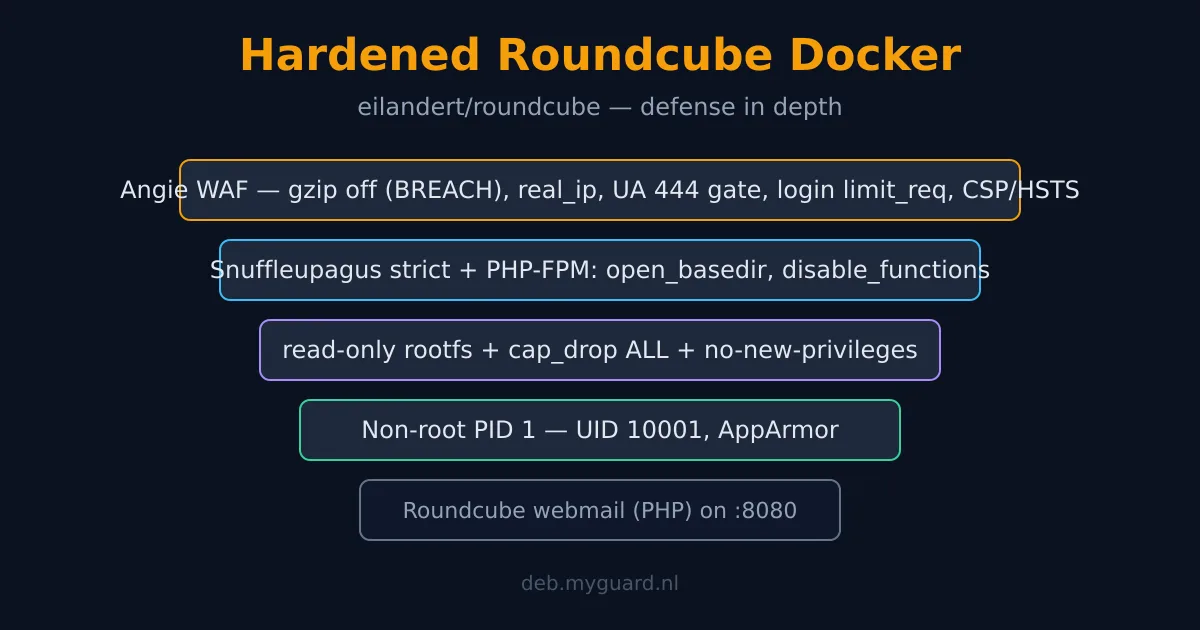
Let’s start with the single most important word in this entire image: unprivileged. The container runs as UID 10001, a system user called roundcube that owns the application code and absolutely nothing else of value. PID 1 inside the container, the very first process, is not root. The Angie web server master, the PHP-FPM master, every worker they spawn, all of them are this nobody user.
Why does this matter so much? Because the classic container escape story goes: attacker gets code execution inside the container (say, through a PHP bug), and then uses the fact that they’re root inside it to chew through a kernel vulnerability or a misconfigured mount and land as root on your host. If the process was never root to begin with, that entire escalation chain loses its first link. The attacker who pops our PHP worker finds themselves as UID 10001, who owns some read-only PHP files and has the system privileges of a particularly disappointing houseplant.
To make this work, the whole identity model is collapsed to one user. There’s no root master “dropping” to a worker user via setuid(), because a non-root master can’t setuid, that needs CAP_SETUID, which (spoiler) we don’t have. Instead, both Angie and PHP-FPM inherit the container’s identity from the start. The Angie config has no user directive. The PHP-FPM pool has its user and group lines commented out. Set them, and a non-root master throws an error and refuses to boot. We learned that the polite way, by reading the error message, which is more than I can say for most people.
And here’s the consequence that trips up everyone the first time: the container cannot chown anything. Not won’t, can’t. With all capabilities dropped, there’s no CAP_CHOWN to change file ownership. So every writable mount has to already be owned by UID 10001 on the host before the container starts. Named Docker volumes inherit this automatically from the image’s directory ownership. Bind mounts you pre-chown yourself: sudo chown -R 10001:10001 ./roundcube/config. Forget to, and the container fails to boot with a Permission denied, which is annoying for about thirty seconds and then deeply reassuring, because it means the container genuinely has no power to fix it on its own. That’s the whole idea.
Dropping Every Capability and Nailing the Filesystem Shut
Linux capabilities are the granular pieces that root‘s god-mode used to be one indivisible blob. Bind to a low port? CAP_NET_BIND_SERVICE. Change file ownership? CAP_CHOWN. Override file permission checks entirely? CAP_DAC_OVERRIDE, the capability that says “permissions are a suggestion.” Default Docker hands a container a pile of these for no reason other than tradition. Our compose file says cap_drop: [ALL] and adds back exactly zero. The container runs with an empty capability set. CapEff is 0000000000000000. It has nothing.
“But how does it bind a port with no CAP_NET_BIND_SERVICE?” Excellent question, you’re paying attention. It doesn’t bind a privileged one. Angie listens on :8080, which is above 1024 and therefore bindable by any user without special powers. You terminate TLS at an upstream reverse proxy and point it at :8080. The container never needs to touch a privileged port, so it never needs the capability to, so we can take it away. This is the recurring theme: every capability we don’t need, we design out, then drop. You can read the full philosophy in our Docker hardening guide for self-hosters, which is the ten-flag checklist this image is built on.
Then we glue the floor down. read_only: true mounts the entire root filesystem immutable. An attacker who gets a write primitive has nowhere to write a webshell, nowhere to drop a cron payload, nowhere to modify the application code that’s about to execute. The only writable surfaces are explicit, minimal, and isolated: a tmpfs at /tmp (sockets, the PID file, Angie’s scratch temp dirs, Roundcube’s attachment staging) owned by UID 10001, and a config volume holding exactly one generated file. That’s it. Everything else is granite.
We finish the container layer with two more flags that cost nothing and matter enormously. no-new-privileges: true sets the kernel bit that makes setuid binaries and similar escalation tricks no-ops, even if some leftover setuid binary existed (we strip the bits at build time anyway, belt and braces), it could not be used to gain privilege. And apparmor=docker-default loads the host’s AppArmor profile, a mandatory-access-control layer that constrains what syscalls and paths the process can touch regardless of file permissions. AppArmor is enforced by the host kernel, not bundled in the image, so your Docker host needs it, most do by default on Debian and Ubuntu.
Snuffleupagus: The PHP Bodyguard That Doesn’t Trust PHP
PHP is a wonderful language to attack. Decades of footguns, a function for every dangerous thing you could possibly want to do, and a community-wide habit of eval()-ing things that should never be eval’d. So we don’t trust it. We run Snuffleupagus, a PHP hardening extension, conceptually the spiritual successor to Suhosin, with a strict, source-audited rulebook tailored to Roundcube.
Snuffleupagus operates at the engine level. It can virtually patch known-vulnerable function behaviors, kill dangerous functions entirely, enforce that uploaded files can never be executed, lock cookies to secure flags from inside the interpreter, and detect when a function is being called from a context it has no business being called from. The point is defense at a layer the application code can’t override. An ini_set() in some compromised plugin can’t undo a Snuffleupagus rule. It’s a bodyguard who reports to the building, not to the guest.
Backing it up at the PHP-FPM pool level is a layer of php_admin_value hardening, the admin prefix meaning userland ini_set() cannot override these. open_basedir confines PHP’s filesystem access to the application directory plus its few writable runtime paths; PHP literally cannot fopen() outside that jail, so the classic “read /etc/passwd via path traversal” trick returns nothing. disable_functions nukes the obvious subprocess and reconnaissance surface, exec, shell_exec, system, proc_open, passthru, pcntl_exec, php_uname, the lot, so even a perfect remote-code-execution bug finds the gun cabinet welded shut.
And the session cookies get the full treatment: secure (never sent over plaintext HTTP), httponly (invisible to JavaScript, so an XSS can’t steal the session), and samesite=Strict (not sent on cross-site requests, which guts CSRF). Session IDs are 64 characters of strict-mode entropy. None of this is exotic. All of it is the stuff that “works out of the box” images can’t be bothered to set, because the box ships with the defaults PHP picked in 2009.
The Angie WAF: Assuming Every Request Is an Attack
The web server is Angie (the nginx fork with the saner config and the better defaults), and we’ve turned its front door into a checkpoint. Not a friendly one. The kind that assumes you’re guilty and makes you prove otherwise.
First, gzip is off. Entirely. This is not a performance oversight, it’s deliberate, and it stops the BREACH attack. BREACH is a compression side-channel: if you compress a response that contains both a secret (like a CSRF token) and attacker-influenced content, the size of the compressed output leaks information about the secret, one byte at a time. Roundcube’s HTML is stuffed with session-bound CSRF tokens. Compressing it dynamically would hand an attacker a BREACH oracle. So we don’t. The static assets are small and cacheable; the bandwidth cost of leaving gzip off is trivial; the security win is real.
Second, the server actually knows who it’s talking to. Sitting behind a reverse proxy, a naive backend sees every request as coming from the proxy’s IP, which makes per-client rate limiting useless and turns your failed-login tracking into a single bucket for the entire internet. We configure real_ip to trust the private proxy ranges and read the true client address from X-Forwarded-For. Now the controls below can actually distinguish one attacker from ten thousand legitimate users behind the same proxy.
Third, the scanner gate. Empty user-agent? return 444, Angie’s special “close the connection without so much as a response” code. User-agent matching nikto, sqlmap, nmap, masscan, nuclei, wpscan, and the rest of the script-kiddie starter pack? Same treatment. Yes, a competent attacker will change their user-agent. But the overwhelming majority of the traffic hammering any public endpoint is automated garbage that doesn’t bother, and 444-ing it costs us nothing while denying them the satisfaction of even a 403. It’s the digital equivalent of not buzzing the door.
Fourth, login brute-force throttling. Roundcube funnels its login through /index.php?_task=login&_action=login, but every dynamic page hits index.php too, so a naive rate limit would throttle normal browsing into oblivion. The trick: a request map keys the rate-limit zone on the real client IP only for the login action, and on an empty string otherwise. An empty key isn’t counted. So the throttle, 12 requests per minute, with a small burst to absorb a human fat-fingering their password, applies to login attempts and login attempts alone. Brute-force a password here and you get a 429 after twelve tries a minute, keyed to your actual address, while the user next to you behind the same corporate proxy browses unbothered.
And finally the response headers, the cheap stuff everyone forgets: a Content-Security-Policy that pins script, style, image, and connection sources to self (with the unsafe-inline concessions Roundcube’s skin genuinely requires, because it has no nonce support, we’re honest about that rather than shipping a CSP that breaks the UI and gets disabled), frame-ancestors 'none' to kill clickjacking, object-src 'none', and a HSTS header with a two-year max-age, includeSubDomains, and preload eligibility, originating from the app so it survives the proxy. None of it is glamorous. All of it is the difference between “we thought about this” and “we shipped the defaults.”
Defense in Depth, or: Why Bother With All Of It?
A reasonable person, not you, you’re reading a 3000-word post about webmail hardening, but a reasonable person, might ask why we need all of this. Surely one good layer is enough? Surely if the app is patched, the rest is paranoia?
No. The entire premise of defense in depth is that any single layer will fail, because layers are written by humans and humans are a catastrophe. The WAF might miss a novel payload. Snuffleupagus might not have a rule for tomorrow’s CVE. The app might ship a bug between your last pull and your next one. So you stack independent controls such that the attacker has to defeat all of them, in sequence, to get anywhere, and each one buys you time, noise in the logs, and a decent chance they give up and go bother someone with a softer target.
Walk the kill chain. An attacker finds a fresh Roundcube RCE. The WAF’s scanner gate already dropped their recon traffic, so they had to work harder to even map the surface. They land code execution, but they’re UID 10001, not root, so no privilege escalation freebie. They try to write a webshell, read-only filesystem, nowhere to put it. They try to spawn a reverse shell, disable_functions ate exec and friends, and Snuffleupagus is watching the rest. They try to read secrets off disk, open_basedir jails them to the app directory. They try to escalate through a kernel bug, no capabilities, no-new-privileges set, AppArmor constraining the syscall surface. At every single step, a layer they didn’t expect says no. That’s not paranoia. That’s just doing the job.
It’s the same philosophy that runs through everything we self-host, from our self-hosted Vaultwarden setup to the ModSecurity and OWASP CRS stack we put in front of higher-risk apps. Layers. Always layers. The attacker only has to be right once; you have to be wrong everywhere, all at once, for it to matter, so make “everywhere, all at once” as expensive as you possibly can.
What’s In The Box: Plugins and Skins
Hardening is the point, but nobody wants webmail that’s a security exhibit and nothing else. So the image ships a curated pile of plugins and skins, pre-installed, loaded only when you ask for them via ROUNDCUBEMAIL_PLUGINS. Nothing runs that you didn’t list, minimal attack surface by default, opt in to what you need.
The bundled plugins: contextmenu and contextmenu_folder (right-click menus on messages and folders), swipe (touch gestures), show_folder_size, quota (IMAP quota display), persistent_login (“keep me logged in”), advanced_search, account_details, message_highlight (colour rules), authres (shows SPF/DKIM/DMARC results so you can spot forgeries), thunderbird_labels, responses (canned replies), easy_unsubscribe (one-click List-Unsubscribe), rcguard (reCAPTCHA after failed logins, another brute-force layer), kolab_2fa (two-factor: TOTP, Yubikey, U2F), and carddav (address-book sync). The 2FA support libraries, endroid/qr-code, spomky-labs/otphp, enygma/yubikey, come along for the ride. Roundcube’s own core plugins (archive, zipdownload, managesieve, password, newmail_notifier, new_user_dialog) are enabled out of the gate.
The bundled skins (pick one with ROUNDCUBEMAIL_SKIN, default elastic): elastic (the responsive default), elastic4mobile (mobile-tuned), elastic-dark (dark mode), elastic2025 (a refreshed look), plus two we built ourselves, gmail and outlook365, look-alikes for the people migrating off Big Mail who want the muscle memory intact. And for the nostalgic: larry and classic, the old Roundcube skins, still here, still working.
Running It Yourself
Pull eilandert/roundcube:latest, give it an external MariaDB or PostgreSQL (there’s no SQLite fallback, on purpose, webmail is not a toy), point it at your IMAP and SMTP servers, and front it with a TLS-terminating reverse proxy targeting :8080. The entrypoint generates the Roundcube config from environment variables on every start, ensures the database schema, and starts the stack, all as UID 10001, chowning nothing, because it can’t.
The one thing you cannot skip: pre-own the writable mounts. sudo chown -R 10001:10001 on any bind mount, or use named volumes that inherit it automatically. If the container boots, you got it right. If it dies screaming Permission denied, you didn’t, and that’s the read-only, cap-dropped, unprivileged design working exactly as intended, refusing to paper over your mistake with privileges it doesn’t have. The full source, the Dockerfile, the Angie config, and the PHP-FPM pool all live at github.com/myguard-labs/dockerized. Read it. Audit it. That’s the point of shipping it in the open.
Default webmail containers trust the user, trust the network, trust PHP, and trust that nobody will ever be rude enough to attack them. Ours trusts nobody, and sleeps fine.
Frequently Asked Questions
What does “unprivileged” mean for a Docker container?
It means the processes inside the container do not run as root. In our Roundcube image, PID 1 and every worker run as UID 10001 with all Linux capabilities dropped (cap_drop: ALL) and no-new-privileges set. If an attacker gets code execution inside the container, they land as a powerless system user instead of root, which removes the first link in most container-escape chains.
Why does the container fail to start with “Permission denied”?
Because it runs unprivileged and cannot chown anything (no CAP_CHOWN). Every writable mount must already be owned by UID 10001 on the host. Named Docker volumes inherit this automatically; for bind mounts run ‘sudo chown -R 10001:10001 ‘ first. The boot failure is the security model working as intended, the container has no power to fix ownership on its own.
Why is gzip turned off in the web server config?
To prevent the BREACH attack. BREACH is a compression side-channel that can leak secrets like CSRF tokens from compressed HTTPS responses. Roundcube’s pages contain session-bound CSRF tokens, so compressing them dynamically would create a BREACH oracle. Static assets are small enough that leaving gzip off costs almost nothing while closing the side channel entirely.
What is Snuffleupagus and why use it with Roundcube?
Snuffleupagus is a PHP hardening extension that operates at the engine level, virtually patching vulnerable functions, killing dangerous ones, enforcing secure cookie flags, and preventing uploaded-file execution. Because it works below the application, userland code (including a compromised plugin) cannot override its rules. We ship a strict, source-audited rulebook tuned specifically for Roundcube.
Why does the container listen on port 8080 instead of 80?
Binding a port below 1024 requires CAP_NET_BIND_SERVICE. Since we drop all capabilities, the container cannot bind a privileged port. Port 8080 is above 1024 and bindable by any user, so the container needs no special powers. You terminate TLS at an upstream reverse proxy and forward to :8080.
How does login brute-force protection avoid throttling normal browsing?
Roundcube routes both login and ordinary page loads through index.php, so a naive rate limit would throttle everything. We use a request map that keys the rate-limit zone on the real client IP only for the login action and on an empty string otherwise. Empty keys are not counted, so the 12-requests-per-minute throttle applies to login attempts alone. The real_ip configuration ensures it keys on the actual client, not the reverse proxy.
Related Reading
- Docker Hardening for Self-Hosters: the ten-flag checklist (rootless, read-only, cap-drop, distroless) this image is built on.
- What Is the BREACH Attack?: why we turn gzip off on dynamic HTML, explained from first principles.
- Self-Hosted Vaultwarden: the same unprivileged, minimal-container philosophy applied to your password vault.
- Install ModSecurity and OWASP CRS on NGINX: adding a full rule-based WAF in front of higher-risk apps.