Last year the world logged north of 8,000 new WordPress vulnerabilities, and almost all of them were the same two ancient sins: cross-site scripting and SQL injection. Sit with that number for a second. Eight thousand. The bugs didn’t get cleverer. We just pointed AI at plugin source code, and the machine doesn’t get bored, doesn’t take lunch, doesn’t quit at 5. It reads every $_GET in a 40,000-line plugin at 3 a.m. and finds the orderby= hole you’ve been shipping since 2019 and kept meaning to refactor. The fix isn’t another PHP plugin, it’s a WordPress hardening plugin for ModSecurity that blocks the attack at the WAF, before PHP ever runs.
Right. Gather round, you lot. First week on the job, and I’m going to tell you the thing nobody told me: you cannot patch faster than a machine can find holes. You just can’t. So you do the next best thing. You put a wall in front of the hole and you wait for the patch to land. That wall is the wordpress-hardening-plugin: an open-source ModSecurity Core Rule Set plugin that bolts 40-odd WordPress-specific rules onto your web server’s edge. No PHP changes. No extra WordPress plugin to babysit. Nothing phoning home. Grab a coffee. We’re doing all of it.
So what even is a ModSecurity CRS plugin?
Quick map of the territory, because half of you are nodding along pretending you know. That’s fine. We all did.
ModSecurity is a Web Application Firewall (a WAF) that lives inside your web server (NGINX, Angie, Apache) and reads every HTTP request before your app ever sees it. On its own it knows nothing. It’s an empty engine with no brain. The OWASP Core Rule Set is the brain you bolt on: a curated, battle-tested library of rules for SQL injection, XSS, path traversal, the whole rogues’ gallery.
And since CRS 4.0 there’s a plugin system. Drop a couple of specially-named files into one directory, CRS loads them automatically, layered on top. No patching core. No forking. No merge hell when CRS updates next month. The wordpress-hardening-plugin is exactly that kind of drop-in.
Here’s what I mean. The stock CRS is a very good bouncer who knows every general troublemaker in the city. Problem is, your venue is a WordPress site, and WordPress has its own private list of regulars who cause grief: xmlrpc.php, ?author=1, wp-cron.php, the theme editor. This plugin hands the bouncer a laminated cheat-sheet of every WordPress-specific trick in the book. Same bouncer. Sharper instincts. And here’s the bit that matters: it stops them at the door, before PHP even wakes up.
The AI vulnerability wave, and why a WAF is suddenly your seatbelt
I’m going to say something the vendor brochures won’t. A WAF does not fix your vulnerabilities. It hides them. That used to be a slightly embarrassing thing to admit at conferences. Now? It’s the whole point. Let me explain, because this is the single most important thing you’ll learn this week.
The economics of finding bugs just flipped. It used to take a skilled human days to audit a plugin and dig out one exploitable orderby injection. Now an LLM does it across a thousand plugins over a weekend, and the same trick runs on both sides of the fence. The good guys disclose responsibly (look what happened when AI got pointed at curl and it coughed up a record pile of vulnerabilities). The bad guys don’t. The gap between “a bug exists in the plugin you installed and forgot about” and “a bot is firing the exploit at your site” has collapsed from months to hours.
But the defender’s loop hasn’t sped up to match. Think about it. The plugin author still has to read the report, write the fix, test it, ship it. You still have to notice the update and apply it. And across that gap, those hours or days where the bug is public and your site isn’t patched yet, something has to stand in the doorway and refuse to let the exploit through. That something is a WAF that actually understands WordPress.
So get this straight now and save yourself a bad night later: this plugin is a last line of defense and a time-buyer. Not a cure. It’s your seatbelt. Seatbelts are brilliant. They are also not a reason to drive into walls. The stuff at the end of this guide (update everything, lock down PHP, harden the box and the container) is the brakes and the steering. You want all of it. Honestly.
Why a WordPress hardening plugin for ModSecurity beats a PHP security plugin
Someone always asks this. Fair question. Wordfence, Sucuri, the rest: they exist, they’re not useless. But for a self-hosted site where you actually care about resources, doing your perimeter blocking at the WAF layer wins. Four reasons, and I want you to remember the first one especially.
- PHP never loads for a blocked request. When ModSecurity rejects something at the NGINX layer, WordPress doesn’t boot, PHP-FPM doesn’t fork, MariaDB never gets touched. A botnet hammering your login page burns almost none of your CPU. A PHP-based security plugin? By definition it has to boot PHP and WordPress before it can decide to block you, which is the exact resource fire you were trying to put out. You know that special hell where the site falls over because of the thing meant to protect it? The firewall cheerfully DDoSing you on the attacker’s behalf? Yeah. Avoid that.
- The guard isn’t standing inside the building it’s guarding. A PHP security plugin runs in the same process, with the same database access, as the code it protects. A WordPress-core zero-day or a bug in some other plugin can take it down with everything else. A rule in ModSecurity has zero exposure to WordPress-level bugs. Different process. Often a different privilege domain entirely.
- One file protects every site. Running twenty WordPress sites behind one NGINX? One plugin directory hardens all of them, the same way, every time.
- One less thing to trust. Every WordPress plugin you bolt on is another supply-chain dependency and another row in next year’s CVE firehose. This one lives outside WordPress completely.
Every rule, explained: the full inventory
No hand-waving. No “enterprise-grade protection” word salad (if anyone ever sells you that phrase, walk away). Here’s every protection the plugin ships, grouped by what it actually defends, with the real reasoning. Nearly all of it is a one-line toggle in plugins/wordpress-hardening-config.conf; I’ll call out the defaults as we go. Anything tagged PL2 only fires if you run CRS at paranoia level 2 or higher.
Access control & identity leaks
- Block
xmlrpc.php(default: ON). A legacy RPC endpoint from the blogging-client era nobody remembers. Today it’s almost pure attack surface:system.multicalllets an attacker test thousands of passwords in one request, pingback enables DDoS amplification, and it exposes upload methods. Unless a specific mobile app needs it, it has no business being public. Localhost and private ranges stay whitelisted so your internal tooling lives. - Block user enumeration (default: ON). WordPress hands out usernames via the
?author=1redirect and the REST/wp/v2/usersendpoint. No username, no targeted brute force. Blocks both. (The?author=Nform is always blocked; the readable/author/<slug>/archive page is a separate toggle, below.) - Block the literal username “admin” at login (default: ON). The single most-tried brute-force username on Earth is “admin”. If you don’t have a user named exactly that, and you shouldn’t, that’s day-one hygiene, this deflects a huge chunk of automated junk with basically zero false positives. It blocks the username “admin”, not your actual admins. Don’t panic.
- Block the
/wp-jsonREST API (default: OFF). The REST API powers Gutenberg and half the plugin ecosystem, so blocking it wholesale breaks most sites. Hence off by default. For a headless or static setup where REST consumers live on an internal network, turning it on closes a real data-exposure surface. - Block
wp-cron.php(default: OFF). WordPress fakes cron by hittingwp-cron.phpon visitor page loads. Inefficient, occasionally abusable. If you’ve wired up a real system cron (do it), public access is dead weight. Off by default so you don’t break sites leaning on the pseudo-cron; localhost stays whitelisted. - Block
/author/<slug>/archive pages (default: OFF). The slug-form author archive also leaks login names. Most blogs expose these on purpose, so it’s off by default; flip it on if author pages aren’t part of your public surface.
File, path & secret leaks
- Block direct PHP execution and directory listing in
/wp-content/and/wp-includes/(default: ON). Real WordPress runs throughindex.php. Direct PHP execution in these trees is either a misconfig or someone running a webshell. Directory listing turns a missingindex.htmlinto a free site map for the attacker. - Block sensitive extensions:
.db .orig .sql .log .git(default: ON). Developers leave things lying around. They just do. Database exports, editor backups, SQLite files, logs, exposed.git/HEAD. Scanners find these on production sites every single day. - Block VCS and dotfile probes:
.env,.git/,.svn/,.hg/,.bzr/,.htpasswd,.DS_Store(default: ON). The.envfile is the modern crown jewel: database password, API keys, mail creds, all in one tidy file. Bots scan for it constantly. Constantly. - Block
wp-config.phpbackup variants (default: ON)..save,.old,.new,.dist,.sample,.copy, a trailing~, numeric.1/.2. Every editor and every tired admin generates one eventually, and any of them serves your database credentials in plaintext to whoever types the URL. Usually the bored teenager currently scanning your /24. - Block backup directories & archives (default: ON). UpdraftPlus, BackWPup and friends sometimes drop
.zip/.tar.gz/.tar.bz2into web-reachable paths. That’s your whole site in one click. - Block compressed database dumps:
.sql.gz,.sql.bz2,.sql.zip(default: ON). A migration leftover that contains every password hash, every email address, every post you’ve ever written. Found more often than you’d believe. - Hard-block info-leak paths in phase 1 (default: ON).
readme.html,license.txt,.user.ini,wp-admin/install.php,wp-admin/setup-config.php,wp-includes/wlwmanifest.xml,wp-content/debug.log. This one fires in phase 1, before any upstream redirect can sneak ahead of ModSec. Thatreadme.htmlversion string is exactly how a scanner learns your WordPress version and which CVEs to throw. - Block plugin/theme
readme.txtversion probes (default: OFF). Scanners read/wp-content/plugins/<slug>/readme.txtto map installed plugin to known CVE. Off by default because legit tooling (wp-cli) reads these too; turn it on if you accept that trade.
Upload abuse & remote code execution
- Block nasty files in
/wp-content/uploads/(default: ON). The uploads directory is world-writable by design. It’s where the cat photos go. It’s also the favourite landing zone for a webshell smuggled in through a vulnerable plugin. Requests for executable or dangerous extensions there get blocked. - Block directory traversal in uploads (default: ON).
../and its URL-encoded cousins inside/wp-content/uploads/requests: the trick that turns a sloppy file-serving function into “read me/etc/passwd, would you.” - Block alternative interpreters:
.pl,.lua,.py,.sh(PL2). If your server is ever misconfigured to run these over HTTP, a file-upload bug becomes full remote code execution. This slams that door. - Block PHP stream wrappers in arguments (default: ON).
php://,data://,expect://,file://,phar://,glob://,zip://,compress.zlib://,compress.bzip2://anywhere in a parameter or the URI. Classic local/remote file inclusion.phar://deserialization alone has powered a decade of WordPress RCE chains. - Block null-byte injection (PL2, default: ON).
%00in the URI or parameters truncates strings in C-based code, beats extension checks (shell.php%00.jpg), confuses parsers. No legitimate request has ever contained one. Not once.
Reconnaissance & version disclosure
- Block the exact
/wp-jsonpath (default: ON). Even with full REST blocking off, the bare/wp-jsonroot returns a manifest of every registered endpoint: a free map of your attack surface. This blocks the map while leaving the API itself working. - Detect version-disclosure response headers (default: tag).
X-Pingback,X-Powered-By, and the RESTLink: rel="https://api.w.org/"header all whisper your software versions. ModSecurity v2 can’t strip response headers, so the plugin flags them and you do the actual removal at the proxy:proxy_hide_header X-Pingback; proxy_hide_header X-Powered-By; more_clear_headers "Link"; - Block XDebug & phpinfo probes (default: ON).
XDEBUG_SESSIONtriggers and phpinfo probe parameters. A live phpinfo on production is a catastrophic leak, and this is exactly how bots go looking for it. - BREACH compression side-channel tagging (default: tag). Requests to
/wp-admin/,/wp-login.phpand/wp-json/*get flagged so you can confirm your proxy stripsAccept-Encodingon those paths. The real fix lives in the server. Our deep dive on the BREACH attack explains why compressing secret-bearing responses leaks them. - Block known security scanners (PL2, default: OFF). nikto, sqlmap, wpscan and pals by user-agent. Off by default (UA blocking is trivially bypassed and real pen-testers use these) but a handy noise-reducer on a heavily-scanned box. Heads up: the bundled list also catches SEO crawlers like Ahrefs and Semrush, so read the README before flipping it if you care about those.
Known CVEs & HTTP hygiene
- Block actively-exploited plugin CVEs (default: ON). Signatures for SureTriggers / OttoKit (CVE-2025-3102, CVE-2025-27007, unauthenticated admin creation) and Bricks Builder (CVE-2024-25600, unauthenticated RCE). Turn it off only if you genuinely run those plugins and need their REST traffic.
- Block legacy CVE scanner probes (default: ON). revslider, timthumb, WP Symposium, MailPoet’s
wysija_captcha, wp-file-manager’sconnector.minimal.php, Duplicator installer leaks. Long dead. Still scanned hourly. Pure log-noise reduction; no legit request hits these. - Block uncommon HTTP methods (default: ON). TRACE/TRACK/DEBUG/PROPFIND/MKCOL/COPY/MOVE/LOCK/UNLOCK/PUT/DELETE/PATCH on
/wp-admin/,/wp-login.php,/xmlrpc.php,/wp-cron.php./wp-jsonis deliberately exempt, because authenticated REST writes legitimately use PUT/DELETE/PATCH. - Block CVE-2018-6389 DoS (default: ON). A long
?load=list onwp-admin/load-scripts.phporload-styles.phpmakes WordPress concatenate dozens of files per request and cook your CPU. Anonymous, unauthenticated, still works on unpatched cores. Blocked. - Block dangerous wp-admin endpoints (default: ON).
upgrade.phpandwp-activate.php, rarely reached on a settled site. (install.phpandsetup-config.phpare already hard-blocked in phase 1 above.) - Block code injection in login fields (default: ON).
<script>,eval(,base64_decode,onload=,onerror=in thelogandpwdPOST parameters ofwp-login.php. Those are the username and password boxes. Nobody’s real password is a<script>tag.
The new front line: typed-parameter SQLi & XSS rules
Okay. Pens down, eyes up. This is the part written specifically for the AI wave, and it earns its own section because it works differently from everything above. Rules 9522330 through 9522334. If you remember one thing from today, make it this.
Here’s the thing nobody tells the new starters: the stock CRS already hunts for SQL injection and XSS in every parameter. It uses a library called libinjection, and at paranoia level 1 it runs on everything. So why add more? Because libinjection is a generalist pattern-matcher, and the single most common WordPress plugin SQL injection, the ORDER BY injection, is precisely the case it has documented bypasses for. Maddening, right? The most common bug is the one the generic tool is weakest at.
Quick lesson, because this genuinely is the most important bug class in the current wave. SQL has a clause: ORDER BY column ASC. And you can’t parameterise a column name or a sort direction the way you can a value, so lazy plugin code just jams $_GET['orderby'] and $_GET['order'] straight into the query. An attacker sends orderby=id-(case when (1=1) then 1 else 0 end) and now your database is happily answering true/false questions about its own contents. No quotes. No SELECT keyword. Nothing that looks like the textbook injection libinjection was trained on. Slips right past.
The plugin’s answer isn’t to play whack-a-mole with cleverer signatures. It’s to use types. A sort direction can only ever be asc or desc. A column name can only ever be letters, digits, underscores, dots. So:
- 9522330:
order=must beascordesc(default: ON). Anything else, blocked outright. There is no legitimate third value. The admin-ajax reorder vector that usesorder[]=arrays is deliberately not matched, so your drag-to-reorder UIs keep working. - 9522331:
orderby=may not contain SQL metacharacters (default: ON). Quotes, parens, comment markers, SQL keywords: rejected. Bare column names, including multi-columntitle,date, pass clean. - 9522332: strict
orderby=allowlist (PL2). At paranoia level 2,orderbymust match a plain column-name pattern and nothing else. Stricter, for the cautious among you. - 9522333: WordPress core numeric query-vars must be integers (default: ON, zero false positive).
p,page_id,attachment_id,m,w,year,monthnum,day,hour,minute,paged,cpageare integers by definition in WordPress core. A<script>or aUNION SELECTin any of them is, with certainty, an attack. (catandauthorare excluded; they legitimately take comma-separated and negative lists.) - 9522334: strict integer enforcement on generic id params (PL2, default: OFF).
id,post_id,user_id,term_id,parent_id,comment_id. These names are generic enough that some plugins (mis)use them for non-integers, so it’s opt-in and only fires at PL2. But when your plugins behave, it’s a wall across the most-injected parameter names in the catalogue.
Why is this stronger than a signature? Think about it this way. An allowlist doesn’t care how clever the payload is. A blocklist asks “does this look like an attack I’ve seen before?”, and a motivated attacker just makes their attack look new. An allowlist asks “is this one of the handful of values that are actually legitimate here?” And for a sort direction, that’s a closed set of two. You cannot obfuscate your way into being the word asc. That’s the whole game. Allowlist the things you can; you’ll sleep better.
Three teeth that aren’t just pattern matching
Signatures can’t cover everything. Three features add stateful, identity-aware defense, and I’m going to be straight with you about their sharp edges, because the README is, and you deserve the same. A tool that lies about its weaknesses is worse than no tool.
IP-based rate limiting for wp-login.php
A slow, distributed brute force (one guess every few seconds from a rotating botnet) sails past signature rules forever. Rate limiting closes that. The plugin counts POST requests to /wp-login.php per resolved client IP using ModSecurity’s persistent collections, and after the threshold it blocks everything further from that IP until the window expires, returning a proper HTTP 429 Too Many Requests (RFC 6585). Default: 5 attempts per 60 seconds, both tunable.
# Tighten to 3 attempts; windows must be one of 30/60/120/300/600
SecAction "id:9522049,phase:1,nolog,pass,t:none,setvar:'tx.wphard.ratelimit_login_attempts=3'"
SecAction "id:9522050,phase:1,nolog,pass,t:none,setvar:'tx.wphard.ratelimit_login_window=30'"
And here’s the sharp edge, the one that’ll bite you if I don’t say it now. Persistent collections work reliably on Apache + mod_security2. On libmodsecurity3, the engine NGINX and Angie use, the collection implementation has long-standing gaps, and the counter often just never persists across requests. So if you’re on NGINX (most of you will be), do your login rate-limiting in the server instead with limit_req zone=..., and treat this feature as Apache-only. There’s also a collection-growth footgun: each unique IP creates an entry, so on a directly-exposed box set SecCollectionTimeout 300 and turn on trusted-proxy pinning (below) before someone rotates IPv6 addresses to bloat your data dir. A firewall that fills your disk is just a slow, self-inflicted outage with your name in the post-mortem. Don’t be that ticket.
GeoIP access control for wp-login.php
If your admins are all in the Netherlands and Germany, why is wp-login.php reachable from anywhere else on the planet? Maintain an allowlist of ISO country codes; everyone outside gets blocked before WordPress loads. The clever bit: no GeoIP database is needed on the WAF. Your upstream already knows the country. Cloudflare sets CF-IPCountry, NGINX with ngx_http_geoip2_module (in our optimized NGINX builds) sets X-GeoIP-Country, and ModSecurity just reads the header.
# plugins/wordpress-hardening-login-countries.data  (lowercase, one per line!)
nl
de
gb
Off by default, fail-open (a missing header lets the request through, so a proxy misconfig can’t lock you out), and the lookup is case-sensitive. Write NL instead of nl and you’ll block every login including your own, then spend twenty minutes convinced the plugin is broken. Ask me how I know. Go on, check your data file. I’ll wait.
IP reputation blocklist
The most aggressive option: block all requests from known-bad IPs, not just logins. A plain-text file of IPs and CIDRs, loaded with @ipMatchFromFile and checked on every request. The plugin ships the mechanism; you supply the data from a threat feed (Spamhaus DROP, Emerging Threats, Firehol Level 1) via a cron job that refreshes the file and reloads NGINX. Off by default. Loopback and private ranges are always immune, so you can’t blocklist your own infrastructure by accident. (You’d be amazed.)
IP whitelisting, so you don’t lock yourself out
Every IP-aware feature (the blockable endpoints, the rate-limit counter, the GeoIP gate, the reputation list) shares a single client-IP resolver and a single “is this a private IP?” decision, so the same identity is used everywhere. Out of the box it whitelists IPv4 loopback and RFC 1918, plus IPv6 ::1 and ULA fc00::/7. Your cron jobs, monitoring, and load-balancer health checks won’t trip a thing.
The resolver defaults to REMOTE_ADDR and, if present, takes the leftmost hop of X-Forwarded-For. Which raises a footgun worth naming out loud: on a directly-exposed server, an attacker can forge X-Forwarded-For to fake a trusted private IP and skate past the whitelist, or rotate it to dodge the rate-limiter. The fix is trusted-proxy pinning: list your real upstream proxy CIDRs in a data file and enable it, and XFF is honoured only when the connecting peer is actually one of your proxies. It’s off by default for backward compatibility. If your box has a public IP, turn it on. Today.
How to install it
Standard CRS plugin install. You need CRS 4.0+ and a ModSecurity-compatible WAF (ModSecurity v2/v3 or Coraza). No WAF yet? Start with our step-by-step guide to ModSecurity and the OWASP CRS on NGINX, then come back and layer this on top.
# 1. Go to your CRS plugins directory
cd /etc/nginx/modsecurity.d/owasp-crs/plugins/

# 2. Clone the plugin in place
git clone https://github.com/eilandert/wordpress-hardening-plugin .

# 3. CRS auto-loads plugins/*-config.conf, *-before.conf, *-after.conf

# 4. Test config and reload
nginx -t && systemctl reload nginx
That’s it. Every sensible default is live immediately; open plugins/wordpress-hardening-config.conf to tune. I’d also strongly grab the companion wordpress-rule-exclusions-plugin, which suppresses the CRS false positives WordPress naturally trips (Gutenberg’s POST bodies are absolutely feral). Add protection, not noise. That’s the whole job, really.
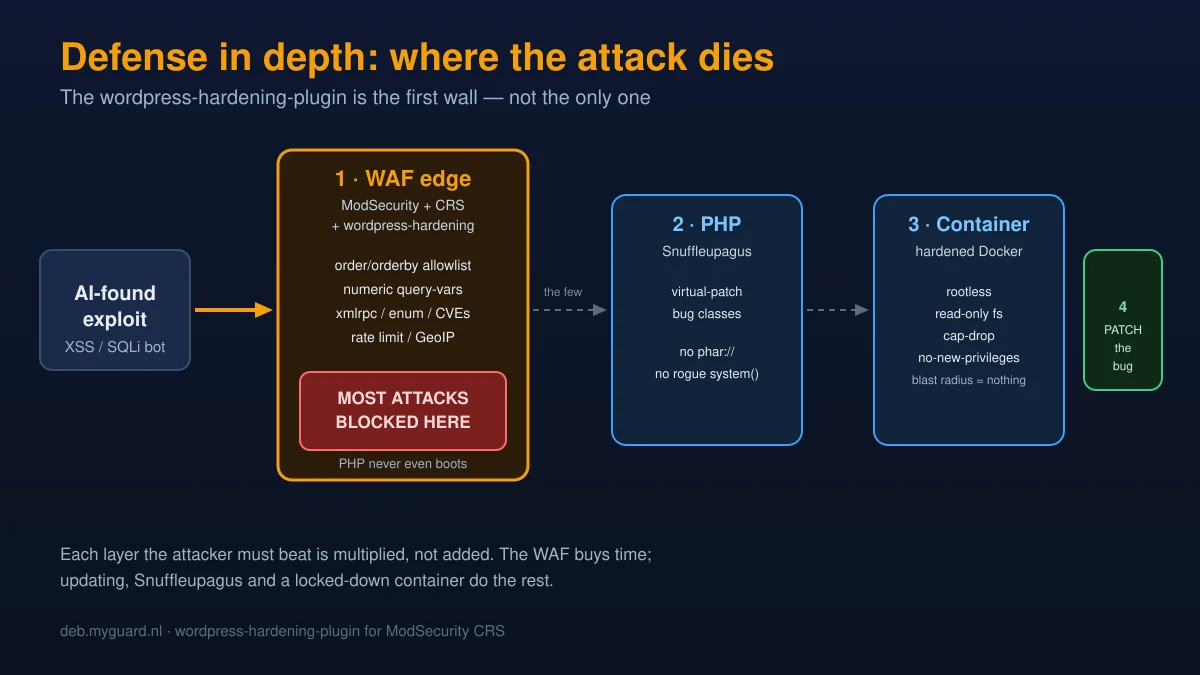
A WAF is the last line, not the only one
And now the lecture you came here to skip and actually need to hear. So sit back down. This plugin buys you time. It does not buy you immortality. Install it, then stop patching, and you’ve built a lovely fence around a house with the doors hanging open. Defense in depth means layers, and the WAF is one of them. Here are the others, ranked by how often people skip them.
- Update and upgrade. Religiously. WordPress core, every plugin, every theme, PHP itself, the OS packages. The whole point of the AI wave is that the gap between disclosure and exploitation is now hours. Auto-update what you safely can; for the rest, check weekly and treat a pending security update like a smoke alarm, not a notification you’ll get to eventually. The breach-disclosure email you send your users is always longer than the changelog you didn’t read. The WAF covers you across that gap. It is not permission to widen it.
- Lock down PHP with Snuffleupagus. Even if an exploit gets past the WAF and reaches PHP, you can stop it doing damage. php-snuffleupagus is a PHP module that virtual-patches whole bug classes: disable
system()calls that don’t match a whitelist, blockphar://deserialization, neuter dangerousini_setcalls, cookie-encrypt sessions. It’s the difference between “the exploit ran” and “the exploit ran, then hit a wall inside the interpreter.” - Harden the web server. TLS done right, security headers, sane timeouts, request-size limits, the WAF itself tuned properly. Our expert guide to NGINX and Angie performance and security is the long version. Short version: defaults are for getting started, not for production.
- Harden the container. If WordPress runs in Docker (and it should), run it rootless, read-only, capabilities dropped,
no-new-privilegesset, so a compromise inside the container is a compromise of nothing useful. Our Docker hardening checklist walks the whole thing: rootless, read-only root filesystem, cap-drop, distroless, network segmentation.
Stack those and an attacker has to beat your WAF, and find an unpatched bug, and get past Snuffleupagus, and break out of a locked container, instead of beating one sloppy PHP plugin. That’s defense in depth. The wordpress-hardening-plugin is the first wall they hit. It should never be the last.
Design philosophy & how it’s tested
A few design choices worth understanding, because they change how you deploy it.
- No PHP, no MySQL, no WordPress in the hot path. Every rule fires at the ModSecurity layer. Under a real attack, that’s the difference between staying up and falling over.
- One toggle per feature. Each blocking group is gated by a
TX:wphard.*variable read in phase 1. Disabling anything is one commented line in the config. No editing rule bodies, no risk of snapping the chain. - Paranoia-level aware. Rules are tagged PL1 or PL2. Run a strict PL2 setup and the extra rules engage automatically; stay on PL1 (right for most sites) and you get the core protection without the PL2 chatter.
- Honest about its own limits. The README documents the libmodsecurity3 rate-limit gap, the collection-growth DoS, and the known false-positive patterns, instead of hiding them. Trust is built on the weaknesses you admit, not the strengths you advertise.
- Tested on every commit. The repo carries a full go-ftw suite: positive regression tests for each rule, a false-positive corpus of legitimate WordPress traffic that must never trip a rule, and a bypass-evasion corpus of obfuscated attacks that must always be caught. It runs against real nginx+libmodsecurity3 and Apache+mod_security2 containers. Rules don’t ship unless all three corpora pass.
There’s even a self-healing touch I’m a bit fond of: a built-in rule (9522801) suppresses three noisy CRS data-leakage rules on front-end blog permalinks only, so a tutorial site that publishes <?php snippets in its posts doesn’t get its own articles blocked by the outbound filter. Admin, login and API paths keep the full protection. That bug was found in production, on this very site, and fixed in the plugin. Dogfooding works. Sometimes it bites first.
Related reading
- How to Install ModSecurity and OWASP CRS on NGINX: build the WAF foundation first, then add this plugin.
- PHP Snuffleupagus Tutorial: Harden PHP-FPM: the in-interpreter layer that catches what gets past the WAF.
- Docker Hardening for Self-Hosters: rootless, read-only, cap-drop, distroless. Contain the blast radius.
- Curl Patches a Record Number of AI-Found Vulnerabilities: the wave this plugin defends against, in one case study.
- Nginx & Angie: The Expert Guide to Maximum Performance and Security: harden the server the WAF runs in.
- NGINX Modules: Optimized & Extended: our builds ship the http-modsecurity and geoip2 modules precompiled.
Frequently asked questions
Does a WAF stop the AI-discovered vulnerabilities by itself?
It mitigates them and buys you time, but it is not a cure. A WAF blocks the exploit shapes it knows, and the typed-parameter rules in this plugin block whole classes of SQL injection by allowlist rather than signature, which is genuinely strong. But the only thing that removes a vulnerability is the patch. Treat the WAF as the layer that protects you in the hours between disclosure and you applying the update, and keep updating.
Do I still need to update WordPress and my plugins if I run this?
Yes, absolutely, and more urgently than before. The plugin is a seatbelt, not a reason to stop steering. The AI-vulnerability wave has collapsed the time between a bug going public and bots exploiting it to hours. The WAF covers that gap; it does not close it. Update core, plugins, themes, PHP and the OS on a tight schedule.
Does this replace Wordfence or Sucuri?
It replaces the perimeter part (request blocking, brute-force protection, IP blocking) and does it before PHP loads, which is far cheaper under attack. It does not do file-integrity monitoring, post-compromise forensics, or in-WordPress alerting. For a high-traffic self-hosted site, the WAF approach is a big resilience win; pair it with off-host monitoring rather than a second PHP plugin.
Will it break my site?
The defaults are deliberately conservative. Anything that risks false positives on a normal WordPress install (REST API blocking, wp-cron blocking, scanner UA blocking) is off by default, and the numeric-parameter SQLi rule only rejects values that WordPress core defines as integers anyway. Start with defaults, watch your ModSecurity log for a few days, then tighten. Disabling any single rule is one commented line.
How do the ORDER BY / orderby rules differ from what CRS already does?
The stock CRS runs libinjection on every parameter, which is a signature-style generalist with documented bypasses for ORDER BY injection (the most common WordPress plugin SQLi). These rules use an allowlist instead: a sort direction can only be asc or desc, a column name can only be letters, digits, underscores and dots. An allowlist cannot be obfuscated past, because it asks what is legitimate rather than what looks malicious.
I am on NGINX. Does the rate limiter work for me?
Probably not reliably. The rate limiter relies on ModSecurity persistent collections, which work well on Apache + mod_security2 but have long-standing gaps on libmodsecurity3, the engine NGINX and Angie use, where the counter often never persists. On NGINX, do login rate-limiting with the server’s native limit_req instead, and use the rest of this plugin for everything else.
Does it work on Apache, or only NGINX?
Both. The rules are standard ModSecurity/CRS and run identically on Apache mod_security2, on NGINX/Angie with libmodsecurity3, and on Coraza. Only the install path differs. Ironically, the persistent-collection features (rate limiting) are more reliable on Apache.
Where is the source, and can I contribute?
It is open source at github.com/eilandert/wordpress-hardening-plugin. Issues and pull requests are welcome: new rules, test cases, documentation. If you report a false positive, include your CRS version, ModSecurity engine and version, and the audit-log excerpt that fired.
The wordpress-hardening-plugin is open source (Apache-2 licensed) and maintained at github.com/eilandert/wordpress-hardening-plugin. CRS 4.0+ required; works with ModSecurity v2, v3 and Coraza.
Related: HTTP/2 Bomb (CVE-2026-49975), another vulnerability an AI found, and how to defend it at the edge.