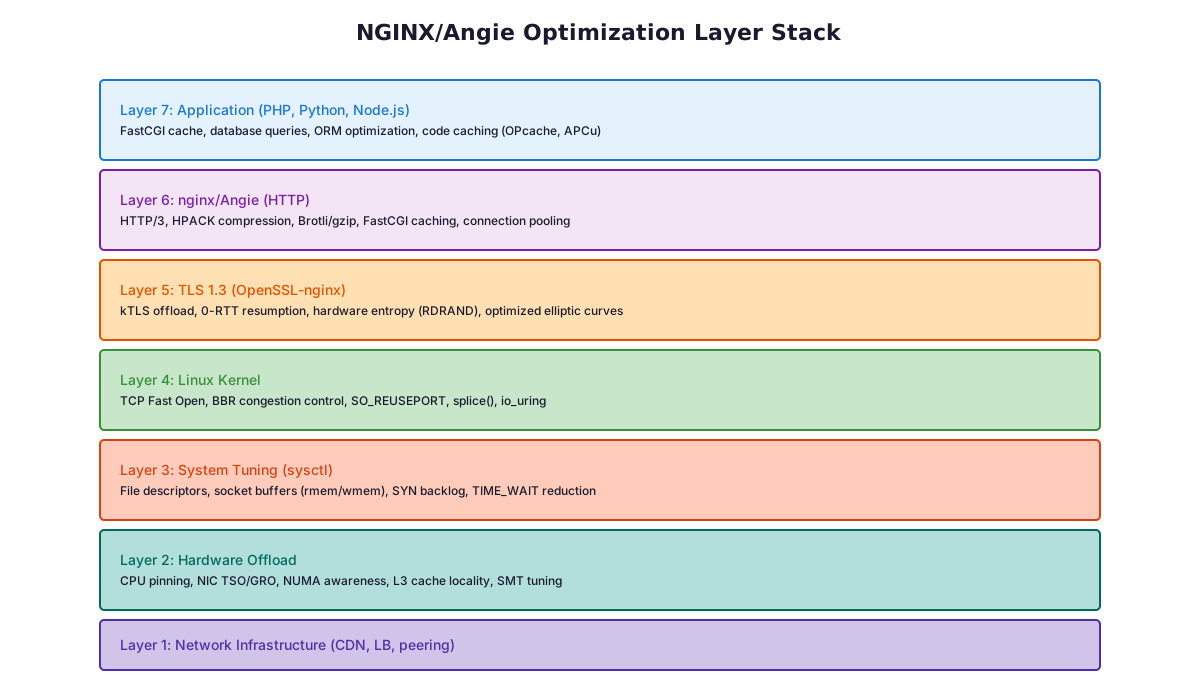
Nginx & Angie: The Expert Guide to Maximum Performance and Security
Quick question: is your NGINX as fast as it could be? Like, actually fast? Not “it works fine” fast, but “it makes your competitors cry” fast? Because the stock NGINX from Debian or Ubuntu is compiled with the same enthusiasm as a government IT project from 2008, conservative, cautious, and leaving a staggering amount of performance on the table. This is the deep guide to NGINX performance optimization: every knob worth turning, from the build flags up to the kernel.
This guide covers the complete picture: how to build or install an optimised NGINX binary, tune TLS for maximum speed and security, set up proper caching so PHP barely gets invoked, lock down your WordPress installation across eight layers of defence, and monitor it all without adding a bunch of extra services. Every directive explained. No copy-pasta without understanding.
NGINX performance optimization starts with the right build
Why the Standard Distro Package Falls Short
The nginx package shipped by Debian and Ubuntu is compiled conservatively, often months or years behind upstream, linked against an older OpenSSL, without HTTP/3 support, and without the performance patches that matter under real traffic. The builds from deb.myguard.nl solve all of this at once. Here is what each improvement actually does:
Compiled with -O3 -flto:-O3 enables higher compiler optimisation than the default -O2. -flto (link-time optimisation) allows the compiler to see across translation unit boundaries and inline or eliminate code that separate-compilation would miss. The result is a faster binary with no source changes.
zlib-ng in native mode: nginx uses zlib constantly: for gzip-compressing responses, decompressing upstream payloads, and serving pre-compressed static files. zlib-ng is a modern rewrite of zlib that uses CPU SIMD instructions (SSE4, AVX2, AVX512) for Adler32, CRC32, and inflate operations. Under high traffic, this meaningfully reduces the CPU time spent on compression, freeing workers for actual request handling.
Cloudflare dynamic TLS records patch: TLS encrypts data in chunks called records. A large record reduces overhead but increases time-to-first-byte because nginx must fill the record before sending it. A small record sends faster but is less efficient for bulk transfers. This patch makes nginx automatically use small records at the start of a connection (for fast first byte) and switch to large records once the connection is established (for throughput). The result is lower perceived latency without sacrificing bandwidth.
OpenResty ssl_cert_cb_yield patch: This enables non-blocking Lua execution during the TLS handshake: specifically in ssl_certificate_by_lua* and ssl_session_fetch_by_lua* hooks. Without it, Lua code in those hooks blocks the nginx worker while running, reducing concurrency.
kTLS (Kernel TLS): Normally, nginx passes plaintext data to OpenSSL, which encrypts it in userspace, then hands the ciphertext back to the kernel for sending. With kTLS, the kernel performs the TLS record encryption itself. This enables true zero-copy sends via sendfile(): the kernel reads data directly from the file cache and encrypts it on the way to the network card, without any userspace buffer copy. The result is lower CPU usage and higher throughput for HTTPS file serving.
TCP Fast Open (TFO): A normal TCP connection requires a three-way handshake before any data is exchanged: one full round trip wasted before nginx even sees the HTTP request. TFO allows returning clients to piggyback data on the SYN packet using a previously issued cookie, saving that round trip. Particularly impactful for short-lived connections (API calls, small page loads).
OpenSSL+quic / HTTP/3: Full TLS 1.3 and HTTP/3 (QUIC) support across all supported distributions. Covered in detail in Part 3.
Server signature de-branded: The Server: header never reveals the nginx version. Attackers routinely scan for known-vulnerable nginx versions; removing the version string eliminates that attack vector at zero cost.
Choose the Right Package Variant
# Full build — all static modules + dynamic module support
apt-get install nginx

# Lean build — only proxy, cache, FastCGI + dynamic module support
# Recommended for WordPress, WooCommerce, Magento, and PHP application servers
apt-get install nginx-minimal
For a WordPress or PHP application server, always choose nginx-minimal. The full build includes static modules you will never use, browser detection, SSI server-side includes, split_clients, memcached, SCGI, uWSGI. Each unused static module still occupies memory and adds surface area. nginx-minimal strips all of that out and lets you load only the dynamic modules you actually need. It boots faster, uses less memory, and is harder to misconfigure.
Angie, the Drop-in Alternative
Angie is a community-driven fork of nginx that is fully API-compatible, every nginx configuration directive and module works unchanged. The myguard build of Angie ships the same extended module set as nginx. Reasons to choose Angie over nginx:
Built-in Prometheus metrics endpoint: no separate exporter needed
Active development with faster patch turnaround on CVEs
apt-get install angie
To switch from nginx to Angie: install Angie, copy your existing /etc/nginx/ config unchanged, start Angie. No other changes required.
Replace the Default Memory Allocator: jemalloc and mimalloc for Nginx
nginx uses the system memory allocator (glibc malloc) by default. Under multi-worker load, glibc’s allocator fragments memory, each worker’s resident set size slowly grows over hours of operation as freed memory is not returned to the OS. The practical symptom is nginx workers consuming progressively more RAM than their actual working set.
Replacing the allocator with a modern one is one of the highest return-on-investment changes you can make: no recompilation, no configuration changes, just a library preload that intercepts all malloc/free calls at runtime.
jemalloc
jemalloc was originally developed for FreeBSD and is used in production by Firefox, Redis, and many others. It uses per-thread arenas to reduce lock contention and manages memory in size-class bins that dramatically reduce fragmentation. The build in the repository is compiled with --disable-initial-exec-tls, which is required for nginx’s multi-process model to work correctly with preloading.
apt-get install libjemalloc2

# Add to /etc/default/nginx or /etc/default/angie
LD_PRELOAD=/usr/lib/x86_64-linux-gnu/libjemalloc.so.2
mimalloc
Microsoft’s mimalloc is a compact, high-performance allocator designed for low fragmentation and high throughput under concurrency. The build in the repository is compiled with securemode (detects heap corruption) and DYNAMIC_TLS (required for preload into nginx workers).
apt-get install mimalloc

# Add to /etc/default/nginx or /etc/default/angie
LD_PRELOAD=/usr/lib/x86_64-linux-gnu/libmimalloc.so.2
Both options typically reduce resident memory by 10–25% and improve throughput under concurrent load. Benchmark both on your workload and pick the winner, neither is universally better, it depends on your allocation patterns.
Nginx TLS 1.3 and HTTP/3 (QUIC): The Fastest Secure Configuration
Enable TLS 1.3 and HTTP/2 + HTTP/3 (QUIC)
server {
    listen 443 ssl;
    listen 443 quic reuseport;  # HTTP/3 over UDP
    listen [::]:443 ssl;
    listen [::]:443 quic reuseport;

    ssl_certificate     /etc/ssl/certs/example.com.pem;
    ssl_certificate_key /etc/ssl/private/example.com.key;

    ssl_protocols TLSv1.2 TLSv1.3;
    ssl_ciphers ECDHE-ECDSA-AES128-GCM-SHA256:ECDHE-RSA-AES128-GCM-SHA256:ECDHE-ECDSA-AES256-GCM-SHA384:ECDHE-RSA-AES256-GCM-SHA384:ECDHE-ECDSA-CHACHA20-POLY1305:ECDHE-RSA-CHACHA20-POLY1305;
    ssl_prefer_server_ciphers off;
    ssl_session_cache shared:SSL:10m;
    ssl_session_timeout 1d;
    ssl_session_tickets off;
    ssl_stapling on;
    ssl_stapling_verify on;

    # Advertise HTTP/3 support so browsers upgrade on next visit
    add_header Alt-Svc 'h3=":443"; ma=86400';
    http2 on;
}
Each directive explained:
TLSv1.2 TLSv1.3: TLS 1.3 reduces the handshake from two round trips to one and drops all legacy cipher suites that were responsible for POODLE, BEAST, CRIME, and similar attacks. TLS 1.2 is retained for compatibility with older clients; TLS 1.0 and 1.1 have no legitimate use case in 2026 and should never be enabled.
ssl_prefer_server_ciphers off: In TLS 1.3, cipher selection is handled by the protocol itself: the server preference setting is irrelevant. For TLS 1.2, modern clients choose sensible ciphers; letting the client choose avoids penalising mobile clients that have hardware acceleration for ChaCha20 but not AES-GCM.
ssl_session_tickets off: Session tickets allow TLS session resumption without a full handshake: but they require the server to encrypt the ticket with a secret key. If that key leaks (or is not rotated frequently), an attacker can decrypt past recorded traffic. The session cache (ssl_session_cache) achieves the same resumption benefit without that risk.
ssl_stapling on: Normally, when a browser connects to your site, it must make a separate HTTP request to your Certificate Authority to check whether your certificate has been revoked. OCSP stapling bundles the CA’s signed response directly into the TLS handshake, eliminating that extra round trip and improving privacy (the CA never learns which clients visited your site).
HTTP/3 (QUIC): HTTP/2 runs over TCP and still suffers from TCP-level head-of-line blocking: one lost packet stalls all multiplexed streams. HTTP/3 runs over UDP with its own reliability layer (QUIC), so a lost packet only stalls the stream it belongs to. The difference is measurable on mobile networks and high-latency connections. The Alt-Svc header tells browsers that HTTP/3 is available so they upgrade automatically on the next connection.
kTLS, Kernel TLS
Enable kTLS on Linux 5.2+ with OpenSSL 3.x:
# Load the kernel TLS module
modprobe tls
echo tls >> /etc/modules

# In the nginx http {} block
ssl_conf_command Options KTLS;
With kTLS active, nginx can use sendfile() to transmit TLS-encrypted data. The kernel reads the file directly from the page cache, encrypts it inline, and sends it to the network, entirely without copying data through userspace buffers. This is particularly impactful for HTTPS file downloads and WordPress media serving.
TCP Fast Open
# Enable in the kernel — 3 = both client and server
sysctl -w net.ipv4.tcp_fastopen=3
echo 'net.ipv4.tcp_fastopen=3' >> /etc/sysctl.d/99-nginx.conf

# Enable in nginx
listen 443 ssl fastopen=256;
TCP Fast Open reduces latency for returning clients by allowing data to be sent in the first TCP packet (the SYN), skipping the three-way handshake latency. The 256 sets the size of the pending TFO connection queue per listening socket.
Nginx Compression with Brotli and Zstd: Faster Pages, Less CPU
Brotli is Google’s compression algorithm, designed specifically for HTTP content. It achieves 15–20% better compression ratios than gzip at equivalent CPU cost for text-based content (HTML, CSS, JavaScript). All modern browsers support it and advertise it via Accept-Encoding: br.
The brotli_static on directive is the key optimisation: at deploy time, pre-compress your static assets with brotli --best file.js to produce file.js.br. When nginx sees a request for file.js from a browser that supports brotli, it serves file.js.br directly from disk, zero CPU cost, maximum compression. This is the most efficient way to serve compressed static content.
Zstd (Zstandard, developed by Facebook) has a different strength: it decompresses roughly 5× faster than gzip and significantly faster than brotli. For API JSON responses that the client (a JavaScript frontend or mobile app) must decompress, Zstd reduces client CPU time. Level 3 is the sweet spot, good compression at very low latency. Gzip, brotli, and Zstd coexist: nginx selects the algorithm based on what the client advertises in its Accept-Encoding header.
Trim HTML Whitespace
apt-get install libnginx-mod-http-trim-filter
trim on;
trim_js off;
trim_css off;
This module strips redundant whitespace and HTML comments from HTML responses in-flight, before they reach the browser. Typically saves 2–5% of HTML response size. No application code changes, no deploy pipeline changes, it just works. Disable trim_js and trim_css unless you have tested your JS and CSS thoroughly, as aggressive whitespace removal can break some inline scripts.
Nginx Security Configuration: Eight Layers of Defence
Security is about depth, not a single tool. Each layer catches what the others miss. The goal is to make exploitation require overcoming multiple independent mechanisms simultaneously, a dramatically harder problem for an attacker than defeating any single control.
Layer 1: ModSecurity v3 + OWASP CRS, The Primary WAF
load_module modules/ngx_http_modsecurity_module.so;

# In server {} block
modsecurity on;
modsecurity_rules_file /etc/nginx/modsecurity/modsecurity.conf;
# /etc/nginx/modsecurity/modsecurity.conf
Include /etc/modsecurity/modsecurity.conf
Include /usr/share/modsecurity-crs/crs-setup.conf
Include /usr/share/modsecurity-crs/rules/*.conf
ModSecurity is an industrial-strength Web Application Firewall. It parses the full HTTP request, URI, headers, body, multipart parts, and matches it against the OWASP Core Rule Set: over 1000 rules covering SQL injection, XSS, path traversal, Remote Code Execution, SSRF, and dozens of other attack classes. Critically, it does this before the request reaches PHP, so even a vulnerable WordPress plugin cannot be exploited if ModSecurity blocks the attack payload.
Deployment strategy: Start with SecRuleEngine DetectionOnly in your modsecurity.conf. Run it for a week. Review the logs to identify false positives generated by your legitimate application traffic. Whitelist those specific rules or request patterns, then switch to SecRuleEngine On. Skipping this tuning step causes ModSecurity to block legitimate requests and frustrates users.
ngx_waf and ModSecurity serve different roles. ModSecurity inspects request content deeply; ngx_waf operates at the connection level, blocking by IP, IP range, or request rate before the request body is even read. The CC mode (challenge collapser) detects and blocks connection floods. Use both: ngx_waf handles volume-based attacks efficiently; ModSecurity handles content-based attacks thoroughly.
Layer 3: NAXSI, Whitelist WAF
apt-get install libnginx-mod-http-naxsi
NAXSI takes the opposite philosophy to ModSecurity. Instead of maintaining a blacklist of known attacks, NAXSI denies everything and you whitelist what your application legitimately sends. A SQL injection attempt is blocked not because NAXSI recognises it as SQL, but because it contains characters your application has no reason to send. Once fully tuned, NAXSI has zero false positives and zero false negatives for attacks that use unexpected characters or patterns. It is harder to set up but ideal for high-security environments where you can precisely model expected traffic.
Layer 4: Bot Mitigation, testcookie and js-challenge
# testcookie example — transparent to real browsers
location / {
    testcookie on;
    testcookie_name BTC;
    testcookie_secret your_random_secret_here;
    testcookie_session $remote_addr;
    testcookie_arg ckattempt;
    testcookie_max_attempts 3;
    testcookie_domain example.com;
    testcookie_redirect_via_refresh on;

    proxy_pass http://backend;
}
testcookie works by issuing a Set-Cookie header and immediately redirecting the client. A real browser follows the redirect and presents the cookie, this happens invisibly, in milliseconds, with no user interaction. Most bots do not handle cookies or redirects correctly and simply fail the challenge. The effect on legitimate traffic is imperceptible; the effect on bot traffic is dramatic.
js-challenge is similar but requires JavaScript execution. The browser must run a small script and return the computed result. This blocks scrapers, scanners, and bots that do not execute JavaScript. Use testcookie as the first line; reserve js-challenge for endpoints under active bot attack where you need to be certain about browser execution.
geoip2 /etc/nginx/GeoLite2-Country.mmdb {
    auto_reload 60m;
    $geoip2_data_country_code country iso_code;
}

map $geoip2_data_country_code $allowed_country {
    default yes;
    CN  no;
    RU  no;
    KP  no;
}

server {
    if ($allowed_country = no) {
        return 444;  # Drop connection silently
    }
}
GeoIP2 resolves each client’s IP address to a country using MaxMind’s database. If you run a business that does not serve certain regions, blocking at the nginx level eliminates scanning, credential stuffing, and spam traffic from those regions before it touches PHP or your database. return 444 drops the connection without sending any response, the client receives a TCP RST, which is more efficient than sending an error page to automated scanners.
Each security header tells the browser how to behave when rendering your page:
HSTS: Forces the browser to use HTTPS for your domain for one year, even if the user types http://. The preload flag allows submission to browser preload lists: the browser will never make an unencrypted connection to your domain, not even the very first one.
Content-Security-Policy: Tells the browser which origins are allowed to load scripts, styles, images, and frames. A properly configured CSP makes stored XSS attacks non-functional: injected scripts from an attacker’s server are blocked by the browser before they execute.
X-Frame-Options SAMEORIGIN: Prevents your site from being embedded in an iframe on another domain, blocking clickjacking attacks.
X-Content-Type-Options nosniff: Prevents browsers from guessing a file’s content type. Without this, an uploaded text file containing JavaScript could be executed as a script by a browser that sniffs the content.
Referrer-Policy: Controls how much of the referrer URL is sent to other sites. strict-origin-when-cross-origin sends only the origin (not the full path) when crossing origins, protecting URL-embedded tokens from leaking.
Rate limiting caps how many requests a single IP can make in a time window. /wp-login.php is hammered by credential stuffing bots constantly, limiting it to 5 requests per minute with a burst of 2 makes brute force attacks take years rather than hours. The dynamic variant (versus nginx’s built-in limit_req) allows you to adjust rates and ban specific IPs at runtime, without a config reload. A burst of repeat offenders can be blocked immediately while the server is running.
Layer 8: IP Anonymisation (GDPR Compliance)
apt-get install libnginx-mod-ipscrub
ipscrub on;
ipscrub_period 86400;
ipscrub anonymises IP addresses in nginx’s access logs by zeroing the last octet of IPv4 addresses (and the last 80 bits of IPv6). Under GDPR, a full IP address is considered personal data. ipscrub eliminates that classification at the network level, no application code changes, no log rotation scripts, no post-processing. It operates before the log line is written, so the anonymisation is complete and irreversible. The ipscrub_period controls how often the anonymisation key is rotated.
Nginx FastCGI Cache for WordPress: Bypass PHP on Every Request
FastCGI Cache, Bypassing PHP Entirely
FastCGI caching is the most impactful performance change for any WordPress or PHP site. Once a page is cached, nginx serves the HTML directly from memory, PHP-FPM is never invoked, the database is never queried. A cached WordPress page can be served in under 1 millisecond; an uncached one typically takes 50–200ms depending on the number of plugins.
http {
    fastcgi_cache_path /var/cache/nginx/fastcgi
        levels=1:2
        keys_zone=WORDPRESS:100m
        max_size=2g
        inactive=60m
        use_temp_path=off;

    fastcgi_cache_key "$scheme$request_method$host$request_uri";
}

server {
    set $skip_cache 0;

    # Never cache POST requests — they modify state
    if ($request_method = POST) { set $skip_cache 1; }
    # Never cache requests with a query string (search results, pagination varies)
    if ($query_string != "") { set $skip_cache 1; }
    # Never cache pages for logged-in users — they see personalised content
    if ($http_cookie ~* "comment_author|wordpress_[a-f0-9]+|wp-postpass|woocommerce_items_in_cart|wordpress_logged_in") {
        set $skip_cache 1;
    }
    # Never cache wp-admin, feeds, or sitemaps
    if ($request_uri ~* "/wp-admin/|/xmlrpc.php|wp-.*.php|/feed/|sitemap(_index)?.xml") {
        set $skip_cache 1;
    }

    location ~ .php$ {
        fastcgi_pass unix:/var/run/php/php8.3-fpm.sock;
        fastcgi_cache WORDPRESS;
        fastcgi_cache_valid 200 60m;
        fastcgi_cache_valid 301 302 10m;
        fastcgi_cache_bypass $skip_cache;
        fastcgi_no_cache $skip_cache;
        fastcgi_cache_use_stale error timeout updating http_500 http_503;
        fastcgi_cache_background_update on;
        fastcgi_cache_lock on;
        add_header X-FastCGI-Cache $upstream_cache_status;
    }
}
The skip cache logic deserves a careful read:
POST requests: POST requests carry form submissions or API payloads: they must always reach PHP to be processed. Serving a cached response to a POST would silently discard the submitted data.
Query strings: A URL like /shop/?page=2&sort=price produces different content than /shop/. Without this rule, all variations would serve the first cached version.
WordPress cookies: The cookie names listed identify logged-in WordPress users, comment authors who have previously commented, users with items in a WooCommerce cart, and password-protected post viewers. These users need to see their personalised content, not a cached version of the anonymous visitor’s page.
fastcgi_cache_background_update on: When a cached entry expires, the next request would normally wait for PHP to generate a fresh response. With background update enabled, the expired but still-present cached entry is served immediately while nginx fetches a fresh response in the background. No user ever waits for cache regeneration.
fastcgi_cache_lock on: Without this, if 100 requests arrive simultaneously for an uncached page, all 100 go to PHP. With lock enabled, one request is sent to PHP and the other 99 wait for the cache to be populated. This prevents cache stampedes under traffic spikes.
X-FastCGI-Cache header: Adds a HIT, MISS, or BYPASS header to every response, making it trivial to see from your browser or a monitoring tool whether a page is being served from cache.
When you publish or update a WordPress post, the cached HTML for that URL is stale. The cache purge module exposes a PURGE HTTP method that invalidates a specific cache key. The Nginx Helper WordPress plugin (covered in Part 9) sends PURGE requests automatically whenever content changes, keeping your cache accurate without manual intervention.
Redis-Backed Transparent Cache with srcache
FastCGI cache stores entries on disk, it is per-server and not shared. For a multi-server setup (load-balanced WordPress), use srcache-filter with Redis to share the cache across all servers. When server A caches a page, server B can serve it from the same Redis instance.
The immutable directive adds Cache-Control: immutable to the response. This tells browsers: do not revalidate this file on reload, it will never change. This eliminates conditional GET requests (If-None-Match, If-Modified-Since) that browsers normally send even for cached files. The assumption is that you use content-hashed filenames (e.g., app.a3f9c2.js), when the file changes, the filename changes, so the browser automatically fetches the new version.
WordPress Nginx Configuration and PHP-FPM Security Hardening
Complete WordPress Nginx Configuration
server {
    listen 443 ssl;
    listen 443 quic reuseport;
    server_name example.com www.example.com;

    root /var/www/example.com;
    index index.php;

    # Block access to hidden files (.htaccess, .git, etc.)
    location ~* /. { deny all; }

    # Block access to WordPress configuration and legacy XML-RPC
    location ~* /wp-config.php { deny all; }
    location ~* /xmlrpc.php { deny all; return 444; }

    # Block readme/license files (leak version info)
    location ~* /(readme|license|changelog).(html|txt)$ { return 404; }

    # Block PHP execution inside the uploads directory
    # Even if an attacker uploads a .php file, it cannot execute
    location ~* /(?:uploads|files)/.*.php$ { deny all; }

    # Rate-limit login page — slows brute force to a crawl
    location = /wp-login.php {
        limit_req zone=login burst=2 nodelay;
        fastcgi_pass unix:/var/run/php/php8.3-fpm.sock;
        fastcgi_index index.php;
        include fastcgi_params;
        fastcgi_param SCRIPT_FILENAME $document_root$fastcgi_script_name;
    }

    location / {
        try_files $uri $uri/ /index.php?$args;
    }

    location ~ .php$ {
        # Prevents nginx from passing non-existent PHP file paths to PHP-FPM
        # Without this, /uploads/image.jpg/evil.php could trigger PHP execution
        try_files $uri =404;
        fastcgi_pass unix:/var/run/php/php8.3-fpm.sock;
        fastcgi_index index.php;
        include fastcgi_params;
        fastcgi_param SCRIPT_FILENAME $document_root$fastcgi_script_name;
        fastcgi_cache WORDPRESS;
        fastcgi_cache_valid 200 60m;
        fastcgi_cache_bypass $skip_cache;
        fastcgi_no_cache $skip_cache;
        add_header X-FastCGI-Cache $upstream_cache_status;
    }
}
The non-obvious security rules explained:
Blocking xmlrpc.php: XML-RPC is a legacy WordPress API, superseded by the REST API. It is almost never needed and is a constant target for brute-force attacks (it allows unlimited login attempts in a single request, bypassing simple per-request rate limits) and DDoS amplification (the multicall method allows one request to trigger hundreds of backend operations).
Blocking PHP in /uploads/: WordPress allows file uploads. If an attacker bypasses file type validation (in a vulnerable plugin) and uploads a PHP file to the uploads directory, this nginx rule prevents the file from being executed. Even if the file exists on disk, nginx returns 403 rather than passing it to PHP-FPM.
try_files $uri =404 before fastcgi_pass: Without this, a request for /uploads/image.jpg/evil.php would reach PHP-FPM even though evil.php does not exist. Some PHP configurations (notably cgi.fix_pathinfo=1) would then execute image.jpg as PHP if it contained PHP code. The try_files check ensures the exact file must exist on disk before nginx passes the request to PHP.
PHP-FPM Pool Tuning
; /etc/php/8.3/fpm/pool.d/wordpress.conf
[wordpress]
user = www-data
group = www-data
listen = /run/php/php8.3-fpm-wordpress.sock

pm = dynamic
pm.max_children = 20      ; Maximum total PHP worker processes
pm.start_servers = 4      ; Workers started at boot
pm.min_spare_servers = 2  ; Minimum idle workers (scale down floor)
pm.max_spare_servers = 6  ; Maximum idle workers (scale up ceiling)
pm.max_requests = 500     ; Recycle each worker after 500 requests
pm.process_idle_timeout = 10s

; Security
php_admin_value[open_basedir] = /var/www/example.com:/tmp
php_admin_value[disable_functions] = exec,passthru,shell_exec,system,proc_open,popen
php_admin_flag[log_errors] = on
php_admin_value[error_log] = /var/log/php8.3-fpm-wordpress.log
The key settings explained:
pm.max_children: The ceiling on total PHP workers. If all workers are busy and a new request arrives, it queues. Setting this too low causes request queuing under normal load; too high causes the server to run out of RAM and start swapping, which is catastrophic for performance. Calculate: available RAM ÷ average PHP worker RSS. A typical WordPress worker uses 50–80MB.
pm.max_requests = 500: Recycles each worker after it has handled 500 requests. PHP extensions (and WordPress plugins) sometimes leak memory: not enough to crash a process in a single request, but enough to accumulate over thousands of requests. Recycling workers regularly bounds this growth.
open_basedir: Restricts PHP’s file system access to the specified directories. If a PHP file inclusion vulnerability exists in a plugin, PHP cannot read files outside /var/www/example.com and /tmp: it cannot access /etc/passwd, other sites’ web roots, or system credentials.
disable_functions: Blocks specific PHP functions at the interpreter level. If a plugin is vulnerable to Remote Code Execution, the attacker’s payload cannot call system(), exec(), or passthru(): the most common ways to turn PHP RCE into server compromise.
PHP-Snuffleupagus is a PHP extension that runs inside PHP-FPM, not at the network layer, not at the application layer, but inside the PHP interpreter itself. It can block attacks that ModSecurity cannot see (encrypted bodies, gzip-encoded payloads, application-specific logic) because it operates after PHP has decoded and parsed the request.
apt-get install php8.3-snuffleupagus
# /etc/snuffleupagus/wordpress.rules
sp.disable_function.function("system").drop();
sp.disable_function.function("exec").drop();
sp.disable_function.function("passthru").drop();
sp.disable_function.function("proc_open").drop();

# Force secure and SameSite flags on all session cookies
sp.cookie.name("PHPSESSID").samesite("strict").secure();

# Block PHP execution triggered by file upload exploitation
sp.upload_validation.script("/usr/bin/sp-check-upload.sh").drop();
; In FPM pool config — different rules per site
php_admin_value[snuffleupagus.config] = /etc/snuffleupagus/wordpress.rules
The cookie rule is particularly useful for WordPress: many plugins set session cookies without Secure or SameSite flags (an oversight that enables session hijacking and CSRF). Snuffleupagus enforces these flags globally at the interpreter level, even cookies set by plugins that forgot to configure them correctly are protected.
Nginx Monitoring: Per-Vhost Traffic Status, Load Shedding and Header Control
This module exposes per-vhost and per-upstream metrics: requests per second, bytes in/out, response time histograms (p50, p75, p90, p99 latency), HTTP status code breakdown, and cache hit rates, all without an external agent, StatsD daemon, or Prometheus exporter. Access /nginx_status in a browser for an HTML dashboard, or use the JSON output (?format=json) for programmatic scraping. The response time histogram is particularly useful for identifying slow PHP responses without touching application-level logging.
Sysguard, Automatic Load Shedding
apt-get install libnginx-mod-http-sysguard
location / {
    sysguard on;
    sysguard_load load15=8 action=/overloaded;
    sysguard_mem swapratio=20% action=/overloaded;
    sysguard_rt rt=0.5 action=/overloaded;
}

location /overloaded {
    return 503 "Server is under heavy load. Please try again in a moment.";
}
Sysguard monitors three signals in real time:
System load (load15): If the 15-minute load average exceeds the threshold, new requests are shed with a 503. This prevents a traffic spike from driving the server into swap-thrashing, where the OS spends more time paging than serving requests.
Swap usage (swapratio): When swap fills up, every request hits disk. This is typically unrecoverable without a restart. Sysguard detects early swap growth and starts shedding load before the situation becomes critical.
Upstream response time (rt): If PHP-FPM is taking longer than 0.5 seconds per response, something is wrong: a slow database query, a deadlock, a runaway process. Shedding new requests while the slow ones complete prevents a cascade where queued requests pile up and exhaust all worker slots.
This is the circuit-breaker pattern at the web server level. It protects your server from cascading failure during traffic spikes, the 503 response is vastly better than a server that is fully unresponsive because every resource is exhausted.
The built-in add_header directive can only add headers, not remove or modify them. Headers-more provides more_set_headers and more_clear_headers to fully control any header, including headers set by upstream PHP applications. The conditional if syntax allows per-location header logic that add_header cannot express.
Best WordPress Plugins for Nginx FastCGI Caching and Security
Nginx-side caching and PHP hardening handle everything upstream of WordPress. But WordPress itself also needs the right plugins to integrate with your nginx setup and fill the gaps that nginx cannot cover. These recommendations are selected specifically for compatibility with a FastCGI caching setup and a hardened PHP-FPM configuration.
Performance
Nginx Helper: essential for FastCGI caching. Without this plugin, your FastCGI cache never gets invalidated, every page serves stale content until the TTL expires. Nginx Helper listens to WordPress actions (post published, post updated, comment approved) and sends PURGE requests to nginx’s cache purge module for the affected URLs. It also handles purging category pages, tag pages, and the home page when a post changes. This is the glue between WordPress and your nginx cache.
Redis Object Cache: for database query caching. Even with FastCGI caching, logged-in users and wp-admin still hit PHP. Every WordPress page load generates dozens of database queries, user data, post meta, options, transients. Redis Object Cache stores all of these in Redis (an in-memory store) so subsequent requests find the results without touching MariaDB/MySQL. On a busy site, this can reduce database load by 80% or more.
Autoptimize: for asset optimisation. Autoptimize concatenates and minifies CSS and JavaScript files, reducing the number of HTTP requests a page requires. Its output is static files that nginx serves directly from disk, fully compatible with brotli_static and zstd_static pre-compression workflows. Configure it to exclude scripts that break when minified (test thoroughly).
Imagify / WebP Express: for modern image formats. Automatically converts uploaded images to WebP (and AVIF where supported). Pair with an nginx try_files rule that serves the .webp or .avif variant when the browser supports it, falling back to the original. WebP images are typically 25–35% smaller than JPEG at equivalent quality.
Security
Wordfence Security: application-context-aware security. Wordfence operates where nginx cannot: inside WordPress, with knowledge of which user is logged in, which plugin made a request, and what the application considers valid. It maintains its own firewall with WordPress-specific rules (protecting wp-admin actions, REST API endpoints, nonce validation), runs malware scans against the file system, and provides login protection with 2FA support. Wordfence complements ModSecurity, use both, not one or the other.
Two Factor (WordPress official plugin): TOTP/FIDO2 second factor. Your nginx rate limiting on /wp-login.php slows brute force. Two-factor authentication makes it irrelevant, even if an attacker guesses the password, they cannot log in without the second factor. The official WordPress Two Factor plugin supports TOTP apps (Authy, Google Authenticator) and FIDO2 hardware keys (YubiKey).
Limit Login Attempts Reloaded: application-layer rate limiting. Provides WordPress-level tracking of failed login attempts and temporary IP bans. Works as a complementary layer to nginx’s limit_req zone, nginx counts requests at the network level; this plugin counts failed authentication attempts at the application level and can lock accounts after repeated failures regardless of source IP rotation.
All-In-One Security (AIOS): baseline WordPress hardening. Checks and fixes common WordPress misconfigurations: file permissions, database table prefix exposure, user enumeration via the author query parameter, default admin username, and more. Its file change detection alerts you when WordPress core files are modified, an early indicator of compromise.
SEO and Developer Tools
Rank Math SEO: structured SEO management. Provides schema markup generation, XML sitemaps, redirect management, and per-post meta tag control. Its sitemap endpoint (/sitemap_index.xml) should be added to your nginx FastCGI cache exclusion list, it is dynamically generated and must always be fresh for search engine crawlers.
Query Monitor: performance profiling. A developer tool that shows exactly which database queries ran for each page load, how long each took, which plugin triggered them, PHP errors, hook execution time, and more. Use it to find the slow queries and redundant plugin calls that your FastCGI cache hides during normal operation. Diagnose before you optimise.
The Complete Nginx WordPress Stack: Full Installation Commands
For a production WordPress or PHP application server, this is the minimum recommended installation:
# Core server — lean, fast, modern
apt-get install nginx-minimal

# Memory allocator — reduces fragmentation and RAM usage
apt-get install mimalloc
# Then add to /etc/default/nginx:
# LD_PRELOAD=/usr/lib/x86_64-linux-gnu/libmimalloc.so.2

# Compression — serve less data
apt-get install libnginx-mod-http-brotli libnginx-mod-http-zstd

# Primary WAF — block known attacks before they reach PHP
apt-get install libmodsecurity3 libnginx-mod-http-modsecurity modsecurity-crs

# Security headers and rate limiting
apt-get install libnginx-mod-http-security-headers
apt-get install libnginx-mod-http-dynamic-limit-req

# GeoIP and bot mitigation
apt-get install libnginx-mod-http-geoip2 libmaxminddb
apt-get install libnginx-mod-http-testcookie-access

# Cache purge — keeps FastCGI cache fresh
apt-get install libnginx-mod-http-cache-purge

# PHP hardening — interpreter-level protection
apt-get install php8.3-snuffleupagus

# Monitoring and load shedding
apt-get install libnginx-mod-http-vhost-traffic-status libnginx-mod-http-sysguard
Frequently Asked Questions: Nginx Performance and Security
What is the fastest nginx configuration for WordPress?
The fastest nginx setup for WordPress combines three things: FastCGI caching (so PHP is bypassed entirely for anonymous visitors), brotli or zstd compression (smaller responses travel faster), and HTTP/3 (lower latency, especially on mobile). Install nginx-minimal from the deb.myguard.nl repository, configure a FastCGI cache zone, and add the Nginx Helper and Redis Object Cache plugins to WordPress to keep the cache accurate.
Is Angie a drop-in replacement for nginx?
Yes. Angie is fully API-compatible with nginx, every configuration directive and module works unchanged. It adds built-in Prometheus metrics and ACME/Let’s Encrypt certificate management that nginx requires separate tools for. Performance is equivalent to nginx. If you want simpler observability or native certificate management, choose Angie. Both are available from the deb.myguard.nl repository with the same extended module set.
How do I enable HTTP/3 in nginx on Debian or Ubuntu?
Add listen 443 quic reuseport; alongside your existing listen 443 ssl; directive, and add add_header Alt-Svc 'h3=":443"; ma=86400'; so browsers know to upgrade on the next visit. You need nginx compiled with OpenSSL+quic support, the builds from deb.myguard.nl include this for Debian Bookworm/Trixie and Ubuntu Jammy/Noble.
What is the difference between ModSecurity and ngx_waf?
ModSecurity inspects request content deeply against the OWASP Core Rule Set, detecting SQL injection, XSS, path traversal, and hundreds of other attack patterns. ngx_waf operates at the connection level, blocking by IP, IP range, or request rate before the body is even read. They complement each other: ngx_waf handles volume-based attacks efficiently; ModSecurity handles content-based attacks thoroughly. Use both for defence in depth.
How does nginx FastCGI caching work with WordPress?
Nginx stores the HTML output of PHP responses in a disk-based cache. On subsequent requests for the same URL, nginx serves the cached HTML directly without invoking PHP-FPM or querying the database. A cached page is served in under 1 millisecond; an uncached WordPress page takes 50–200ms depending on the number of plugins. The $skip_cache logic ensures logged-in users, POST requests, and wp-admin traffic always reach PHP. The Nginx Helper plugin sends PURGE requests when content changes, keeping cached pages fresh.
What is PHP-Snuffleupagus and do I need it?
PHP-Snuffleupagus is a PHP extension that runs inside PHP-FPM and blocks attacks at the interpreter level, before your application code executes. Unlike ModSecurity (which operates at the HTTP layer), Snuffleupagus sees the fully decoded and parsed request, including encrypted payloads that WAFs cannot inspect. It can disable dangerous functions (system(), exec()), enforce Secure and SameSite cookie flags, and validate file uploads. For any publicly accessible WordPress site, it is strongly recommended as the final layer of defence.
How do I make nginx GDPR compliant for IP address logging?
Install the libnginx-mod-ipscrub module and add ipscrub on; to your nginx config. This anonymises IP addresses before they are written to the access log, zeroing the last octet of IPv4 addresses and the last 80 bits of IPv6. The anonymisation is irreversible and happens at write time, so no post-processing scripts are needed. Under GDPR, this removes the classification of the full IP address as personal data.
Summary Checklist
☑ Use nginx-minimal or angie from deb.myguard.nl for a modern, optimised build
☑ Preload mimalloc or jemalloc via LD_PRELOAD to reduce memory fragmentation
☑ Enable TLS 1.3, HTTP/2, HTTP/3 (QUIC), kTLS, and TCP Fast Open
☑ Enable brotli and zstd alongside gzip; pre-compress static assets at deploy time
☑ Deploy ModSecurity + OWASP CRS as your primary WAF; tune in detection mode first
☑ Add ngx_waf for high-speed IP-level and connection-flood protection
☑ Use testcookie for transparent bot mitigation on all public endpoints
☑ Enable FastCGI caching with correct skip logic and background update
☑ Install cache purge module and configure Nginx Helper in WordPress
☑ Install PHP-Snuffleupagus for interpreter-level PHP function blocking and cookie hardening
☑ Configure sysguard thresholds for automatic load shedding under stress
☑ Monitor per-vhost traffic and latency percentiles with vhost-traffic-status
☑ Install Redis Object Cache and Wordfence in WordPress
☑ Enforce 2FA on wp-admin with the Two Factor plugin
All packages listed are available from the deb.myguard.nl repository for Debian Bookworm/Trixie and Ubuntu Jammy/Noble. Each module is rebuilt automatically within hours of a new nginx upstream release.