Debian 14 won’t land on your servers until roughly 2027, and yet its name has been settled since before Trixie shipped: Forky. Named after the googly-eyed spork from Toy Story 4, the plastic utensil that spends the whole film insisting it’s trash. Fitting mascot for a release that, right now, you absolutely should not put anywhere near production.
That’s not an insult. That’s the whole point of what Forky currently is. Let me walk you through it, because half the confusion I see from juniors is treating “Forky” and “Debian testing” as two different things when they’re the same thing wearing two hats.
What Forky actually is
Debian doesn’t develop a release in a side branch and unveil it finished. It runs a rolling pipeline. New packages land in unstable (permanently codenamed sid, the kid next door who breaks his toys). If a package sits there for a while without any release-critical bugs filed against it, it migrates automatically into testing. Testing is where the next stable release slowly congeals.
When Debian 13 Trixie shipped on 9 August 2025, the testing branch got a fresh codename and started over as a copy of Trixie. That copy is Forky. So today, “install Debian testing” and “install Forky” mean the identical thing. The version number 14 only gets stamped on the day it freezes, stabilises, and releases as stable. Until then it’s a moving target that changes under you every single day.
The name, by the way, comes from Pixar. Every Debian release since 1.1 has been named after a Toy Story character, a tradition Bruce Perens started back when he worked at the studio. Buzz, Rex, Bo, Woody, Sarge, and on down the line. Forky’s the newest recruit. Toy Story runs out of memorable characters eventually, but that’s a problem for whoever’s running the project in 2035.
Where Forky sits right now
As of mid-2026, Forky is wide open. No freeze. The freeze timeline spells it out plainly: the full freeze date gets decided when the project starts planning an actual release, and it’s announced at least 14 days before it bites. Nobody’s announced anything. Following Debian’s roughly two-year cadence since Buster, the smart money puts Debian 14 somewhere in 2027.
Two years feels like forever when you’re waiting. It isn’t. It’s the reason your Debian box stays up while the shiny rolling distros are busy explaining why GNOME won’t start after last night’s update.
During this open window, packages flow in from sid constantly. Big transitions happen. Libraries bump soname. Things break, get filed as bugs, get fixed, migrate. This is the messy, productive middle of the cycle, and it’s exactly why it’s not for you to run on a machine you care about.
Why you don’t run testing in production
Here’s the one that pages people at 3 a.m. Debian’s security team does not issue timely security updates for testing. Read that again. When a CVE drops for OpenSSL or the kernel, stable gets a patched package pushed through the security archive within hours. Testing waits for the fix to wander through unstable and migrate on the normal schedule, which can take days. Sometimes longer if the fix is tangled in a transition.
So a Forky box sitting on the public internet is a box with a known, published, unpatched hole in it for a window measured in days. The official Forky release page says it straight: if you need security support, use stable. Believe them.
There’s a second, subtler trap. Testing packages can have release-critical bugs that just haven’t been found yet. The RC-bug gate keeps out the known breakage. It does nothing about the unknown. I’ve watched a testing upgrade eat a working NetworkManager config and leave a laptop with no wifi and no obvious way to notice until the reboot. On a server, that same class of surprise is a bad afternoon.
Run Forky if you’re a developer testing your package against the next release, a Debian contributor squashing bugs, or a nerd with a throwaway VM and time to burn. Not on the mail server. Not on the thing your paycheck depends on.
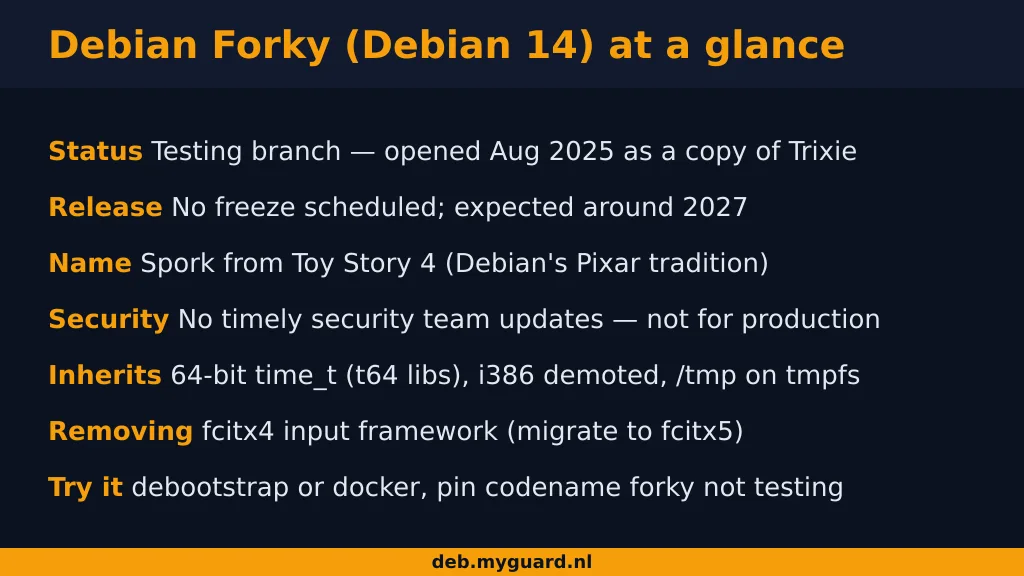
The transitions Forky inherited from Trixie
Forky didn’t start from nothing. It started as a clone of Trixie, so the three big architectural shifts that landed in Debian 13 are baked into Forky’s foundations. If you’re going to meet them anywhere, you’ll meet them here first, and they’re worth understanding before the upgrade day arrives.
64-bit time_t, the Epochalypse fix
Every 32-bit Unix system stores time as a signed 32-bit count of seconds since 1 January 1970. That counter overflows at 03:14:07 UTC on 19 January 2038, wraps negative, and your system thinks it’s 1901. This is the Year 2038 problem, and it is the Y2K of our generation except the fix is genuinely hard.
Debian’s answer, carried out across the archive during the Trixie cycle, was to widen time_t to 64 bits on almost every architecture. The catch is ABI. Widening that type changes the memory layout of any struct that holds a time, without changing the library’s soname. So Debian renamed the affected library packages with a t64 suffix. That’s why you’ll see libssl3t64 where you expected libssl3. A third-party .deb built against the old ABI is now both binary-incompatible and package-incompatible, which is the polite way of saying it won’t install and if you force it, it corrupts your timestamps silently. Rebuild your out-of-tree packages. Don’t force the dependency.
i386 is basically a museum exhibit now
From Trixie onward, i386 stopped being a real architecture. No official kernel, no installer, no bootable i386 Debian. What survives exists only as multiarch on a 64-bit host, to run that one ancient closed-source binary you can’t recompile. And even that shrank: the i386 target now requires SSE2, so it won’t run on the genuinely old 32-bit chips it was originally meant for. If you’ve still got physical 32-bit hardware, Trixie was your wall, and Forky doesn’t move it back.
/tmp lives in RAM now
New installs from Trixie mount /tmp as a tmpfs by default. It’s RAM-backed. Fast, and it evaporates on reboot, which is what /tmp was always supposed to do anyway. Files older than 10 days get swept even without a reboot; /var/tmp keeps its 30-day persistence on disk.
The gotcha that’ll bite a junior: if you’ve got a job dumping a 40 GB database export into /tmp, you’re now writing that into memory, and the OOM killer will wake up and shoot your process in the head when RAM fills. Point big scratch writes at /var/tmp or a real disk path. And if you upgrade an existing box, files already in /tmp get hidden under the new tmpfs mount, not deleted. They reappear if you mount --bind / /mnt and go look in /mnt/tmp. Handy to know before you panic about “missing” files.
What’s actually getting removed in Forky
Every Debian cycle drags along a list of things marked for death, and the deprecation warnings you ignore in one release become the removals that break your setup in the next. Forky’s list is still filling out, but the pattern is set: what Trixie deprecated, Forky deletes.
The concrete one already confirmed: the old fcitx input method framework, fcitx4, is gone in Forky. Upstream stopped maintaining it, so the fcitx package and everything named fcitx-* gets removed. If you type in Chinese, Japanese, Korean, or any language that needs an input method editor, migrate to fcitx5 now, on Trixie, while both still coexist. Do it on a quiet Tuesday, not on the morning you’re mid-upgrade and suddenly can’t type your own language into the terminal.
This is the rhythm to internalise. Debian tells you what’s dying a full release ahead. The Trixie release notes carry the “will be removed in forky” warnings, and reading them the week you deploy stable is the cheapest insurance in this business. The person who reads the release notes looks like a wizard. They just read the docs everyone else skipped.
How to try Forky without regret
Curiosity is good. Feed it in a sandbox. The cleanest way to poke at Forky is a container or a throwaway VM, never your daily driver.
A minimal chroot takes about a minute:
sudo debootstrap forky /srv/forky-chroot http://deb.debian.org/debian/
sudo chroot /srv/forky-chroot
Or if Docker’s more your speed, debian:trixie images exist today and a debian:forky or debian:testing tag will get you the rolling snapshot. Inside, your sources.list wants the codename, not the suite name:
deb http://deb.debian.org/debian forky main contrib non-free non-free-firmware
deb http://security.debian.org/debian-security forky-security main
Pin the codename forky rather than the word testing. Here’s why that trailing detail matters, and it’s the trap I promised you back at the top. If you track testing, then the day Forky releases as stable, your “testing” line silently rolls onto Debian 15’s development branch and your box lurches forward a whole release overnight while you sleep. Pin the codename and your machine stays on Forky through its release and freezes into a normal stable box. One word. Career-defining difference at 3 a.m.
If you’re running Debian for real work, the move is boring and correct: stay on Trixie, read the Forky deprecation notes as they land, migrate the flagged bits early on stable, and upgrade to Debian 14 sometime in 2027 after the .0 dust settles. Boring is the goal. Boring means you sleep.
The short version
Forky is Debian 14 in the oven. It’s the testing branch, born as a copy of Trixie in August 2025, due out around 2027, with no freeze scheduled yet. It carries Trixie’s big three forward: 64-bit time_t with the t64 library renames, i386 demoted to a multiarch relic, and a RAM-backed /tmp. It’ll drop fcitx4 and whatever else Trixie flagged for removal. And it has no timely security patching, which is the single fact that decides whether it belongs on a given machine.
Test it in a container. Read the release notes the week you deploy stable, not the week you upgrade. And back up your /etc before you touch any of it.
What is Debian Forky?
Forky is the codename for Debian 14, the next stable release after Debian 13 Trixie. Right now it is the Debian testing branch, which started as a copy of Trixie in August 2025. The name comes from the spork character in Toy Story 4, continuing Debian’s tradition of Toy Story codenames.
When will Debian 14 Forky be released?
No release date has been announced. Debian releases roughly every two years, and since Trixie shipped in August 2025, Debian 14 is expected around 2027. The full freeze that precedes release will be announced at least 14 days before it takes effect, and as of mid-2026 no freeze has been scheduled.
Is Debian Forky the same as Debian testing?
Yes. Today, installing Debian testing and installing Forky are the same thing. Testing gets a new codename after each stable release, and Forky is the current one. The version number 14 is only assigned when the release freezes and stabilises.
Can I run Debian Forky in production?
No. The Debian security team does not provide timely security updates for testing, so a Forky machine can carry known unpatched vulnerabilities for days. Testing can also contain undiscovered release-critical bugs. Use Debian stable (Trixie) for anything that matters, and reserve Forky for throwaway VMs, containers, and package testing.
What is being removed in Debian Forky?
The deprecated fcitx4 input method framework (the fcitx package and all fcitx-* packages) is being removed in favour of fcitx5. Other packages Trixie deprecated are also slated for removal. The Trixie release notes list the items marked to be removed in Forky, so read them early and migrate before upgrade day.
How do I try Debian Forky safely?
Use a container or throwaway VM, never your main system. A quick debootstrap chroot (debootstrap forky /srv/forky-chroot) or a debian:testing Docker image works well. In sources.list, pin the codename forky rather than the suite name testing, so your machine does not automatically roll onto the next development branch when Forky releases as stable.
Related reading
- NGINX on Debian 13 Trixie: Install, Modules and Modern Stack — the current stable release, and where Forky started life.
- NGINX on Debian 13 Trixie: What Changed and How to Upgrade — the t64 transition in practice on a real service.
- Speed Up Debian Package Builds: eatmydata, mold, ccache, distcc, tmpfs — rebuilding your own packages against a new ABI, fast.
- The New deb.myguard.nl Repository Layout: Per-Package APT Trees Explained — how a real APT repo tracks multiple Debian suites at once.