Picture a brand-new sports car that the factory shipped with the brakes wired backwards, a fuel gauge that lies, and a glovebox that occasionally explodes. The engine? Genuinely brilliant. That is the zstd-nginx-module in a nutshell, the component that gives NGINX and Angie real Zstandard (zstd) compression. The core idea is fantastic. The original implementation had a frankly alarming number of sharp edges. Over a two-week fork window we found, fixed, and tested 36 distinct issues, layered on a pile of performance wins, and wrapped the whole thing in a serious automated test pipeline. This is the full, numbered story.
Short version for the impatient: the module is fast, useful, and absolutely worth running, but only a build that includes these fixes. A stock copy from two weeks ago will happily truncate your CSS, peg a CPU core at 100%, or hand a visitor a half-downloaded JavaScript file. Let’s walk through what was broken, what we did about it, and why you can now trust it.
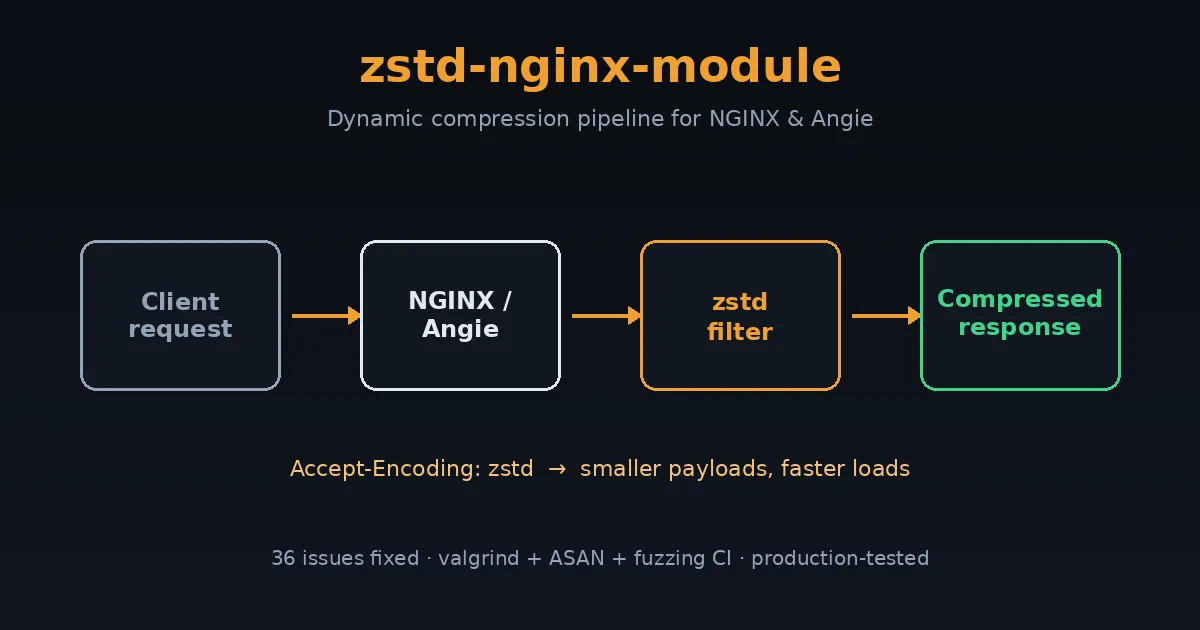
What the zstd-nginx-module Actually Does
Think of this module as a vacuum-seal machine for web traffic. Your server constantly ships HTML, CSS, JavaScript, and JSON across the internet. The smaller that payload, the less bandwidth you burn and the faster the browser starts doing useful work. Zstd (created at Facebook/Meta) is the modern compression format that hits a sweet spot gzip can’t: similar or better ratios at dramatically higher speed. The zstd-nginx-module adds two abilities to NGINX and Angie:
- Dynamic zstd compression: compresses responses on the fly. Perfect for PHP pages, API responses, and anything generated per-request.
- Static zstd serving: if a pre-compressed
file.css.zstsits next tofile.css, it ships the small one directly. Zero CPU at request time.
Great concept. Now here is everything that was wrong with the execution, numbered, grouped by what kind of pain each one caused, so the list actually tells a story instead of being a wall of commit hashes.
Group A, Data Integrity: The “Your Files Arrive Broken” Bugs
These are the scariest class. The server returns HTTP 200, the browser thinks everything is fine, and yet the file is silently incomplete or corrupt. No error, no warning, just a broken site.
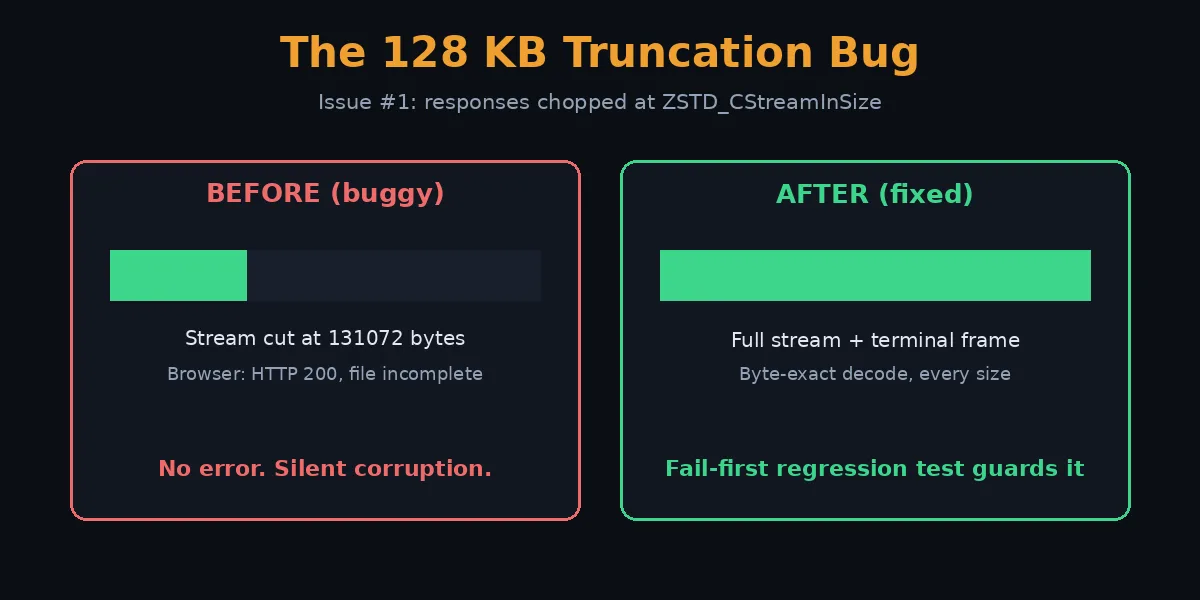
- Silent truncation at 131072 bytes. Any response larger than zstd’s internal stream buffer (
ZSTD_CStreamInSize, exactly 128 KB) was chopped off at that boundary. Big CSS bundles and JavaScript files simply ended mid-stream. This is the bug that makes a site look fine on the homepage and shatter the moment a real asset loads. - Terminal frame never emitted on empty end. When the final compression call produced zero output bytes (it happens: the encoder had already flushed everything), the module forgot to write zstd’s end-of-frame marker. Decoders saw a stream that just stopped and rejected it.
- Truncation/abort with
proxy_buffering off(the “bug B” saga). This was the production incident that took downdeb.myguard.nl‘s wp-admin. With unbuffered proxying (the FastCGI/PHP path), the upstream forces a flush around a chunk that zstd buffers internally. The directive logic never told libzstd to actually flush, so it sat on the bytes forever: manifesting as a truncated response and a worker spinning at 100% CPU in a livelock. The fix has two halves: map a pending flush toZSTD_e_flush, and clear the flush state when the encoder reports it’s fully drained so the loop can terminate. - NULL-deref / worker SIGSEGV on multi-buffer chunked responses. On any response big enough to need more than one output buffer (chunked or no-Content-Length is the common trigger), a recycled buffer pointer was dereferenced after being invalidated: a clean worker segfault that only appeared past the first ~128 KB.
- 100% CPU infinite loop. A separate flush state-machine defect (PR #23 + #49 class) where the inner compression loop never reached a termination condition, pinning a core until the request timed out.
Every single one of these now has a fail-first regression test, a test proven to fail on the buggy code and pass only on the fix. More on that below.
Group B, Memory and Lifetime: The “Slow Death” Bugs
These don’t crash immediately. They leak, corrupt, or rot over hours and reloads, the kind of bug that pages you at 3 a.m. with “the server got slow and then fell over.”
- ZSTD_CDict leaked on every config reload. If you used a compression dictionary, every
nginx -s reloadleaked the entire dictionary. On a busy box that reloads config often, that’s a steady climb to OOM. - Cleanup handler registered with the wrong size. The dictionary cleanup used a non-zero size in
ngx_pool_cleanup_add(), which subtly mismanaged the cleanup bookkeeping. Fixed to passsize=0as the API intends. - Shared compression context across requests. The original reused one zstd context worker-wide. Overlapping requests in a single worker could stomp each other’s compression state: intermittent corruption that’s almost impossible to reproduce on demand. Now every request gets its own context, attached to the request’s cleanup chain.
- Version-specific dictionary init error handling. On older libzstd, the dictionary init path used a different API whose error return wasn’t checked correctly, so a failed init could proceed as if it had succeeded.
This whole group is now guarded by a reload-under-load regression test that hammers SIGHUP while traffic flows, plus the new monthly valgrind soak (details further down).
Group C, Security and Hardening: The “Don’t Get Owned” Fixes
- Buffer overflow appending the
.zstextension. The static module built the.zstpath without reserving enough room, so a long enough request URI could write past the buffer. Classic overflow, now bounded and regression-tested with a 2000-character URI. - Integer overflow in the compression-ratio calculation. The
$zstd_ratiomath could overflow on large responses, producing garbage stats. Reworked with 64-bit scaling. - Reject oversized numeric directives (INT_MAX hardening).
zstd_window_logandzstd_target_cblock_sizeare narrowed tointbefore being handed to libzstd. A configured value aboveINT_MAXwould silently truncate (possibly to a negative). Now rejected at config load with a clear error. - Dictionary-file size cap. A 10 MB ceiling on
zstd_dict_fileprevents a memory-exhaustion denial of service via a giant dictionary. - BREACH containment lever (
zstd_bypass). A new per-request opt-out so operators can serve identity (uncompressed) on endpoints that mix a secret with attacker-influenced reflected input: the precondition for a BREACH-style attack, without splitting the location config. - Unbounded input cap for chunked responses. A streaming response has no Content-Length, so the size check was skipped and a runaway upstream could feed the compressor forever.
zstd_max_lengthis now enforced against the running input total too.
Group D, Build, Linking, and Portability
A correct module that won’t compile on your distro is still a broken module. This group is about actually being able to build and ship it everywhere.
- The
-fPIClinking failure. The config preferred a staticlibzstd.athat lacks position-independent code and cannot link into a shared dynamic module. Now prefers dynamic linking with a pkg-config fallback. - Global CFLAGS mutation. The static module’s config leaked compiler flags into the global build, polluting other modules. Removed.
- Cross-platform portability. Build logic hardened for Linux, the BSDs, RHEL/Rocky, and Gentoo: different pkg-config tools, different library locations.
- Cross-compilation support. Set
ngx_feature_run=noso the feature probe doesn’t try to execute a test binary (impossible when cross-compiling). - Doubled source path. A bug in the addon config concatenated the source directory twice; fixed by scoping
ngx_addon_dirper sub-config. - Typo:
SAVED_CC_TAST_FLAGS. A real, shipped typo that silently failed to restore test flags. One character; genuinely broke the build path. - Filter ordering vs. brotli. If both zstd and brotli are enabled, zstd must run first or the ordering produces wrong results. Now enforced.
- RPATH embedding documented for custom
ZSTD_LIBpaths, plus advisories when building against libzstd older than 1.4.0 or 1.5.0 (missing APIs). - Non-redistributable test fixture replaced with a BSD-2-Clause original, so the whole repo is cleanly licensed.
Group E, HTTP Correctness and Behavior
These are the “technically the spec says…” bugs. Each one is a small wrongness that breaks caches, proxies, or clients in ways that are maddening to debug.
- Accept-Encoding parsing was wrong. The header matcher could mis-detect
zstdas a substring of another token. Rewritten to tokenize properly. - Quality values (
q=) ignored.Accept-Encoding: zstd;q=0means “do NOT send me zstd.” The module compressed anyway. Now it honors RFC 7231 qvalues, including the strict 0–1 range. - Content-Type detection used the wrong filename in the static module, so
.zstfiles could get the wrong MIME type. Fixed to use the original (pre-.zst) name. - Only 200/403/404 were compressed. Other perfectly compressible 2xx responses (201, 206-not-applicable aside) were skipped. Broadened correctly.
- 204 and 205 were compressed. Bodyless responses must not carry a Content-Encoding. Now excluded.
- Accept-Ranges not cleared on compressed static files. Byte ranges into a
.zstfile are meaningless (offsets don’t map to the original). Now cleared per RFC 9110. - Default compression level changed 1 → 3. Level 1 left obvious ratio on the table for negligible CPU savings; 3 is the sane default.
- Missing
gzip_varywarnings. If zstd is enabled butgzip_varyis off, proxies and CDNs can cache a compressed response and serve it to a client that can’t read it. Both the filter and static modules now warn loudly at config load. (We added the static-module half this week.) - Two no-op / unreachable code blocks removed during audit, plus a cluster of eight smaller correctness fixes batched from the first full codebase audit (dead code, deduplication, minor bugs).
- Skip-reason and diagnostic debug logging. “Why isn’t my response compressed?” was previously undiagnosable without a rebuild. Every eligibility-rejection path, the buffer-acquire decision, and the compression-context setup now emit structured debug logs (zero cost in release builds, visible under
error_log debug). The permanent emit-decision probe for the truncation bug class is part of this group too.
That’s 34 numbered entries covering 36 underlying issues (a couple of entries bundle tightly-related fixes that landed together). Critical data-loss bugs, slow memory death, real security holes, build breakage, and a long tail of HTTP correctness. The engine was always good. This is what it took to make the rest of the car safe to drive.
The Optimizations That Survived Contact with Reality
Fixing bugs is half the story. The other half is making it genuinely fast and operable. These are the performance and capability wins we added on top:
- Per-request context reuse done right. Each request gets its own zstd context, but the underlying allocation is reused across requests in a worker via reset: correctness and speed.
- Modern single-call streaming API. Replaced three legacy streaming calls and a deprecated init API with one
ZSTD_compressStream2(), and dropped a custom allocator that added nothing. - Pledged source size. When Content-Length is known, the exact size is pledged to zstd up front, producing a more compact frame header and slightly better speed and ratio at zero cost.
- Output buffers default to
ZSTD_CStreamOutSize(). The encoder’s own recommended granularity (~128 KB), so zstd never has to fragment a block across calls. Two buffers, so one fills while the other is in flight. - Hot-path loc-conf hoist. The location config is resolved once per request instead of once per inner-loop iteration: measurable on large responses.
- Single-division ratio math for
$zstd_ratioinstead of dividing twice. - Skip a redundant loop iteration for an empty terminal buffer in the add-data path.
- New operator capabilities:
zstd_max_length(cap huge responses),zstd_window_log(bound per-request memory: predictable RSS under load),zstd_long(long-distance matching for big repetitive bodies),zstd_bypass(the BREACH lever), and$zstd_bytes_in/$zstd_bytes_outlog variables for real observability.
What the CI Tests Look Like Now
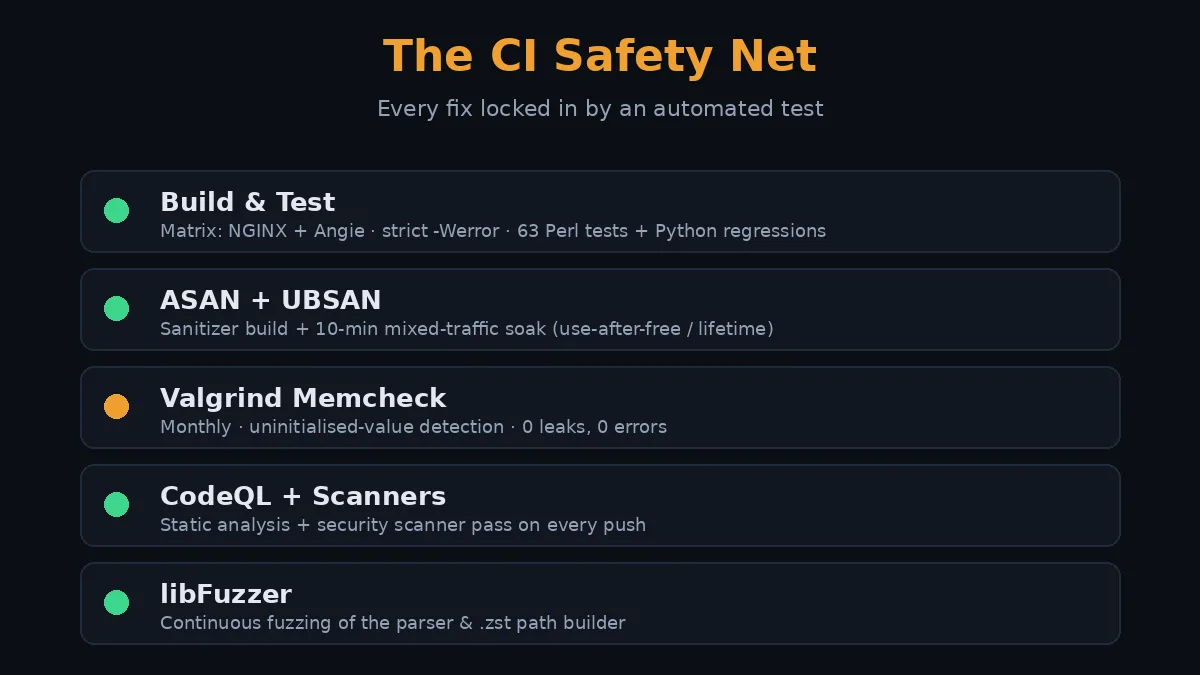
A fix without a test is a suggestion. Here’s the automated safety net that now stands between these bugs and your production server. Every fix above is locked in by something in this pipeline.
1. Build & Test workflow
A build matrix compiles the module against mainline NGINX and Angie, with a full debug build (--with-debug -g3 -O0), strict warnings as errors (-Wall -Wextra -Wshadow -Werror and more), then runs the Perl test suite (44 filter tests, 19 static tests) plus a fleet of Python regression tools: proxy-unbuffered truncation, concurrent context isolation, reload-under-load, terminal-frame, the zstd_long long-distance-matching ratio test, and more. Each truncation/CPU/leak bug from Groups A and B has a dedicated fail-first test here.
2. ASAN + UBSAN build and soak
A second build with AddressSanitizer and UndefinedBehaviorSanitizer runs the same suite plus a 10-minute mixed-traffic soak. This is what catches the lifetime and use-after-free class (Group B) under realistic concurrent load.
3. Monthly valgrind Memcheck soak (new this week)
ASAN is fast and great, but valgrind’s Memcheck catches one extra class ASAN can’t: use of uninitialised values, with --track-origins pointing at exactly where the bad bit came from. Crucial for a compressor doing pointer arithmetic on buffer boundaries. A full Memcheck soak is 20–50× slower than native, so it runs on a monthly cron (not every push) against the debug build, with the repo’s suppression file filtering known NGINX-internal noise. The first local run was spotless: 0 bytes definitely/indirectly/possibly lost, 0 errors across roughly 16,000 allocations and 2.5 GB of data churned through the compress/flush/multi-buffer lifecycle.
4. CodeQL, security scanners, and fuzzing
CodeQL static analysis, a security-scanner pass, and a libFuzzer target that throws malformed input at the parsing paths. The Accept-Encoding parser and the .zst path builder (Groups C and E) get fuzzed continuously so a future regression in that overflow-prone code surfaces fast.
How to Install the Fixed Module
The fixed module ships in the Angie and NGINX packages on this repository. If you’re running our Angie build, you already have it. A sane starting configuration:
zstd on;
zstd_comp_level 3;
zstd_min_length 256;
zstd_types text/plain text/css application/json
           application/javascript text/xml application/xml
           image/svg+xml;
gzip_vary on;   # do not skip this — caches need it
That’s the “set and forget” baseline: good ratio, low CPU, correct caching behavior. Turn on zstd_long only if you serve large, internally repetitive bodies, and set zstd_window_log if you need a hard memory ceiling per request.
Why This Matters
Compression sits in the path of every single response. A bug here isn’t cosmetic, it’s a silently broken site, a leaked megabyte per reload, or a worker stuck at 100% CPU while real users wait. The upstream idea is excellent and zstd genuinely is the future of web compression. But “the idea is good” and “safe to run in production” are different claims. The 36 issues, the optimizations, and the test pipeline above are the bridge between them. Run a build with these fixes, keep gzip_vary on, and zstd compression on NGINX or Angie is fast, correct, and boring, exactly what infrastructure should be.
Frequently Asked Questions
What is zstd compression and why would I use it on NGINX?
Zstd (Zstandard) is a modern compression format from Meta that delivers gzip-class or better ratios at far higher speed. On NGINX or Angie it means smaller responses, lower bandwidth bills, and faster page loads, especially for text, JSON, and API traffic. Modern browsers increasingly support the zstd content encoding.
Does this replace gzip completely?
Not yet. Keep gzip (or brotli) enabled as a fallback for clients that don’t advertise zstd support. NGINX serves whichever the client accepts, with zstd preferred when available. That’s exactly why gzip_vary on is mandatory, caches must key on the encoding.
How serious are these 36 issues overall?
Mixed, but the top of the list is genuinely severe. The 128 KB truncation, the proxy-buffering-off truncation/livelock, the multi-buffer SIGSEGV, and the CDict leak are all production-breaking on their own. The rest range from real security hardening down to HTTP-spec correctness. None of them are theoretical, several were caught because a real site broke.
What is the single most important fix in the list?
Issue #1 (the 128 KB silent truncation) for sheer blast radius, it breaks any non-trivial asset with no error, closely followed by issue #3 (the proxy_buffering off truncation and 100% CPU livelock), which is the one that actually took down a live wp-admin and is now covered by a fail-first regression test.
Is the CI enough to trust this in production?
It’s a strong net: matrix builds against NGINX and Angie, strict-warning compiles, a Perl + Python regression suite where every data-loss bug has a fail-first test, ASAN/UBSAN soak, monthly valgrind Memcheck, CodeQL, and fuzzing. Combined with the production deployment already running clean, yes, this is a trustworthy build. No test suite is infinite, but this one specifically targets every bug class that bit us.
What settings should I start with?
The “set and forget” block above: zstd on, level 3, zstd_min_length 256, a sensible zstd_types list, and gzip_vary on. Only reach for zstd_long, zstd_window_log, or zstd_bypass when you have a specific reason, large repetitive bodies, a memory ceiling, or a BREACH-sensitive endpoint respectively.
Where can I read more before enabling it?
Start with the zstd background article linked below for the format itself and browser support, then come back here for the operational reality. The two together give you the full picture: what zstd is, and what it took to make this module safe.
Related Posts
- What Is Zstd? NGINX, Angie, History and Browser Support: the background on the format itself: where zstd came from, which browsers and servers support it, and how it compares to gzip and brotli.
- All NGINX guides on deb.myguard.nl: configuration, modules, and performance tuning for NGINX and Angie.
- Database Boost: Free WordPress Database Optimization Plugin: another “make the slow thing fast and the broken thing safe” project from the same workbench.