
Most articles about zstd vs Brotli vs zlib-ng accidentally compare a fruit salad to a turbocharger. That is the first problem we are going to fix.
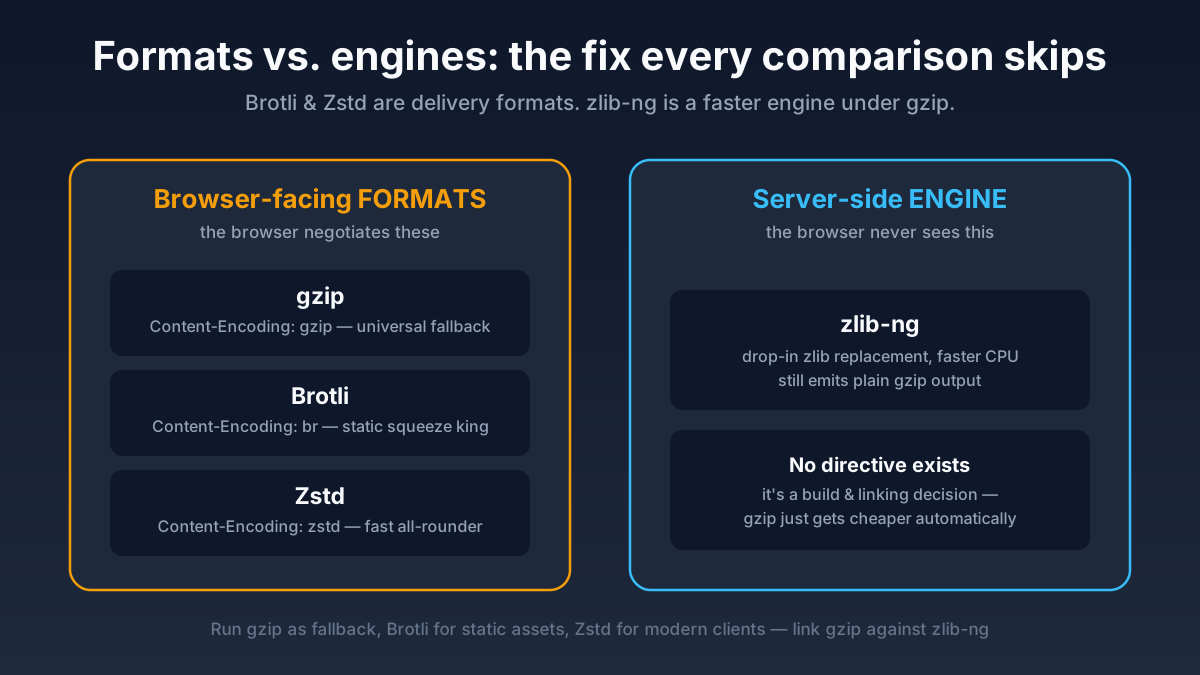
Brotli and Zstd are compression formats that can show up in HTTP as Content-Encoding: br and Content-Encoding: zstd. Browsers can explicitly ask for them with Accept-Encoding. zlib-ng, on the other hand, is not a new browser encoding at all. It is a modern, optimized replacement for the old zlib library that powers gzip/deflate. The browser still sees gzip. The server just spends less effort making it.
That distinction matters because it changes the answer to every practical question. If you ask, “Which one gives me the best universal compatibility?”, zlib-ng is not competing with Brotli or Zstd in the same lane. If you ask, “Which one should I send to modern browsers?”, now Brotli and Zstd are in the spotlight, and zlib-ng becomes an optimization strategy for your gzip fallback path.
This rewrite takes the original comparison article and turns it into the grown-up version. We are going deep on what each option actually changes, where it fits in our NGINX builds and our Angie builds, how static and dynamic compression differ, and which production combinations make sense when real traffic, real caches, and real CPU budgets show up to ruin the fantasy.
The one-sentence answer
If you only have patience for one paragraph, here it is:
- gzip is still the universal baseline every browser understands.
- zlib-ng makes that gzip path faster and cheaper, but does not create a new browser-visible encoding.
- Brotli usually wins on compression ratio for static text assets like CSS and JavaScript.
- Zstd offers a very attractive speed-to-ratio balance for modern clients and is increasingly practical for web delivery.
- The production answer is usually “run more than one”, not “pick one and become emotionally attached.”
What each thing actually is
| Thing | What it is | Browser sees | Best mental model |
|---|---|---|---|
| gzip | Old reliable HTTP compression format | Content-Encoding: gzip |
The universal fallback |
| Brotli | Compression format and library | Content-Encoding: br |
The high-squeeze specialist |
| Zstd | Compression format and library | Content-Encoding: zstd |
The fast modern all-rounder |
| zlib-ng | Optimized zlib-compatible deflate engine | Usually still gzip |
The performance upgrade under gzip |
That last row is the one that trips people. zlib-ng is closer to “a better engine under the same car hood” than “a different car.” If your NGINX build links the gzip path against zlib-ng, you do not suddenly start sending Content-Encoding: zlib-ng. That header does not exist. You are still serving gzip-compatible output. You are just doing the work with a faster, more modern implementation.
gzip and zlib-ng: the boring baseline that still pays the bills
gzip is old, yes. It is also still incredibly useful. Every browser, every proxy, every weird embedded client, and every corporate security appliance from the Bronze Age understands it. That alone gives gzip a job title that neither Brotli nor Zstd can fully steal yet.
Where zlib-ng enters the story is on the server side. The zlib-ng project describes itself as a next-generation zlib-compatible data compression library with major speed improvements and a drop-in compatibility path. In practice, that means you can keep the same gzip-compatible output while asking modern CPUs to do the work more efficiently. If your workload has a lot of dynamic gzip compression, that can be a very nice trade.
The killer detail: there is no NGINX directive called something like zlib_ng on;. This is not a runtime toggle. It is a build and linking decision. If your NGINX or Angie packages are built against zlib-ng in the deflate path, gzip gets cheaper automatically. If they are not, no amount of configuration yoga will conjure it into existence.
So when should you care?
- If you serve mixed traffic and need the safest broad-compatibility compression path, gzip remains mandatory.
- If that gzip path burns more CPU than you would like, zlib-ng is attractive because it improves the familiar path instead of forcing a new client capability requirement.
- If your CDN or reverse proxy layer already handles most compression, zlib-ng may matter less at the origin.
Brotli: still the ratio champion for many static assets
Brotli exists for the moment when you look at a CSS or JavaScript bundle and say, “Can you be smaller? No, smaller than that.” The Brotli project describes it as a generic-purpose lossless compression algorithm that offers more dense compression than deflate while staying in a similar speed neighborhood. That density is why Brotli became such a strong choice for precompressed static assets.
For static files, especially CSS, JavaScript, SVG, and sometimes HTML, Brotli at higher levels can squeeze out wonderfully small payloads. That is why you so often see teams precompress assets during build or deploy time and then serve them with brotli_static. The expensive compression work happens once, not on every request. The browser gets the smaller file over and over, and everybody goes home happy.
Where Brotli gets less magical is hot dynamic compression. Higher Brotli levels can be expensive enough that turning them on blindly for every response is a good way to heat the room and disappoint the latency graph. The more dynamic your content is, and the more requests you have to compress on the fly, the more careful you need to be with levels and response targeting.
That does not make Brotli bad. It just makes it best when used with intent. Static text assets are its natural habitat.
Zstd: the modern balance people hoped for
Zstd is the new star because it attacks the usual compression compromise from a better angle. The official project leans hard on two traits: a wide speed-vs-ratio tuning range and a very fast decoder. That second part matters more than many people realize. Compression happens once on the server side, but decompression happens on every client. Fast decode is a deeply practical feature, not just benchmark decoration.
In the web context, Zstd is interesting because it often feels like the adult in the room between gzip and Brotli. Gzip is universal but old. Brotli can squeeze harder but may ask for more patience. Zstd often lands in the “strong compression, fast enough to use dynamically, fast to decode on clients” zone that ops teams actually want.
The catch is deployment maturity. Browser support is now good enough to matter, but stock NGINX still does not just hand you Zstd out of the box. In our repository, Zstd support comes from the hardened http-zstd module, the same module discussed in our explainer on what Zstd is and how it fits into NGINX and Angie. That makes Zstd very practical for our builds, but it is still a deliberate module story, not a default checkbox in upstream open-source NGINX documentation.
Dynamic vs static compression changes the answer
A lot of “which compression is best?” arguments quietly ignore the most important operational question: are you compressing dynamically on every request, or serving precompressed static files?
If the response is static, you can be much more aggressive. You compress once during build or deploy, then serve the file repeatedly. That favors Brotli strongly, and it can favor Zstd too if your client population is modern enough. In NGINX terms, that means features like gzip_static, brotli_static, and zstd_static.
If the response is dynamic, the CPU cost lands in the request path. Now the best choice depends on how hot the route is, how much origin CPU you have, how cacheable the responses are, and how modern the client set is. This is where Zstd starts looking more attractive, and where zlib-ng can quietly improve the universal gzip fallback you cannot get rid of anyway.
Precompression examples look like this:
brotli -k -q 11 app.js
zstd -3 -k app.js
gzip -9 -k app.js
Then NGINX or Angie can serve the right variant when the client advertises support. That is a very different life from compressing a freshly rendered HTML or JSON response at the origin on every request.
A sane NGINX stack in practice
If your build includes the modules, the most pragmatic setup is usually layered, not exclusive:
http {
    gzip on;
    gzip_vary on;
    gzip_min_length 1000;
    gzip_types text/plain text/css application/javascript application/json application/xml image/svg+xml;

    brotli on;
    brotli_comp_level 5;
    brotli_static on;
    brotli_types text/plain text/css application/javascript application/json application/xml image/svg+xml;

    zstd on;
    zstd_comp_level 3;
    zstd_min_length 1000;
    zstd_static on;
    zstd_types text/plain text/css application/javascript application/json application/xml image/svg+xml;
}
And here is the critical note that people miss when they paste monster configs from random forums: zlib-ng has no directive in that block. If your packages were built with zlib-ng for the deflate path, the gzip part gets the benefit automatically. If they were not, the config stays the same and nothing magical happens.
That is why package choice matters. If you want all the compression toys in one place, the easiest path is using the NGINX modules builds or the Angie modules builds rather than turning your weekend into an artisanal compile-and-link disaster.
Caches, CDNs, and the part people always forget
Compression choices do not live alone. They interact with caching, CDN behavior, origin CPU, and negotiation headers.
- You need
Vary: Accept-Encodingso caches do not mix compressed variants incorrectly. - If your CDN already compresses aggressively, your origin may not need expensive dynamic compression for every response.
- Precompressed static assets are easier to reason about than heavy dynamic compression on hot paths.
- Different compression variants mean different cache objects, which is good for correctness but relevant for cache footprint.
- APIs and HTML are not the same workload, so a single rule for everything is usually lazy rather than elegant.
This is also where the choice between Brotli and Zstd becomes less ideological and more situational. Brotli often shines for static asset distribution. Zstd can make a lot of sense for dynamic responses to modern clients. gzip remains the compatibility blanket. zlib-ng makes that blanket cheaper to knit.

So what should you actually run?
Here is the practical recommendation, stripped of benchmark cosplay:
- For universal compatibility: keep gzip enabled. It is still your seatbelt.
- If your build supports zlib-ng: use it to make the gzip path faster and cheaper.
- For static text assets: precompressed Brotli is still extremely hard to beat.
- For modern-client dynamic compression: add Zstd where your module support and traffic profile justify it.
- For mixed real-world traffic: run multiple encodings and let content negotiation do its job instead of trying to crown one universal king.
If you run only one thing because you want life to stay simple, run gzip and make it efficient. If you want the best real-world stack, run gzip as fallback, Brotli for static assets, and Zstd for modern clients where supported. That is the answer infrastructure people usually land on after the fun part of the benchmark thread wears off.
Final verdict
Brotli is the “squeeze it harder” specialist. Zstd is the “modern, fast, balanced” option. zlib-ng is the “stop paying so much CPU for gzip” upgrade. They are not interchangeable. They are pieces of a compression stack.
So what matters is not “Which one wins?” What matters is “Which layer of my delivery path am I trying to improve?” Once you ask that question, the fog lifts very quickly.
If you want the beginner-friendly background first, read the Zstd explainer. If you want the broader performance and security context around modules, HTTP/3, caching, and TLS, the NGINX and Angie expert guide is the next stop.
Frequently Asked Questions
Is zlib-ng a replacement for Brotli or Zstd?
No. zlib-ng is a faster zlib-compatible engine for the deflate/gzip path. It does not create a new browser-visible compression format. Brotli and Zstd are actual encodings the browser can negotiate.
Should I replace Brotli with Zstd?
Usually not as a blanket rule. Brotli is still excellent for precompressed static assets. Zstd becomes attractive when you want a strong speed-to-ratio balance for modern clients, especially on dynamic paths.
Should I replace gzip with Zstd?
Not completely. gzip remains the universal fallback because support is essentially everywhere. The sane move is to keep gzip, then add Brotli and Zstd where they help.
Does zlib-ng need extra NGINX config directives?
No runtime directives in the usual sense. The key choice is whether your NGINX or Angie build links the deflate path against zlib-ng. If it does, your gzip path benefits automatically.
What is the best setup for a public website?
For most public sites: gzip fallback, Brotli for static assets, optional Zstd for modern browsers, and correct Vary: Accept-Encoding handling. That gives you reach, ratio, and sensible origin CPU behavior.
What is the best setup for APIs?
APIs often benefit from fast dynamic compression more than from maximum squeeze-at-all-costs behavior. That makes Zstd especially interesting for modern clients, while gzip remains the fallback for older tooling and long-tail compatibility.
Related Posts
- What Is Zstd? NGINX, Angie, History and Browser Support: the beginner-friendly foundation for readers who want the backstory before the production decisions.
- NGINX Modules optimized & extended: the package page if you want these modules without hand-building your own stack.
- Angie modules optimized & extended: the Angie package page with the same practical angle.
- Nginx & Angie: The Expert Guide to Maximum Performance and Security: the bigger-picture guide once compression leads you into the rest of the tuning rabbit hole.