Access and error logs go to stdout / stderr, so docker logs shows everything. PHP-FPM workers’ slowlog is also piped to stderr (configured via catch_workers_output=yes + slowlog=/proc/self/fd/2), so you can watch slow CMS pages in real-time without exec-ing into the container.
Is it safe to give the agent user passwordless sudo?
Inside the container, yes — by design. The container’s threat surface is the network and your code, not “what happens if I trust the local agent”. The point is to keep that sudo path unreachable from PHP / the web server, which we do by locking the binary perms (4750 root:www-data) and only granting sudoers to agent. If you don’t want the agent user at all, set --user phpfpm on docker run and you’re back to a no-shell container.
Further reading
- Angie modules — the full 50+ list with descriptions
- NGINX mainline — optimized and extended with 50+ modules
- How to install ModSecurity + OWASP CRS on NGINX (step-by-step)
- What is Zstd? NGINX, Angie, history and browser support
- All images on Docker Hub
- Source on GitHub — Dockerfiles, generators, hardening notes
Just docker pull eilandert/angie:deb-php8.5 and docker compose up -d. The images rebuild daily from upstream — security fixes, package updates, the works. No rebuild on your side needed. If you’re on Watchtower or Diun, point it at the registry and forget about it.
Where do logs go?
Access and error logs go to stdout / stderr, so docker logs shows everything. PHP-FPM workers’ slowlog is also piped to stderr (configured via catch_workers_output=yes + slowlog=/proc/self/fd/2), so you can watch slow CMS pages in real-time without exec-ing into the container.
Is it safe to give the agent user passwordless sudo?
Inside the container, yes — by design. The container’s threat surface is the network and your code, not “what happens if I trust the local agent”. The point is to keep that sudo path unreachable from PHP / the web server, which we do by locking the binary perms (4750 root:www-data) and only granting sudoers to agent. If you don’t want the agent user at all, set --user phpfpm on docker run and you’re back to a no-shell container.
Further reading
- Angie modules — the full 50+ list with descriptions
- NGINX mainline — optimized and extended with 50+ modules
- How to install ModSecurity + OWASP CRS on NGINX (step-by-step)
- What is Zstd? NGINX, Angie, history and browser support
- All images on Docker Hub
- Source on GitHub — Dockerfiles, generators, hardening notes
Every module gets loaded. Two modules — mod-http-lua and mod-stream-lua — get auto-disabled because they need extra configuration to start cleanly, and we’d rather not greet you with a crash log. The container prints a warning telling you to set NGX_MODULES. To shut the warning up, touch /etc/angie/modules-enabled/.quiet and we’ll leave you alone.
How do I update? Do I have to rebuild?
Just docker pull eilandert/angie:deb-php8.5 and docker compose up -d. The images rebuild daily from upstream — security fixes, package updates, the works. No rebuild on your side needed. If you’re on Watchtower or Diun, point it at the registry and forget about it.
Where do logs go?
Access and error logs go to stdout / stderr, so docker logs shows everything. PHP-FPM workers’ slowlog is also piped to stderr (configured via catch_workers_output=yes + slowlog=/proc/self/fd/2), so you can watch slow CMS pages in real-time without exec-ing into the container.
Is it safe to give the agent user passwordless sudo?
Inside the container, yes — by design. The container’s threat surface is the network and your code, not “what happens if I trust the local agent”. The point is to keep that sudo path unreachable from PHP / the web server, which we do by locking the binary perms (4750 root:www-data) and only granting sudoers to agent. If you don’t want the agent user at all, set --user phpfpm on docker run and you’re back to a no-shell container.
Further reading
- Angie modules — the full 50+ list with descriptions
- NGINX mainline — optimized and extended with 50+ modules
- How to install ModSecurity + OWASP CRS on NGINX (step-by-step)
- What is Zstd? NGINX, Angie, history and browser support
- All images on Docker Hub
- Source on GitHub — Dockerfiles, generators, hardening notes
Yes. /var/www is pre-created as phpfpm:www-data mode 2750. The setgid bit means any file created in there inherits the www-data group, so static assets stay readable by Angie. If you’re mounting from the host, chown -R 1500:33 ./sites on the host before mounting (uid 1500 = phpfpm, gid 33 = www-data on Debian/Ubuntu).
What happens if I don’t set NGX_MODULES?
Every module gets loaded. Two modules — mod-http-lua and mod-stream-lua — get auto-disabled because they need extra configuration to start cleanly, and we’d rather not greet you with a crash log. The container prints a warning telling you to set NGX_MODULES. To shut the warning up, touch /etc/angie/modules-enabled/.quiet and we’ll leave you alone.
How do I update? Do I have to rebuild?
Just docker pull eilandert/angie:deb-php8.5 and docker compose up -d. The images rebuild daily from upstream — security fixes, package updates, the works. No rebuild on your side needed. If you’re on Watchtower or Diun, point it at the registry and forget about it.
Where do logs go?
Access and error logs go to stdout / stderr, so docker logs shows everything. PHP-FPM workers’ slowlog is also piped to stderr (configured via catch_workers_output=yes + slowlog=/proc/self/fd/2), so you can watch slow CMS pages in real-time without exec-ing into the container.
Is it safe to give the agent user passwordless sudo?
Inside the container, yes — by design. The container’s threat surface is the network and your code, not “what happens if I trust the local agent”. The point is to keep that sudo path unreachable from PHP / the web server, which we do by locking the binary perms (4750 root:www-data) and only granting sudoers to agent. If you don’t want the agent user at all, set --user phpfpm on docker run and you’re back to a no-shell container.
Further reading
- Angie modules — the full 50+ list with descriptions
- NGINX mainline — optimized and extended with 50+ modules
- How to install ModSecurity + OWASP CRS on NGINX (step-by-step)
- What is Zstd? NGINX, Angie, history and browser support
- All images on Docker Hub
- Source on GitHub — Dockerfiles, generators, hardening notes
Because the web server and the PHP code don’t have the same threat model. The web server processes HTTP — pretty constrained. PHP runs arbitrary user code, including whatever plugin a tired admin clicked “install” on at 2am. Giving them different Linux accounts means a plugin RCE doesn’t automatically inherit the web server’s reach. It’s the same reason you don’t run your database as root.
Can I still bind-mount my site files and have permissions work?
Yes. /var/www is pre-created as phpfpm:www-data mode 2750. The setgid bit means any file created in there inherits the www-data group, so static assets stay readable by Angie. If you’re mounting from the host, chown -R 1500:33 ./sites on the host before mounting (uid 1500 = phpfpm, gid 33 = www-data on Debian/Ubuntu).
What happens if I don’t set NGX_MODULES?
Every module gets loaded. Two modules — mod-http-lua and mod-stream-lua — get auto-disabled because they need extra configuration to start cleanly, and we’d rather not greet you with a crash log. The container prints a warning telling you to set NGX_MODULES. To shut the warning up, touch /etc/angie/modules-enabled/.quiet and we’ll leave you alone.
How do I update? Do I have to rebuild?
Just docker pull eilandert/angie:deb-php8.5 and docker compose up -d. The images rebuild daily from upstream — security fixes, package updates, the works. No rebuild on your side needed. If you’re on Watchtower or Diun, point it at the registry and forget about it.
Where do logs go?
Access and error logs go to stdout / stderr, so docker logs shows everything. PHP-FPM workers’ slowlog is also piped to stderr (configured via catch_workers_output=yes + slowlog=/proc/self/fd/2), so you can watch slow CMS pages in real-time without exec-ing into the container.
Is it safe to give the agent user passwordless sudo?
Inside the container, yes — by design. The container’s threat surface is the network and your code, not “what happens if I trust the local agent”. The point is to keep that sudo path unreachable from PHP / the web server, which we do by locking the binary perms (4750 root:www-data) and only granting sudoers to agent. If you don’t want the agent user at all, set --user phpfpm on docker run and you’re back to a no-shell container.
Further reading
- Angie modules — the full 50+ list with descriptions
- NGINX mainline — optimized and extended with 50+ modules
- How to install ModSecurity + OWASP CRS on NGINX (step-by-step)
- What is Zstd? NGINX, Angie, history and browser support
- All images on Docker Hub
- Source on GitHub — Dockerfiles, generators, hardening notes
The myguard Docker images bring the same performance-optimized, module-rich NGINX and Angie builds from the APT repository — but containerised, daily-rebuilt, and now with a properly separated user model so your WordPress (or Drupal, or Joomla, or anything PHP) doesn’t share a Linux account with the web server. Yes, that’s a thing. Yes, it’s the kind of thing nobody mentions on the marketing page. We’re going to mention it on the marketing page.
Everything is on Docker Hub (eilandert) and on GitHub. Swap nginx for angie in any tag if you want the Angie variant. The base images eilandert/ubuntu-base:rolling and eilandert/debian-base:stable are hardened (no setuid binaries left where we can help it, restrictive umask, no su/sudo/dmesg by default) so every image downstream starts from a sensible floor.
The image lineup (or: which one do I actually pull?)
Pick the one that matches your stack. All tags also exist as :ubu-* for Ubuntu builds — these examples use Debian (:deb-*) because most production folks run Debian and we don’t judge.
eilandert/nginx:deb-latest        # NGINX, no PHP — for static / reverse-proxy
eilandert/nginx:deb-php8.5           # NGINX + PHP-FPM 8.5
eilandert/nginx:deb-php8.4
eilandert/nginx:deb-php8.2
eilandert/nginx:deb-php8.0
eilandert/nginx:deb-php7.4
eilandert/nginx:deb-php5.6           # yes, still here for the truly stuck
eilandert/nginx:deb-multi         # 5.6 / 7.4 / 8.0 / 8.2 / 8.4 / 8.5 in one image

eilandert/angie:deb-latest        # Angie drop-in replacement for NGINX
eilandert/angie:deb-php8.5
eilandert/angie:deb-multi

eilandert/php-fpm:deb-8.5         # PHP-FPM only (use behind your own proxy)
eilandert/php-fpm:deb-multi
eilandert/apache-phpfpm:deb-8.5   # Apache + PHP-FPM if you must
eilandert/angie-cms:latest        # Angie + PHP 8.5 + the entire CMS toolbox
All PHP-bearing images include Composer, WP-CLI, nullmailer, jemalloc, and mimalloc out of the box. PHP packages come from the excellent Ondřej Surý PPA (mirrored locally on deb.myguard.nl, so builds don’t break when Launchpad has a bad day).
A five-minute docker-compose example
Mount config directories to empty local paths — they get populated with working defaults on the first start. No “where do I copy the conf files from” dance. If you’ve ever spent an hour figuring out which sample.conf to copy where, you’ll appreciate this.
services:
  angie:
    container_name: angie
    image: eilandert/angie:deb-php8.5
    stop_grace_period: 3s
    ports:
      - "80:80"
      - "443:443"
      - "443:443/udp"           # UDP for HTTP/3 QUIC
    restart: always
    volumes:
      - /etc/letsencrypt:/etc/letsencrypt:rw
      - ./angie/config:/etc/angie:rw
      - ./angie/php:/etc/php:rw
      - ./angie/log:/var/log/nginx:rw
      - ./angie/modsecurity:/etc/modsecurity:rw
      - ./angie/nullmailer:/etc/nullmailer:rw
      - ./cache/angie:/var/cache/nginx:rw
      - ./sites:/var/www:rw
    environment:
      - MALLOC=jemalloc
      - TZ=Europe/Amsterdam
      - PHP85=YES                # for :deb-multi only
      - NGX_MODULES=mod-http-modsecurity,mod-http-brotli,mod-http-headers-more-filter,mod-http-zstd
That’s it. docker compose up -d and you have a hardened Angie with HTTP/3, ModSecurity, Brotli, and Zstd compression. The container ships a healthcheck (/healthz on port 8181) so docker ps shows you when it’s actually ready, not just when the container started.
Meet the users: phpfpm, www-data, and agent
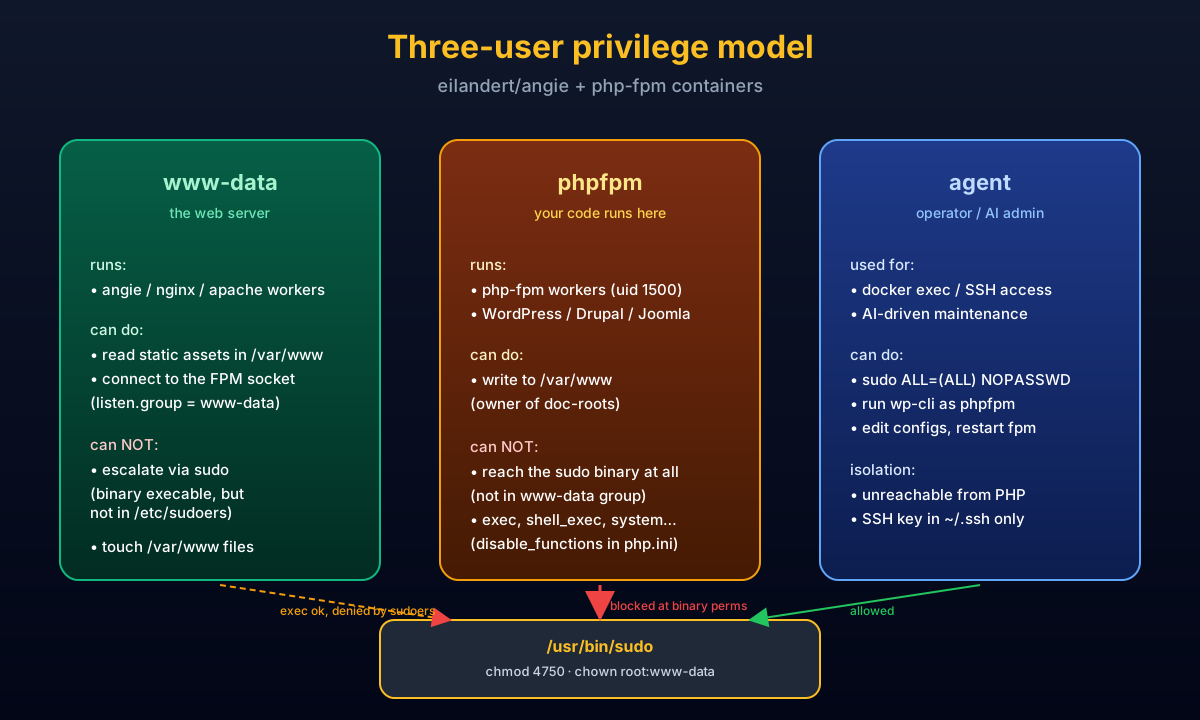
This is the new bit. If you’ve ever read a security writeup that said “the WordPress plugin escalated privileges through sudo because everything ran as www-data“, you’ll like this section. We split the container into three Linux accounts, each with a tiny, specific job. Like a small, sensible team rather than one overworked intern doing everything.
www-data— the web server. Angie / NGINX / Apache workers run as this user. It can read your site’s files and connect to the PHP-FPM socket. That’s its whole job.phpfpm(uid 1500) — the PHP workers. This is where your code actually runs. Crucially,phpfpmis not a member of thewww-datagroup. If a plugin gets popped, the attacker is stuck asphpfpmwith no group membership that lets them reach anything dangerous.agent(uid 1501) — the operator / AI account. Bash shell, home dir, supplementarywww-datagroup, and a passwordlesssudoentry in/etc/sudoers.d/10-agent. This is the user that an operator (or a Claude / Copilot agent doing maintenance) logs in as via SSH ordocker exec.
The sudo binary itself is locked down: chmod 4750 root:www-data. Translation: only root and members of www-data can even execute the binary. phpfpm can’t reach it. www-data can reach it but isn’t in /etc/sudoers, so sudo refuses. agent can reach it and is in sudoers — so it works. Three-way isolation, all in one image.
To inject your SSH key, mount /home/agent/.ssh/authorized_keys at runtime or drop it in a build-time Dockerfile. The .ssh directory is already pre-created with 0700 agent:agent permissions, so you can’t accidentally make it world-readable.
The CMS image: angie-cms
The eilandert/angie-cms:latest image is Angie + PHP-FPM 8.5 + a complete WordPress-and-friends toolbox in a single container. Pull it, mount your site, and you’re hosting. Nothing else to install. Picture the difference between “I just bought a kit cake” and “I have to drive to the supermarket for eggs at 11pm”. We’re the kit cake.
What’s inside on top of the angie+php-fpm-8.5 base:
- WP-CLI with
doctor-commandandprofile-commandpre-installed (the two best WordPress diagnostic tools nobody knows about). - Drush for Drupal sites — installed via Composer to
/opt/drushand added to$PATH. - Composer with sensible
COMPOSER_HOMEpointing at/var/www/.composer. - Image-optim toolchain:
jpegoptim,optipng,pngquant,gifsicle,webp, pluslibvips42+php-vipsfor the speed-fanatic option. - ImageMagick with a hardened policy that disables the historically-exploitable coders (PS, EPS, PDF, MSL, URL — the entire ImageTragick family). Resource caps prevent upload-bomb OOMs.
- Backup tooling: a built-in
cms-backupscript that snapshots DB +wp-content+ a sanitisedwp-config.php(secrets stripped) into/var/www/_backups/. Plusresticandrclonefor off-site copies. - wp-cron via a real cron daemon — every minute, every
/var/www/*/doc-root with awp-config.phpgets its overdue events dispatched asphpfpm. - Admin shell tools:
git,patch,mariadb-client,rsync,openssh-client,goaccessfor log reports,jq,mc,nano,less. - PHP tuned for CMS workloads:
memory_limit=512M,upload_max_filesize=64M,opcache.jit=tracing, large realpath cache. Defaults that won’t make a CMS cry. - Angie tuned for CMS workloads:
client_max_body_size 64m,fastcgi_read_timeout 300s, gzip on, server tokens off. Drop-in WordPress and Drupal site snippets ship at/etc/angie/snippets/wordpress.confanddrupal.conf.
Bonus: the bootstrap auto-generates /root/.my.cnf from $DB_HOST / $DB_USER / $DB_PASS environment variables, so when you docker exec -it cms bash and type mysql, it Just Works. Tiny touch, huge dignity boost.
Selecting modules at runtime
Set the NGX_MODULES environment variable to a comma-separated list. No custom Dockerfile required, no rebuilds for “I forgot Brotli”. All 50+ modules from the Angie / NGINX modules page are available:
NGX_MODULES=mod-http-modsecurity,mod-http-geoip2,mod-http-brotli,mod-http-zstd,mod-http-lua,mod-http-headers-more-filterWithout NGX_MODULES set, every module is enabled at boot. That’s fine for testing, less fine for a hot production box where each module costs a tiny bit of startup time. Pick what you need.
HTTP/3, QUIC, and the small luxuries
Expose UDP 443 in your compose file and HTTP/3 just works. The OpenSSL fork shipped with the image speaks QUIC, the server is compiled with HTTP/3 support, and you only need a one-line vhost snippet to advertise it via Alt-Svc:
server {
    listen 443 ssl;
    listen 443 quic reuseport;
    http3 on;
    add_header Alt-Svc 'h3=":443"; ma=86400';
}
Build speed — BuildKit cache mounts everywhere
Every Dockerfile starts with # syntax=docker/dockerfile:1.7 and uses --mount=type=cache for apt’s archive and list caches. Translation: rebuilds skip the package download phase entirely once the cache is warm. First build pulls everything once; every rebuild after that is 5–30× faster on the apt step. If you’re tweaking a Dockerfile in a loop, you’ll feel this.
FAQ
Why a separate phpfpm user instead of just using www-data?
Because the web server and the PHP code don’t have the same threat model. The web server processes HTTP — pretty constrained. PHP runs arbitrary user code, including whatever plugin a tired admin clicked “install” on at 2am. Giving them different Linux accounts means a plugin RCE doesn’t automatically inherit the web server’s reach. It’s the same reason you don’t run your database as root.
Can I still bind-mount my site files and have permissions work?
Yes. /var/www is pre-created as phpfpm:www-data mode 2750. The setgid bit means any file created in there inherits the www-data group, so static assets stay readable by Angie. If you’re mounting from the host, chown -R 1500:33 ./sites on the host before mounting (uid 1500 = phpfpm, gid 33 = www-data on Debian/Ubuntu).
What happens if I don’t set NGX_MODULES?
Every module gets loaded. Two modules — mod-http-lua and mod-stream-lua — get auto-disabled because they need extra configuration to start cleanly, and we’d rather not greet you with a crash log. The container prints a warning telling you to set NGX_MODULES. To shut the warning up, touch /etc/angie/modules-enabled/.quiet and we’ll leave you alone.
How do I update? Do I have to rebuild?
Just docker pull eilandert/angie:deb-php8.5 and docker compose up -d. The images rebuild daily from upstream — security fixes, package updates, the works. No rebuild on your side needed. If you’re on Watchtower or Diun, point it at the registry and forget about it.
Where do logs go?
Access and error logs go to stdout / stderr, so docker logs shows everything. PHP-FPM workers’ slowlog is also piped to stderr (configured via catch_workers_output=yes + slowlog=/proc/self/fd/2), so you can watch slow CMS pages in real-time without exec-ing into the container.
Is it safe to give the agent user passwordless sudo?
Inside the container, yes — by design. The container’s threat surface is the network and your code, not “what happens if I trust the local agent”. The point is to keep that sudo path unreachable from PHP / the web server, which we do by locking the binary perms (4750 root:www-data) and only granting sudoers to agent. If you don’t want the agent user at all, set --user phpfpm on docker run and you’re back to a no-shell container.
Further reading
- Angie modules — the full 50+ list with descriptions
- NGINX mainline — optimized and extended with 50+ modules
- How to install ModSecurity + OWASP CRS on NGINX (step-by-step)
- What is Zstd? NGINX, Angie, history and browser support
- All images on Docker Hub
- Source on GitHub — Dockerfiles, generators, hardening notes